Jagged edges

jrp

Member
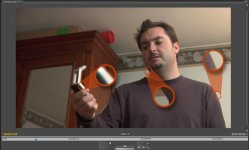
I'm getting my 720pn immages with some jugged edges when editing in premiere pro cs3. As the screenshot shows.
I imagine this is a result of the stretching needed from the MXF files, to get the 16:9 aspect ratio, but I've never seen this jugged edges before.
I'm wondering if it's a Premiere thing, or if it's normal.

Thanks
 

Attachments

  • jagged.jpg
    jagged.jpg
    91.6 KB · Views: 0
Its not a Premiere thing and nothing to do with any "stretching" (which does not happen).

What is your Playback Setting?

What does it look like on an external monitor?

What is your project setting?

Try: Hover your mouse over the Program Monitor and press the "~" (tilde) key.
 
I don't have an external HD monitor, so I don't know how it looks outsiode my computer monitor (it's 1920x1200).

Playback settings are grayed out. The prject settings say:
Editing Mode: P2 720p 60Hz DVCPROHD
Timebase 23.976 frames/second
Frame size: 960x720 (16:9)
Pixel Aspect ratio: HD Anamorphic 1080 (1.333)
Fields: No Fields (progressive Scan)

Using the ~ does nothing for the image (the screenshot shows video at 100%)
 
I did a quick experiment.

I imported the footage into after effects. the jugged edges were still there. Then I changes the composition setings:
from 960x720 at 1.333 pixel aspect ratio
to 1200x720 at 1.0 pixel aspect ratio
​
Both are 16:9, but in the later, the jagged edges disappear. The drawback, of course, is that that resolution is not P2 native, and I have to render all the project in order to get the edges off. I duess it's not sucha big deal, if I only do it once, when I'm finished.

The thing is I'm pretty sure this is not the "appropriate" way to do it, and I'm guessing I'll have problems by delivering stuff in non standard DVCPROHD settings.

Any light on the matter would be deeply apreciated.

Than You,
 
Yes, you're seeing artifacts from differing pixel aspect ratios. Programs like premiere and AE use duplicate pixels to translate between ratios, which makes diagonals appear jaggy. It's faster than resizing.
If you deliver in 960x720 DVCProHD, you're fine. If you resize to a different format, like 1200x720, hopefully the program will take a little extra processor time to properly resize your video.
 
I do not see any jagged edges (artifacts) on my PC or my external HD monitor. (in AEFX or Premiere) My footage is all 720P and pn and it is edited mxf native in Premiere at online quality and exported to Broadcast (TV) at FHA (full height anamorphic 16:9)

I do not understand "stretching" because 720pn mxf has an anamorphic PAR that does not require Premiere to process (stretch) it to fit because it interprets the PAR as it sees it in the footage via the Project setting.

It concerns me that you are judging the quality on the PC monitor (and we do not know your playback setting).

Your screen grab shows "magnified areas". What scale is the enlargement?
 
I'm unable to access the playback settings. I'm gessing it's because I have no hardware that allows me to connect an HD monitor. (I can access the playback settings when I work in SD projects).

The magnification is 300%
 
Playback Settings are accessed by the small Twirl down "triangle" at the side of the Source or Program Monitors no matter what the Project is. ie Sd or HD

What have you magnified 300% to display the "issue" of your post? (ie jagged)

If you magnify any pixel 3x above its original resolution you will discover "artifacts"
 
Ok. Thanks for the tip of the triangle. The Playback settings say:

Realtime Playback:
-External Device: None
-Aspect Ratio Conversion: Hardware(if supported)

Export:
-External Device: None

24p Conversion Method:
-Interlaced Frame (2:3:3:2)

Desktop Display Mode:
-Standard

The magnified spots are there mostly to highlight what I'm talking about. If you look a the unmagnified spots, you can see the jaggines. In particular, arround the left arm.
 
After fiddling with the playback settings, changing the Desktop Display Mode to "Compatible", removed the jugged edges.

It oes, however, turns jugged again while I play the videos, but gives me sharp images when paused. This leads me to believe that this is a premiere dislapy isue, and once the project is rendered for delivery, the jugginess will disapear.

Thanks.
 
Back
Top