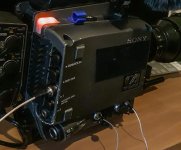
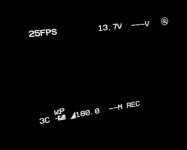
F35: It may be simpler than we thought to get Tally Light with External Recorders...

So, I just ran across something looking into the F23 firmware, and then checked it against the F35 Manual:

To select the operation mode when starting/stopping recording on the SRW-1 using a REC trigger via the DC OUT 24 V connector.

SWITCH: Mode detecting an edge of the REC trigger signal to start/stop SRW-1 recording by using an external switch.


RECORDER: Mode detecting the level of the REC trigger signal for start/stop SRW-1 recording by entering the REC status from an external recorder connected to the interface box. The same as when recording is started on the SRW-1, the RUN indicator and the fan quieting function are valid.

What does that mean? It would seem that applying some sort of simple electrical pulse to the 24VDC out port of the camera, in conjunction with the menu setting, will make the tally lights and fan respond as if the camera is recording!!!

So how do we implement this practically? One, we need to know what the electrical pulse is, and how it's wired. It may be simply closing the circuit (shorting it), but I'm a little leery of testing it. Second, we need to attach that to the record state of the recorder. How to do that will vary on the recorder. But this might be possible.


(I'm wondering it this mode converts the 24VDC out to something like 5VDC out, and then closing the circuit triggers it... but that's just a first theory.)


If anyone has a better idea on how this works, can you let me know?


I believe it is just a shorting of a circuit. Ie. a moviecam or arri handle from a 435/SR3/Compact will run and stop my F65 - so it would work with the F35 too.

I don't know if it would have the desired effect when running with a non-standard recorder (which is basically all of them these days)
 
I believe it is just a shorting of a circuit. Ie. a moviecam or arri handle from a 435/SR3/Compact will run and stop my F65 - so it would work with the F35 too.

I don't know if it would have the desired effect when running with a non-standard recorder (which is basically all of them these days)

In regards to the F23/F35, this only operates the tally light and fan noise. Since, by nature, it's for a recorder that's not docked, doing this has no control over the recorder, but rather, should be controlled by the recorder. A more apt point is that most recorders don't support this feature by default. The trick is seeing how a record active signal might be captured and sent to the camera. A good test subject might be a cheap Hyperdeck Shuttle recorder - see if you can open it up, and latch into a led light that only goes active when recording, or some such.

This isn't a zero work project, but it's something potentially interesting and feasible.
 
By the way a lot of wired LCS system can send a run/stop command as they get their power from the 24v RS socket too...
 
If we can get this figured out precisely, it may be something the remote port on the Convergent Designs Odyssey 7Q/7Q+ would be hardware capable of delivering. If so, I think it might be relatively simple firmware update... and, again, if so, then you could use an O7Q to get full 12bit RGB, tally light, and fan noise reduction during recording...
 
Such tally light triggers are generally embedded into the SDI stream as secondary signals. You'll never be able to pull them out to use elsewhere.

But there is a simpler way and it is available today. For the Odyssey7Q+, we offer a cabled remote trigger that plugs into the monitor/recorder's RMT port. The remote trigger button contains an LED that functions as a tally light. Even if you use other trigger mechanisms in the Odyssey7Q+ to initiate recording, that LED will still function as a tally light. So you can wrap that cable around to anywhere you'd like on your camera rig and use it as a tally indicator. And don't worry about touching it and accidentally triggering recording; the Odyssey needs to be set to the remote for the switch to function as the trigger.
 
Such tally light triggers are generally embedded into the SDI stream as secondary signals. You'll never be able to pull them out to use elsewhere.

But there is a simpler way and it is available today. For the Odyssey7Q+, we offer a cabled remote trigger that plugs into the monitor/recorder's RMT port. The remote trigger button contains an LED that functions as a tally light. Even if you use other trigger mechanisms in the Odyssey7Q+ to initiate recording, that LED will still function as a tally light. So you can wrap that cable around to anywhere you'd like on your camera rig and use it as a tally indicator. And don't worry about touching it and accidentally triggering recording; the Odyssey needs to be set to the remote for the switch to function as the trigger.

Mitch, I believe you misunderstood the basis of how this works for the F35. I'm not discussing a method of triggering the external recorder (O7Q or otherwise) from the F35. I'm discussing a method by which an external recorder could inform the F35 that it is recording. They provided this feature so that the camera could reduce fan noise and turn on the tally lights. I'm actually more concerned about the fan noise than the tally light, since that would benefit audio on set.

In practice, it appears that the F35 does a voltage edge detect on a wire attached to the 24VDC out port. This was specifically developed for a Codex recorder that didn't wet-dock like the SRW-1. So, in theory, I'm thinking it might be possible for the O7Q remote port to also use it's remote port to trip this voltage edge detect, whenever someone hits rec/stop on the O7Q - not on the camera (hitting record on the camera would do nothing)

Does that make sense?
 
I see.

We do output a signal voltage for recording at the RMT port. If anyone can find out what that edge detection signaling is on the F35 then we could determine if we are or could become compatible. It is likely to be something similar to the trigger pulse system used for motion control systems using Kuper control protocols, but this is something one would need to reach out to Sony to determine.
 
I see.

We do output a signal voltage for recording at the RMT port. If anyone can find out what that edge detection signaling is on the F35 then we could determine if we are or could become compatible. It is likely to be something similar to the trigger pulse system used for motion control systems using Kuper control protocols, but this is something one would need to reach out to Sony to determine.

Copy, and thank you. And agreed. We'll need to present you with the specification before you'll be able to determine whether it's within the hardware capabilities and so forth. And I anticipate it will also require a custom wired cable to complete the solution. But I am, at this stage, glad to see that the O7Q(+) is a likely candidate for this support, as it is perhaps the most fully compatible F35 field recorder outside of the Codex and SRW-1.
 
Copy, and thank you. And agreed. We'll need to present you with the specification before you'll be able to determine whether it's within the hardware capabilities and so forth. And I anticipate it will also require a custom wired cable to complete the solution. But I am, at this stage, glad to see that the O7Q(+) is a likely candidate for this support, as it is perhaps the most fully compatible F35 field recorder outside of the Codex and SRW-1.
Thanks, and it's only going to get MORE compatible. Just went over the list of upcoming features likely ready during the rest of the summer. We try to have a little something for everyone, including F35 owners. The few, the proud.
 
Thanks, and it's only going to get MORE compatible. Just went over the list of upcoming features likely ready during the rest of the summer. We try to have a little something for everyone, including F35 owners. The few, the proud.

Good to know. I've been told there are only 211 F35's in the wild, although that source was less confident about whether that included F23 conversions. I haven't gotten a number on how many F23s there are. Perhaps we can get the F23 added to this forum?

...As I now own an A7S, an F35, an F23, and an FS7, the O7Q+ is tempting, but I'm also enticed by the very low pricing I've been offered on a Codex that would dock to the F23/F35 and do the ramping features. Ugh. Too many toys!
 
So... I've got this solved. And the answer is good news: Even without directly connecting the camera to the recorder, it should easy to make a simple cable with switch that will control the camera fan noise and tall lights.

I reviewed the F23/F35 service manual wiring diagrams and then consulted a document on the standard Arri film camera pin out for 24VDC on a Fisher 3 pin connector. After review, I tested on my F35. The F35 essentially uses the Arri standard. In typical operation the 3rd pin of the 24VDC port is a momentary toggle switch, that triggers start/stop when a supported recorder is docked. This switch works by shorting the 3rd pin to the ground pin. The attached remote trigger need do nothing but close the circuit.

When the menu item referenced in the original post is set to "Recorder" instead of "Switch" the 3rd pin becomes a pure momentary switch, active only when circuit is closed. In practice, this means the controlling party needs to keep the circuit closed for the duration of the record length. It may be possible to integrate this functionality to be automatic with some recorders, via firmware and a cable connection. However, even without it, it should be possible to make a simple cable that can be triggered separately from the recorder. Ideally, such a cable should have a switch or a latch button instead of a momentary button (you'd have to hold the momentary button for the entire record). Of course, doing this might be a small nuisance, but particularly for the fan noise reduction I think it would be very useful on narrative sets.

Reference document for port:
http://www.fauer.com/PDF/435pinouts.pdf (On page 2)
 
Does the F35/F23 actually spin the fan down completely when recording, or better put, is there a silent mode during VTR operation?
I had a try of grounding pin 3 on the 24v connector on my F23 and indeed it does trigger record mode, in both VF and tally light but I notice that regardless of the fan mode or service menu "FAN TYPE" the speed doesn't seem to change from what appears to be MIN speed.

Does it just set speed to "MIN" during record if the normal idle state happens to be at higher rate in one of the AUTO modes (i.e. in a hot environment where the fans have ramped up?)
I've never seen my camera enter a higher fan state than MIN speed, when in AUTO1 or 2, but it hasn't been that hot around here.
Does the camera need to be powered via the 3P Lemo connector for anything to happen?

I can't say I'm a fan of the sound of the fans even at minimum level!
F23_Triggered2.jpg F23_Screen2.jpg
 
Minimum is all their is even with srw1 and Leno... tested it. Camera is not loud. Clean your fans if you haven’t. Can you post picture of pins you grounded?

Does this tally light hack trigger record via SDI?
 
Last edited:
Minimum is all their is even with srw1 and Leno... tested it. Camera is not loud. Clean your fans if you haven’t. Can you post picture of pins you grounded?

Does this tally light hack trigger record via SDI?

rbirnbaum - my fans are slightly loud on the SRW1 even at idle, are they not suppose to sound like a jet landing? lol.. my camera is only loud upon boot up and then its fairly quiet.
 
Srw1 is louder than I would like to, but workable. Yes, the blast when it starts is to get residue out of the system in case dust is trapped. I don’t have any complaints about the camera on operation. Never had an audio guy complain.
 
Many thanks for the reply, I'll take a look at those fans! Perhaps they're just a bit tired.
I'm almost certain the SDI trigger will work when set to do so on camera. I'll test that out asap.
Would imagine it will work with SR-R1 and atomos recorders that support sony type trigger over SDI.
Limited uses for me though if it means using monitor out feed for record.

Pins were pin 3 (bottom most) on fischer 24v connector, and pin 5 I believe on Ext IO, which is GND.
You can also use the 24v GND if you had a proper connector wired.
It's all in the service manual, volume I.
I would be tempted to create my own run/stop cable based on this with a flick switch of some kind.
 
Last edited:
Many thanks for the reply, I'll take a look at those fans! Perhaps they're just a bit tired.
I'm almost certain the SDI trigger will work when set to do so on camera. I'll test that out asap.
Would imagine it will work with SR-R1 and atomos recorders that support sony type trigger over SDI.
Limited uses for me though if it means using monitor out feed for record.

Pins were pin 3 (bottom most) on fischer 24v connector, and pin 5 I believe on Ext IO, which is GND.
You can also use the 24v GND if you had a proper connector wired.
It's all in the service manual, volume I.
I would be tempted to create my own run/stop cable based on this with a flick switch of some kind.

Thanks!
 
Back
Top