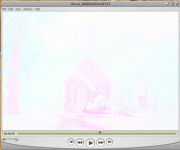
Issues with quicktime.. good codec?

Majority of the time I export to a quicktime from PP2 (PC USer), I get an image like the one attached--washed out and just not functioning properly. Anyone know what causes this? also, what codec (for quicktime) do the experts here use to export their timeline for streaming online such as a demo reel? is in the planar RGB? the .264? The motion jpegs? Any advice appreciated.

Thanks
Brett
 

Attachments

  • example.gif
    example.gif
    55.6 KB · Views: 0
Hi BrettHickman

Not sure if I can help BUT afrter installing QT after a format I get this when playing back any video ..I have to go into the Window file and click on show AV controlls , then re set the brightness which of course never stays once you close .
looks like a old church or school house .
Sorry I couldn't be of much more help
Ian
 
arielman said:
Hi BrettHickman

Not sure if I can help BUT afrter installing QT after a format I get this when playing back any video ..I have to go into the Window file and click on show AV controlls , then re set the brightness which of course never stays once you close .
looks like a old church or school house .
Sorry I couldn't be of much more help
Ian

Ian,
That solved the problem! So you helped a ton! I really appreciate your help. And that's exactly what I did to.. reformat my computer. Maybe I'll try uninstalling QT and Reinstalling it again to get the brightness to be permenate.
 
Back
Top