Issues with my 7Q. What am I doing wrong?

Gene Sung

Veteran
Hello Mitch or Dan,

Just got back from Vacation and yesterday was the first day I spent testing out and trying to familiarize myself the the 7Q, and some really strange stuff has been happening. Lots of crashes and error messages that just will not go away.

I want to preface this by saying I am not very tech savvy. My TV career is entire based on my strong art background, certainly not my Tech skills. I am probably doing something wrong and there's a very good chance it's my fault, so please help me on my 7Q issues. I tried to NOT mix any frame rates with 240 fps on the same cards. 240 fps by itself even, has just given me hell. I have mixed 24fps and 120fps on the same cards though.

I tried different Sony L-Series batteries, used the AC adapter, took off the elbows from my Canare BNC cable (About 1 year max, not used often), formatted the cards over and over, used 1 SSD card, used 2 SSD cards, etc... etc...; yet crashes and error messages kept happening no matter what I did.

Here's a screenshot of my settings. Please check out my settings. I am toggling between 24fps and 120fps using the S&Q button. Is that the right way to do it?
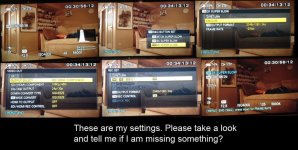
Setting7Q.jpg


The most common error (amongst 5 or 6 different errors) was "Miss-Matched SSD's for RAID / Record Play." I am constantly getting this error, especially when switching between 24fps and Super Slow Motion 120 fps. However, sometimes it happens just by using 24fps. There's no exact pattern and often the only way for it to go away is by shutting down the 7Q. I formatted both cards quite a few times, but this error keeps popping up.
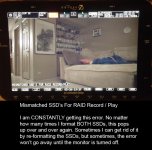
Error3.jpg


This error popped up somewhat frequently and it would crash the 7Q. The Shut Down button did nothing and I would have to unplug the power source. The errors would just loop / flash over and over and the 7Q would just be frozen.
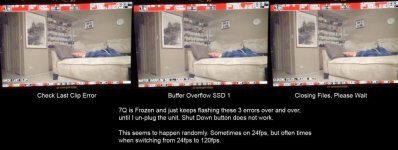
Error01.jpg


I think I have the right settings, but the 7Q cannot seem to go more than 5 minutes without an error message or a crash.

I think CD is GREAT and I'm not posting this to slam you guys, but maybe it might help someone else as well as myself. Thanks for any advice.
 
I think you can't record both high frame rates and normal frame rates on the same SSD's. You need to offload and reformat inbetween.
 
As Essami says, the higher frame rates need to write to both disks at the same time (using RAID), in order for this to work both drives need to be identical. Lower frame rates don't need this and so will only write to one drive.

The side effect of this, if you record a low frame rate and then switch to high frame rate, the two drives will not be identical, hence the drive mismatch error.

The workaround for now, dedicate a pair of same sized drives for high frame rates and a single drive for low frame rates. Long term, Mitch has indicated that the functionality of the unit will be increased to get around this in a firmware release.

I'm afraid I can't see the jpegs, so can't comment on the other messages... Although I would say, check your SDI cables, if they're not spot on you will have issues.
 
I've noticed that I get that same error message about mismatched SSD's, even after I reformat. But, no matter, everything still works fine.
Also, if you removed an SSD without properly ejecting it, you take the chance of corrupting the data base. Have you done a "RECOVER" on both SSD's?
 
I have a few thoughts, but I want to wait until I talk to our engineers in Colorado before advising. In the meantime, please try another SDI cable. I have found that when the signal is even slightly compromised it can freak out the system. Good to remove the right angle adapter -- they are notoriously lossy. Even if your SDI cable is brand new it might not be rated for 3G, which is very important with the amount of data pushed through in RAW, particularly high speed.

Also, we do have a technical support desk at Convergent Design. We are dedicated to making sure our clients are not left out in the cold. e even have a 24-hour emergency support line in case you're on a shoot and things go pear-shaped. More info can be found here:

http://www.convergent-design.com/Support.aspx
 
Last edited:
There's nothing in the specs listed on that cable to indicate that it is 3G rated, so I couldn't tell you. But if something doesn't say 3G then generally it isn't.

Convergent Design makes our own SDI cables which are 3G rated. They are also very lightweight and ultra-thin, which we feel is best for on-camera use. Some people see our thin cables and fear that they are fragile, but they are actually quite rugged.

We recently changed our product listing to make all our cables a standard 36" length. hat way you can position the monitor where you like, even as a viewfinder, and wrap the cable around the mounting arm to keep it under control. List price on our SDI cable is $20 and is available wherever you can purchase an Odyssey or any other Convergent Design products.
 
Gene,

I do encourage you to contact our support desk, either using the link I noted earlier or by simply calling our offices in Colorado at 720-221-3861. We can walk you through the issues you're experiencing and find the cures.
 
Gene,

I do encourage you to contact our support desk, either using the link I noted earlier or by simply calling our offices in Colorado at 720-221-3861. We can walk you through the issues you're experiencing and find the cures.

Thanks Mitch. Andy at CD has been helping me and I have corresponding with him over the day.
 
There's nothing in the specs listed on that cable to indicate that it is 3G rated, so I couldn't tell you. But if something doesn't say 3G then generally it isn't.

Convergent Design makes our own SDI cables which are 3G rated. They are also very lightweight and ultra-thin, which we feel is best for on-camera use. Some people see our thin cables and fear that they are fragile, but they are actually quite rugged.

We recently changed our product listing to make all our cables a standard 36" length. hat way you can position the monitor where you like, even as a viewfinder, and wrap the cable around the mounting arm to keep it under control. List price on our SDI cable is $20 and is available wherever you can purchase an Odyssey or any other Convergent Design products.

Hey Mitch, I blindly missed this response before I mailed back my 7Q :( I mentioned the RG59 Canare Cables I was using to the CD tech support MULTIPLE times asking if it was the right cable, and they didn't think it was a problem. Canare tech support also said the cables were 3G, but not sure if I completely trusted his knowledge, as he didn't exactly inspire confidence.

PLEASE reiterate to CD tech support to mention how IMPORTANT the 3G cable thing is before they have someone send in a unit. I would have gladly tried one of your 3G cables if the tech support guy told me to do so. Instead, CD tech support just told me to mail in the unit as they didn't seem to think the cables were a big deal, especially since I tried different ones.

If the cables are that critical to the operation of the 7Q, it should be the first thing tech support mentions. Just have them say: "Buy our CD 3G cables," and I would have. Who knows, it might not be the problem but I would have happily tried that first before mailing it back.

Thanks again for your response. It's not your fault as I should have followed this thread more carefully.
 
Last edited:
At Westside A V we contact each customer who ordered the Odyssey before we ship it and we go through explaining exactly what you need, consulting with you to make sure you get the right SSD's for your needs as well as SSD reader, power solution , mounting solution. We carry CD cables and we also make custom length 3G cables, we carry 90 degree 3G adapters and power cables with many different ends are also in stock, as well as our battery plates. We also supply you with a stylus to make menu selection easier and keeps the Odyssey screen cleaner.

We have also just developed a 2 part hood for the Odyssey. It is a 2 stage system, a small 3 sided molded plastic hood, top and sides, that fastens very securely with screws but comes off quickly if you like. This acts as a hood but also very importantly as a guard, the glass front is very easy to bump and thus scratch, I use mine full time. Then there is a second longer extension that velcroes on and has a bottom flap that easily flips down to make the touch screen accessible, this is ideal for outdoor bright situations. I will post photos of this later this week.

Even if you don't buy the Odyssey from Westside A V you can contact us and we can go over any questions you have about the kit setup. We also offer Skype tech support to our customers, set this up by emailing us first.

I am not just a dealer, I use the Odyssey myself in my video productions. Basically all the products we sell are ones we use ourselves.
 
Would you ship the hood to the UK? If so, any idea of price inc. shipping?

Yes we ship all over the world. I am just figuring out the pricing.

I will post here as soon as I have it nailed down.

If you contact me by email I can arrange to send you a pre release kit, I am shipping a few of these out this week to get feed back from other users. Shipping to the UK is pretty reasonable.

Email info@westsideav.com.
 
Figured I could piggy back on here to avoid a second "problems with 7Q" topic. Maybe Mitch could help me out.

7Q just arrived in the mail, hooked it up, and I appear to be getting a thin line across the bottom portion of the screen as well as a slight flicker. It flickers more toward the bottom than it does toward the top. I'm going to do some recording tests, I'm sure it's just in the display.

Here is a screen shot. The line gets more visible toward the right side.
line.jpg

And here is a short clip, the moire from shooting the screen makes the flicker look worse, ignore that.
https://vimeo.com/81406692
password: flicker


EDIT: Wanted to quickly confirm that it's not the signal to the 7Q. Recorded clips look perfectly fine... Appears I have a bad OLED panel? Bummer... Hopefully I can use this one for a bit and they'll swap/fix it later? Let me know if it's anything I can address, Mitch.

Thanks!
 
Last edited:
This is a known firmware issue and it will be corrected in the next firmware release. Doesn't happen to everybody but there is no need to send it in.
 
Hi Mitch,

Here's 2 issues that I noticed on my 7Q that has gone back to CD.

I don't think this issue would have anything to do with cables.

1) Footage that was recorded in 24, 30 or 60fps, when played back on the 7Q the last 2 seconds would always be cut off. For example, when playing back a 10 second clip, only 8 seconds would playback. However, footage shot in Super Slow Motion - 120 fps or 240 fps, would play back with no problems and for the full duration of the clip.

I checked the RAW sequence on the computer and all the frames were there, but they would not playback on the 7Q properly

2) I was using Olof's Westside AV Sony L-Series adapter with a NP770 battery. The voltage starts off around 7.9v as indicated by the 7Q. However, after testing for a while when the battery life dropped down to about 6.7v, I would get a "Low Voltage" warning and the monitor would go on and off when shooting 240fps. I popped the battery into the FS700 and there was still about 15% life left on the battery.

So does that mean when shooting 240fps, you need a more charged battery?

FYI, I checked with FilmTools about the Canary RG59 BNC cable, and they assured me (as did Canary) themselves that it's 3G compliant. However, just to be on the safe side I'm only going to use Convergent Design BNC cables from now on.
 
Hi Mitch,

Here's 2 issues that I noticed on my 7Q that has gone back to CD.

I don't think this issue would have anything to do with cables.

1) Footage that was recorded in 24, 30 or 60fps, when played back on the 7Q the last 2 seconds would always be cut off. For example, when playing back a 10 second clip, only 8 seconds would playback. However, footage shot in Super Slow Motion - 120 fps or 240 fps, would play back with no problems and for the full duration of the clip.

I checked the RAW sequence on the computer and all the frames were there, but they would not playback on the 7Q properly

2) I was using Olof's Westside AV Sony L-Series adapter with a NP770 battery. The voltage starts off around 7.9v as indicated by the 7Q. However, after testing for a while when the battery life dropped down to about 6.7v, I would get a "Low Voltage" warning and the monitor would go on and off when shooting 240fps. I popped the battery into the FS700 and there was still about 15% life left on the battery.

So does that mean when shooting 240fps, you need a more charged battery?

FYI, I checked with FilmTools about the Canary RG59 BNC cable, and they assured me (as did Canary) themselves that it's 3G compliant. However, just to be on the safe side I'm only going to use Convergent Design BNC cables from now on.
First let me say that the DVXuser forum is not the proper place for this discussion. I'm not trying to hide anything or "sweep it under the rug," it's just that we do have a proper service support desk and your unit has in fact gone back to the factory under an RMA. It is important that you communicate these issues with Andy at the support line. He is the one who will shepherd your 7Q through any service that is necessary. Telling me just means that the information will be two-stepped, and something can be lost in translation.

Shooting at 240fps absolutely requires more power. It is 10 times the data load! Your car uses more gas when driving at 100mph then it does at 10mph. On the Upper Tool Bar near the left is a status box indicating not only the available voltage of the battery but the active power drain of the 7Q in watt hours. Any time you switch to high frame rate I would suggest switching to a full battery, or certainly at least one with a lot more than 15% of juice left.

Electricity doesn't exactly behave like gas in a car. In a battery as the reserve drops, so does the ability to deliver a given amount of power at any one time. The cells are only capable of squeezing so much juice out of the chemistry. So when you drain down the battery to just 15% it is likely to be able to deliver so little power at any given moment that it is no longer enough to run the Odyssey. The minimum voltage for running the Odyssey7Q is 6.5v. If you start to get close to that then it is time to switch to another battery.
 
Hey Mitch,

I don't mean to offend you. I am not trying to expose anything, but just trying to get answers and learn more about the unit. You just seem to be the most knowledgeable about the product. I asked CD tech support about these same issues and they couldn't really give me a definitive answer. Same with cable issue. Without you mentioning the cables, I would not have known that CDs own cables are the best fit for a 7Q. Now others also know that the 7Q requires top quality 3G cables and will probably buy the proper cables, saving them headaches down the road.

I thought maybe the Playback issue was like Josh's screen glitches, something that might be cleared up in a firmware release. Thanks to Josh's post, we all know it's nothing to worry about. As for the low voltage issue, I just figured since the FS700 can run 240fps with almost no battery juice, the 7Q would be able also. Now I know that once it gets close to 6.5v, it's time to not run 240fps. I have a definitive answer.

I'll keep my questions off the board from now on. And once again, I'm not trying to cause you any grief, I just want to learn more about the unit and whether certain issues are something everyone is experiencing. Up until now, the 7Q has been this almost mythical product and now we are seeing that it's like just anything else, a real product that has huge potential, but there are glitches here and there.

I doubt posts about technical glitches is really going to hurt 7Q sales because none of us expect a perfect product and I completely understand it's new and there are going to be problems that arise, especially for early adopters. For me, there are things that I don't understand and want to know about, and others probably feel the same way.

Once again, not trying to offend you, just trying to see if other's might have the same issues and find possible solutions.
 
Last edited:
This is a known firmware issue and it will be corrected in the next firmware release. Doesn't happen to everybody but there is no need to send it in.

This is great to hear. Sorry I brought it up on the forum, I just figured it wouldn't be worth hassling support about it.

Thanks, Mitch!
 
Gentlemen, do not fret. You are not offending anyone. You purchased products and have questions. Please, ask away and it is fine to do so publicly.

My point was and is that if you wish to get the best and most effective product support, our support desk is the route. All I can do is give general answers as best I can and to forward information along. But I am not the support system, not an engineer, and I am not located at our factory. So at a certain point telling me won't get the results you need. And while I don't mind you telling me here, it's not like I man this forum 24/7 so it won't be the most expedited response.

Sharing information is good, and we certainly have nothing to hide. Any product can have a hiccup here and there. If anything, by posting it publicly I can answer both for you and whomever else may be reading but not inclined to ask. But I would not rely on this method as the proper and efficient conduit to you getting your issue resolved.
 
Back
Top