Issue with External Drive in FCPX

francheezie

Active member
I was watching some tutorials on importing (Izzy's to be exact), and he says to Create an Archive when importing footage. I tried this method, and was going to select an external drive to hold the footage, but my drive isn't showing up. Is there something special I need to do for it to show up? Anyone else ran across this issue? I double-checked and the external was definitely showing in Finder, but not showing up in FCPX.

Image:fcpx_screen.jpg
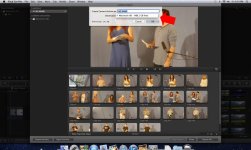
Any input would be great, - Ben
 
Make sure it's formatted at Mac OS Extended (Journaled). In the Finder, highlight it on your Desktop, Cmd+i to get it's information.
How is it connected (USB, FW, eSATA, Ethernet, SAN)?
What's it's capacity and how much free space is on it?

I've only heard of this once before with FCP X, and I'm still working with that person to troubleshoot it.
 
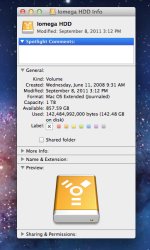
It looks like everything is formatted correctly, check out the screenshot:

drive_info.jpg

Plenty of space available still, about 850GB out of a 1TB. Connected over Firewire 800.
 
Yeah that'd be my guess- if it's ever been designated as your Time Machine backup drive that won't work with X.

Noah
 
Try a different HD- could be the brand. You can always start playing with X with the internal drive only.

-Noah
 
the screenshot of the time machine window doesn't matter. Time Machine being off or on isn't important, it's whether the drive has ever been chosen to be a Time Machine.

But, if you could take a screenshot of the Finder Window with the drive selected, that would help.

If there are any folders already on this drive, one of them could be interfering with FCX
 
Yeah you should reformat that drive again and make sure Time Machine doesn't pick it up then see what happens to completely rule that out (but it's the most likely culprit).
 
FIXED! My first instinct that it was a FCPX issue was correct. Turns out fcpx doesn't like there being certain folders on your external for it to recognize it. To get mine to work I deleted a "PRIVATE" folder from an old SD card import, as well as changed any folder named "video" to something else. That did it!
 
Back
Top