
Navigation
Install the app
How to install the app on iOS
Follow along with the video below to see how to install our site as a web app on your home screen.
Note: This feature may not be available in some browsers.
More options
You are using an out of date browser. It may not display this or other websites correctly.
You should upgrade or use an alternative browser.
You should upgrade or use an alternative browser.
Is this CMOS rolling shutter -- and the reason to buy the HMC150?
- Thread starter PatrickMcVideo
- Start date
PatrickMcVideo
Member
Hmmm... the price of a used HMC150 is of course enticing, but I'd be afraid there would be something wrong with the camera and I'd be stuck.
I see that you've got the HMC150 and a HS-700. May I ask, do you use them together as A and B cameras, and if so, does the footage match well enough to not be distractingly obvious to the average viewer? I would imagine you have to do some tweaking if you used the footage together. Also, the HS-700 looks like it is 1080p60 like the TM900, so what are you using to edit your footage? Thanks!
I see that you've got the HMC150 and a HS-700. May I ask, do you use them together as A and B cameras, and if so, does the footage match well enough to not be distractingly obvious to the average viewer? I would imagine you have to do some tweaking if you used the footage together. Also, the HS-700 looks like it is 1080p60 like the TM900, so what are you using to edit your footage? Thanks!
The HS-700 records higher resolution, but it's fairly easy to get the HS-700 footage to match by downgrading it to 720p and then matching it to the format I am using with the HMC-150. The biggest differences between these cameras are:
- no-rolling shutter with the HMC-150, so anything with high motion I shoot with the 150
- MUCH better low-light sensitivity with the HMC-150, so the HS-700 is mostly used for daylight or brightly lit interior shooting
- MUCH better camera image controls with the HMC-150
- the HS-700 has MUCH better auto-focus ( handy for quick grab shots )
- the HS-700 has MUCH better image stabilization ( handy for quick grab shots )
- the HS-700 is useful when shooting endless convention/symposium presentations ( 17 hours of HQ HD recording on the hard-drive )
...No matter what, I would buy at least one HMC-150 camera if you need to shoot anything with fast motion in the shot, or if you need to shoot low-light. And used is not that big a deal, as this is a solid-state camera so there aren't many moving parts. ( I would only buy a used camera if it looked and functioned like a brand new camera, which usually means that it was ALWAYS kept in a heavy-duty case when not shooting )
- no-rolling shutter with the HMC-150, so anything with high motion I shoot with the 150
- MUCH better low-light sensitivity with the HMC-150, so the HS-700 is mostly used for daylight or brightly lit interior shooting
- MUCH better camera image controls with the HMC-150
- the HS-700 has MUCH better auto-focus ( handy for quick grab shots )
- the HS-700 has MUCH better image stabilization ( handy for quick grab shots )
- the HS-700 is useful when shooting endless convention/symposium presentations ( 17 hours of HQ HD recording on the hard-drive )
...No matter what, I would buy at least one HMC-150 camera if you need to shoot anything with fast motion in the shot, or if you need to shoot low-light. And used is not that big a deal, as this is a solid-state camera so there aren't many moving parts. ( I would only buy a used camera if it looked and functioned like a brand new camera, which usually means that it was ALWAYS kept in a heavy-duty case when not shooting )
PatrickMcVideo
Member
Thanks TheDingo. Very good info. When you "downgrade to 720p" are you doing that with ClipWrap or some other 3rd party utility? And are you editing in FCP by any chance? I'm still worried about getting a 1080p60 camera to work with my system. Thanks.
When you "downgrade to 720p" are you doing that with ClipWrap or some other 3rd party utility?
I am Windows based, so I use Sony Vegas Pro and save the intermediate production file using either the Cineform CODEC ( $100 for NEO SCENE for either Windows or Mac from www.videoguys.com ) or use the free AVID DNxHD Lite CODEC ( both of these are cross platform CODEC which work on both Mac and Windows editors ). If I was using Final Cut Pro I would render out my intermediate file in the appropriate ProRes format. ( you want to use a video editing CODEC and NOT a video DELIVERY CODEC which will throw away most of the video information )
PatrickMcVideo
Member
Cool. My plan then is to suggest the HMC150 plus AC130 as the ultimate package, and then if the reaction to that is "no way that's too expensive" then I'll suggest the HMC150 plus TM900 package, and then on down to the two TM900 package. Crossing my fingers ...
Thanks again for all the input.
Thanks again for all the input.

MadHMC150
DVXuser Sponsor
( you want to use a video editing CODEC and NOT a video DELIVERY CODEC which will throw away most of the video information )
Great point here.. You will want to use FCP's Log and Transfer and transcode your footage over to prores. FCP edits prores very well or you can use prores(LT) if you want a lighter codec. THEN export it down, like mentioned 720p and h.264 for web.
PatrickMcVideo
Member
I tried to find a raw TM900 file to download and test with my FCP, but I couldn't find one. But it sounds like Log and Transfer will handle it okay. Thanks MadHMC150.
That's a good point about two TM900's, ejoison. I was thinking two TM900's would be okay, or one TM900 and one HMC150 would be even better -- but -- I'm running FCP 6, and there are apparently issues with the TM900's 1080p60 not being supported. (And it's not even supported on FCP 7 or FCP X.)
I got some extra time to figure this out since my boss left early yesterday and I didn't have to give him my list of recommendations, but I'm not sure what to tell him today. Two HMC150's is totally awesome in my book (or HMC150 + AC130), but I can't have my "budget" recommendation include a camera (TM900) that I'm not sure will work with my software.
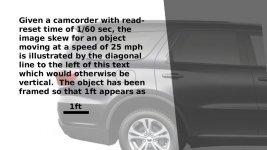
Two HMC150's seem ideal for taking videos of cars driving by. As for compatibility, the TM900 also records i60 which should work with most editing softwares. If you wind up with a TM900 you may wish to experiment with the different recording modes. My guess is that p60 may exhibit more skew than the i60 and iFrame modes anyway. I created an illustration of how an image taken with a CMOS camera with read-reset time of 1/60 sec might look. The image is attached below.
Attachments
PatrickMcVideo
Member
Thanks for the illustration. I don't fully understand how you arrived at those results but, if that's the amount of skew at 25 mph, I would guess the skew would be even greater as the speed of the vehicle increases. All the more reason to get the HMC150.
I just saw my boss in the hallway -- gotta get all my facts together and grab him ... (hopefully in a good mood)
I just saw my boss in the hallway -- gotta get all my facts together and grab him ... (hopefully in a good mood)
To draw the picture I calculated how far the car would move in 1/60 sec and then skewed the picture so the bottom scan line was offset from the top line by that exact amount. If the car were moving faster, the skew would be more. However, if the image were framed so the car appeared smaller, then the skew would be less.
For many people skew only becomes objectionable when it suddenly changes direction. Basic physics implies that a moving car is not likely to suddenly start going in reverse at the same speed. Therefore, the objectionable artifacts from rolling shutter usually result from camera motion rather than motion of the subject.
For many people skew only becomes objectionable when it suddenly changes direction. Basic physics implies that a moving car is not likely to suddenly start going in reverse at the same speed. Therefore, the objectionable artifacts from rolling shutter usually result from camera motion rather than motion of the subject.
Last edited:
PatrickMcVideo
Member
Ah, I see. Very informative. Thanks.
Well last night my boss liked the idea of one HMC150 and one TM900, so I'm happy about that. The only hang up is that now he wants to present it to the big boss/owner. But at least that gives me time to find out for sure that my software can handle the TM900's 1080p60. (Though I'll look stupid if I have to go back and say, Um, I actually won't be able to edit the footage from the TM900...)
Thanks again everyone for the help.
Well last night my boss liked the idea of one HMC150 and one TM900, so I'm happy about that. The only hang up is that now he wants to present it to the big boss/owner. But at least that gives me time to find out for sure that my software can handle the TM900's 1080p60. (Though I'll look stupid if I have to go back and say, Um, I actually won't be able to edit the footage from the TM900...)
Thanks again everyone for the help.

scapsinger
Well-known member
For better or for worse, all AVCHD footage is roughly equal in terms of processing difficulty for an NLE (assuming you edit native....if you go intermediate, it's just a matter of storage space and speed).
1080 isn't much different from 720 at any frame rate. There IS some difference, just not much. The only place you might run into hangups between the two is if you're downrezing 1080 to fit in a 720 timeline. But all in all, the bitrates are rather low (so your HDD will love it) and all of them are heavily compressed (which your CPU will despise).
1080 isn't much different from 720 at any frame rate. There IS some difference, just not much. The only place you might run into hangups between the two is if you're downrezing 1080 to fit in a 720 timeline. But all in all, the bitrates are rather low (so your HDD will love it) and all of them are heavily compressed (which your CPU will despise).
Though I'll look stupid if I have to go back and say, Um, I actually won't be able to edit the footage from the TM900...
Budget another $50 for Clipwrap.
https://store.divergentmedia.com/store/browse
It will be useful for processing AVCHD from both the HMC150 and the TM900.
For better or for worse, all AVCHD footage is roughly equal in terms of processing difficulty for an NLE.
AVCHD 1080p60 takes up to 5 times as much compute power to decode as 720p24. Depending on your computer this could be significant or barely noticeable.
Last edited:
PatrickMcVideo
Member
Hmmm, I know the HMC150 also can shoot 1080 60i and 1080 24p (so that's good they'd match), but I wasn't planning on shooting in either of those modes.
Most of the stuff I do is for web content and not television broadcasts, and I'm afraid shooting "i" will give me those comb lines on the edges of stuff that moves. And if I deinterlace, then I'm losing resolution. Right? And I wasn't planning on shooting 24p because I was under the impression that 24p is not good for sporting events with fast action and panning (like the drag racing events I capture).
Shoot, I'm starting to get worried now. I wonder if Panasonic makes a camcorder similar to the TM900 that shoots 1080 30p and 720 60p. Anyone, anyone ...???
Update: This post was in response to TheDingo -- and now I see scapsinger and ejoison have replied. Thanks. I'll read and see if I still need to look into a different B camera.
Most of the stuff I do is for web content and not television broadcasts, and I'm afraid shooting "i" will give me those comb lines on the edges of stuff that moves. And if I deinterlace, then I'm losing resolution. Right? And I wasn't planning on shooting 24p because I was under the impression that 24p is not good for sporting events with fast action and panning (like the drag racing events I capture).
Shoot, I'm starting to get worried now. I wonder if Panasonic makes a camcorder similar to the TM900 that shoots 1080 30p and 720 60p. Anyone, anyone ...???
Update: This post was in response to TheDingo -- and now I see scapsinger and ejoison have replied. Thanks. I'll read and see if I still need to look into a different B camera.
Shoot, I'm starting to get worried now. I wonder if Panasonic makes a camcorder similar to the TM900 that shoots 1080 30p and 720 60p. Anyone, anyone ...???
As suggested by Dingo in
http://www.dvxuser.com/V6/showthrea...y-the-HMC150&p=2525522&viewfull=1#post2525522
downsample the 1080p60 footage to 720p60 before editing. Here is a possible workflow:
TM900 1080p60 AVCHD -> Clipwrap -> 720p60 ProRes (or AIC)
HMC 720p60 AVCHD -> Clipwrap -> 720p60 ProRes (or AIC)
Then all files will be in 720p60 ProRes (or AIC) format and easy to edit with FCP.
scapsinger
Well-known member
720p60 is an ideal format for producing sports footage for the web. You may also want to adjust your shutter speed to minimize motion blur, but even just shooting straight 60p is pretty good.
PatrickMcVideo
Member
Awesome. Looks like I can stick with the TM900 to go with the HMC150. I am now pouring virtual mugs of beer for you guys and giving you a virtual toast.
Last edited:
PatrickMcVideo
Member
Howdy one and all. I just wanted to add a quick note to say thanks again for all the insightful posts. Next week when the UPS person arrives here, I will feel like a kid at Christmas -- my boss just signed off on one HMC150 and one TM900!!!
I must admit though, all the way up until he signed his name on the purchase order, I was wavering and deliberating and going back and forth in my mind between the HMC150, the JVC HM150 and the AC130. (I kept checking for new posts from Jan on the AC130's auto focus issue, and I kept reading reviews on the JVC to see if it would be worth getting a camera that would work super easily with FCP but was "not quite as good" of a camera.)
I'm sure I won't regret deciding upon the HMC150 -- it seemed like the "sure thing" and I can't wait to do great things with it. Thanks again.
I must admit though, all the way up until he signed his name on the purchase order, I was wavering and deliberating and going back and forth in my mind between the HMC150, the JVC HM150 and the AC130. (I kept checking for new posts from Jan on the AC130's auto focus issue, and I kept reading reviews on the JVC to see if it would be worth getting a camera that would work super easily with FCP but was "not quite as good" of a camera.)
I'm sure I won't regret deciding upon the HMC150 -- it seemed like the "sure thing" and I can't wait to do great things with it. Thanks again.