GH1 Is there a Virtualdub workflow?

frear

Member
Hello everybody.

I'm new to video in general and didn't care at all about editing before reading this forum, now just moving the first steps into this world and would like to begin from the basics.

I've read marvels of Virtualdub and some filteres, namely deshaker, and would really like to try to process some freehand footage I've made in Venice channels, shooting at boats, standing in a boat.

I've installed evereything on my win 7 (ie. Virtualdub, directshow, ffdshow, DirectShowSource, deshaker) and found no way to even Open my GH1 .MTS files in Virtualdub. Followed the only two guides googled out, with no success at all.

Is there a way to use it? Anybody has ever tried with success?

If so, I would take my first steps into color grading so a further advice on any plugin which does the job would be appreciated.

Thank you.
 
Hello everybody.

I'm new to video in general and didn't care at all about editing before reading this forum, now just moving the first steps into this world and would like to begin from the basics.

I've read marvels of Virtualdub and some filteres, namely deshaker, and would really like to try to process some freehand footage I've made in Venice channels, shooting at boats, standing in a boat.

I've installed evereything on my win 7 (ie. Virtualdub, directshow, ffdshow, DirectShowSource, deshaker) and found no way to even Open my GH1 .MTS files in Virtualdub. Followed the only two guides googled out, with no success at all.

Is there a way to use it? Anybody has ever tried with success?

If so, I would take my first steps into color grading so a further advice on any plugin which does the job would be appreciated.

Thank you.
Hi there,

It's certainly possible, I use VirtualDub extensively, but I frame-serve using Avisynth, and I would recommend using this method as you also gain access to more fantastic filters. It seems daunting at first, but once you get a grasp on the fundamentals it becomes much easier.


If you're interested, here's what you could do:

  • Download and install Avisynth from here: http://avisynth.org/mediawiki/Main_Page - get the top most edition named v.2.5.8 ST, 32-bit.
    It's not labelled very well, but the MT (multi-threaded) edition below does not provide the main installer required. Basically, you install the MT version "over" the original by replacing some .dll files.

  • Once Avisynth is installed you'll then be able to open up .avs files in VirtualDub. First, though, you'll need to create one.

  • For ease of use, create a blank text document in the same directory as your MTS clips and rename the extension to .avs

  • The two most successful methods of decoding AVCHD clips are either through DirectShowSource, or by using the FFMPEG library (through a filter called FFMPEGSource2). I'll run through both quickly:

  • To use DirectShow, simply punch this into your .avs script:

    DirectShowSource("ClipName.MTS")

  • All you need to do now is open that .avs file through VirtualDub, and your clip should load.


  • I would recommend using FFMPEGSource2 however, which you can download from: http://code.google.com/p/ffmpegsource/downloads/list

    I haven't had much luck with the MT (multi threaded) versions, they seem to introduce a lot of grey decoding artefacts. If you want to play it safe, grab the bottom-most copy (vanilla) called ffmpegsource-2.15.7z.

    If you want the filter to load automatically (easiest for now), extract the contents to the "plugins" folder within your Avisynth directory in Program Files (x86 if you're on 64-bit Windows).

  • Once you've done that, you can load your clip using the following:

  • audio=FFAudioSource("Clip.MTS")
    video=FFVideoSource("Clip.MTS")
    audiodub(video,audio)

  • Now open your .avs script in VirtualDub and it should load up just fine.


Hope that helps somewhat! I realise it seems complicated at first (especially if you use FFMPEGSource2), but once you start playing around with Avisynth you'll discover you can achieve similar if not better results than those you would usually have to pay for.


I've used Deshaker previously, as I had hours of autogyro footage that needed some serious stabilisation. Using After Effects and tracking points would have probably driven me insane, so I'm glad Deshaker exists! It did a damn good job too, considering the original footage was basically unusable.
Just be aware that you have to do two passes for that filter (I'm sure the readme will explain it).


As for exporting from VirtualDub, you can use ffdshow's encoder for all the usual codecs (MJPEG, WMV, huffyuv, etc).
For Avid/Final Cut material, use the QTSource Avisynth filter (you can write back out to Quicktime using this).

If you're using Edius, this is even easier. I recently started using this NLE, it's almost a hidden gem! Great codecs (Canopus HQX and Lossless) that work through VFW and it has really good AVCHD support.

Finally, you can also download free lossless codecs such as Lagarith, UT and the MSU codec. UT seems to work really well and it's insanely fast to decode, so it's worth looking at that one too.


Also, a quick pointer: I still use VirtualDubMod (whose last release I believe was in 2006) as I find it far more reliable than the latest versions of VirtualDub when it comes to dealing with AVCHD. It's more than likely just me, but if you're having difficulties, give the Mod version a go.


Sorry for barraging you with a wall of text!

Cheers,
James
 
Thank you, James. I'm too newby to understand all at once, and I'm sorry to write back with such a delay.

There was unfortunately no way, for me, to use technique number 1: Directshow. Simply tried everything. Not working. Win 7? Who knows..
Method 2, instead, works.

The MTS loaded via Avisynth is not really manageable by VD, blocks, locks, "grey freezes", have to press F2 too many times, and so on.
While it's incredibly fast with lossless 1Gb (for 1 minute and a few seconds... sooo much!!) files.
So I think I understood what the begining of the workflow should be:

1- write the script
2- include some plugin if needed (tried the stack 2 videos one, cool but got dumb colors)
3- open it up in VD
4- whatever you might want to do with it, convert it immediately in a lossless format (tried Lagarith and UT, going for UT).
5- STEP 5 (need to write this as reference for my question at bottom)
6- Save Lossless, File-close .MTS served video, File-open just-saved-Lossless video
7- Crop, trim, apply filters (what does the blen option do, BTW?), color grade (used Curves and Layer filters)
8- Save Lossless again
9- Open videopad
10- Put all Lossless clips together (save often, and pray it doesn't crash).

Okay.. it works, you can then export in Mpeg.

Question 1: am I doing the workflow the clever way?

Question 2: what am I supposed to do in STEP 5?
- deinterlacing?? I didn't yet understand if the wrapper is still there, even though I think it's not...
- 50fps to 25fps if 50fps shot on SH aren't really needed??
- Changing the color to some 4:2:2 for more accurate grading??
- of course deshaking (which I did without checking the upscale option and immediately understood how it works! Cool!!)

I'm sure there are some best practices one should follw to get the most of STEP 5..

Thank you very much again, you've been really clear and allowed me to begin.
 
Hello again,

Right, something I forgot to mention about using the DirectShow method - you need to install Haali Media Splitter first (get it here - http://haali.su/mkv/). Once that's installed you should be able to open up your .mts clips fine.

The problems you've described regarding grey blocks and locking up are, from my own experience, symptomatic of using both the multi-threaded version of FFMPEGSource2 and the latest VirtualDub. Try a combination of VirtualDubMod and the vanilla FFMPEGSource2 and see if you still have those problems.


Now, a few pointers!


You shouldn't need to export to lossless then bring it back into VirtualDub before applying filters. Apply any filters you need in your Avisynth script - this can include trimming - bring it into VirtualDub, apply any VirtualDub filters you need, then export straight to whatever codec you're editing with. This could be a lossless codec or a specific editing codec (for example Canopus HQX, which comes with Edius).


As regards Step 5, if you're shooting on an unhacked GH1 in the 1080i mode you'll probably want to apply pulldown and de-interlacing. I believe there's a thread in this very sub forum which covers that in more detail. If you can, though, hack your GH1! The improved results are more than worth the technical complications. If you've shot in 720p50, you don't need to de-interlace or use pulldown. If you want to "conform" your clip to a lower frame rate (for slow motion), use Avisynth's AssumeFPS() command like so:

Code:
AssumeFPS(25, sync_audio=true)

Word of advice though, if you want to conform to 23.976fps, use these figures:

Code:
AssumeFPS(24000,1001)

This will ensure the clip ends up at 23.976 and not a rounded-up value such as 23.98 (Edius will actually flag this discrepancy up in the clip's properties).


You're putting the clips back together using videopad? You can do that in Avisynth you know! Simply chain your clip loading functions like so:

Code:
DirectShowSource("Clip1.AVI") + DirectShowSource("Clip2.AVI") + DirectShowSource("Clip3.AVI")

Also, if you want to clip them on the fly without exporting your trimmed versions try:

Code:
DirectShowSource("Clip1.MTS").Trim(23,120) + DirectShowSource("Clip2.MTS").Trim(67,780)

You can append filters to the end of your clip loading functions simply by adding a full stop (as seen above). It'd be a slow experience, but you could effectively knock together an edit of many clips using nothing but Avisynth commands! I'd prefer a regular editing setup though..


Finally, if you're exporting for web delivery (I saw your thread about The Angry Turtle, nice footage!), I'd use a codec better suited for that purpose. You mentioned MJPEG, but for web uploading I'd advise going for H264, which will significantly decrease the overall filesize whilst maintaining the quality (perceptually). One of the best H264 encoders, x264, happens to be free.

If you want to give x264 a go, here's the easiest way: grab a program called StaxRip, which comes pre-installed with the encoders you need. Create an Avisynth script that imports your finished clip (or it might even be the current one you have), which StaxRip will then open. You can then choose a suitable preset (try x264 Film) and play around with the various settings. The main option you should look at is the Preset setting. By default it's set to Medium. Using Slow, Slower, Veryslow or Placebo will enable/change settings to achieve better quality, but at the cost of more encoding time. It pays to experiment, but unfortunately that can take some time..


Footnote then, if you're interested in Avisynth and its available filters, it's worth looking at the Doom9 forums (http://forum.doom9.org/) - there you can find a vast array of filters plus many discussions about the best ways to use them. It can be a bit of an overwhelming read at first, but you soon get used to it.

Hope that helps,
James
 
My turtle lost 90% of his weight w/ x264 "medium" settings in mp4 container and no artifacts around: this x264 is nice.
Did everything you suggested, DirectSource working and VD doesn't show no grey screens and reads fluid.
And, guess what.. Videolan now also reads MTS as well (it didn't, before)!! A chance to test their NLE.

Okay, my PC is set up with video codex now.. :P

I will check that forum you suggest. Thanks for all your advice, they all hit the sign.
 
I have tried to find a simple way to remove pulldown from 1080 (note: my camera is PAL).
After reading many old threads, I achieved some result reading the manual..

LoadPlugin("C:\Program Files\AviSynth 2.5\plugins\decomb.dll")
DirectShowSource("00001.MTS")
AssumeTFF()
Telecide(guide=2,post=2,vthresh=26,show=false)

Opened in VD and saved as avi file n.1 via Lagarith lossless. It runs smoothly.

I then appended the AssumeFPS(24000,1001) command to the scrip, run through the flow again and saved avi file n.2 via Lagarith lossless. It runs smoothly also.

I couldn't notice any differences between 25p (clip1) and 23.976p (clip2).

So I encoded both files H264 into .mp4 and wrote a StackVertical(clip1.mp4, clip2.mp4) script to better see. To my eyes, nothing to see.

Apart from: run through the same process, but with new fps assumption grades the resulting image.

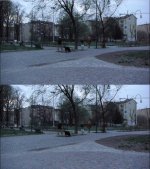
Here is a take from the clip. Bottom is 24 (lighter), top is 25 (darker). MTS is like 25.

25pVS24p.jpg
 
I have a new GH2, use Linux almost exclusively but have been quite prepared to go with the crowd when it comes to post. Virtual dub is of course available in Linux (and ffmpeg & other file processing apps). I know Cinelerra and am usually prepared to go the extra mile for open source. But when it comes to editing .mts I really don't want it to go it alone.
So, just before I invest in a Mac, is there any sign of a serious Linux/Panasonic .mts workflow community developing?
 
I am also interested in this topic. Maybe this should be its own thread instead of tacked on to this one. Hope someone answers with a good workflow for Linux.

I have a new GH2, use Linux almost exclusively but have been quite prepared to go with the crowd when it comes to post. Virtual dub is of course available in Linux (and ffmpeg & other file processing apps). I know Cinelerra and am usually prepared to go the extra mile for open source. But when it comes to editing .mts I really don't want it to go it alone.
So, just before I invest in a Mac, is there any sign of a serious Linux/Panasonic .mts workflow community developing?
 
if you are serious about deling with video (cutting, deinterlacing, color correction and other filters) you should first find a decent codec that you can use in all your applications.
for me cineform neo works well since it makes .AVI from almost any source and is less heavy than uncompressed.
Main problem with video conversion is to avoid color or luminance shift, handle properly frame rate and interlacing. Again here cineform proved to be the king and what he cannot
do can be done in virtualdub. As long you can avoid multiple conversion, all is great.
Others codecs exists like huffyuv but anyway the thousand known forms of mpeg4 or mpeg2 are always a pain to work with, so get rid of it.
 
Last edited:
Back
Top