
Rylan Zolinski
Well-known member
As far as I can tell, you can only use XLR? Or would an attenuator work with a 3.5mm line?

Follow along with the video below to see how to install our site as a web app on your home screen.
Note: This feature may not be available in some browsers.
What does "use a 3.5mm line" mean?
We are unable to answer you question because it is too ambiguous.
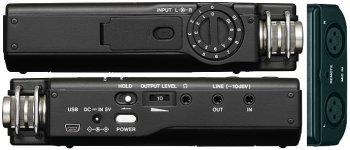
The Tascam DR-100 mkII has 3.5mm jacks for headphones, for Line In, and for Line Out.
View attachment 99264

The DR-100 (without the MKII) appears to have exactly the same configuration.I don't have the MKII; just the regular DR-100.
The AT System-10 receiver has a 3.5mm TRS output that can be switched to either balanced, or "dual-mono" unbalanced.I have this wireless setup: http://www.bhphotovideo.com/c/produ...ica_atw_1701_l_system_10_digtal_wireless.html
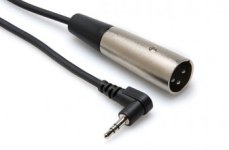
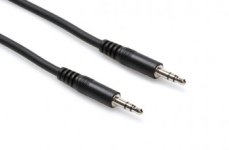
The 1st generation DR100 only has a 3.5 unbalanced line in (-10dB) as well. You would need an XLR adapter cable to feed the AT wireless system into the DR100. B&H states it doesn't have one included. You could try the Tascam's 3.5mm line-in but the level will probably be very low if usable at all. Otherwise get the optional XLR adapter cable designed for the System 10 Camera-Mount receiver.
The DR-100 (without the MKII) appears to have exactly the same configuration.
The AT System-10 receiver has a 3.5mm TRS output that can be switched to either balanced, or "dual-mono" unbalanced.
And it has a built-in attenuator for either mic-level output, or line-level output.
So, with the AT receiver switched to "dual-mono" output, and attenuated to mic-level, you can use a simple 3.5mm TRS cable to male XLR plug.
http://hosatech.com/product/xvm-100m/
View attachment 99295
Or, with the AT receiver switched to line-level output, you can use a 3.5mm TRS to 3.5mm TRS cable into the "LINE IN" connector on your recorder.
http://hosatech.com/product/cmm-100/
View attachment 99296
Can we assume that the receiver was displaying "normal" levels?I tried with a 3.5mm to 3.5mm and the audio levels are very low. With the gain cranked all the way up, I'm only hitting at about -30.

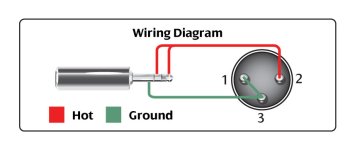
Actually, they are correct. As it turns out, that adapter from Hosa is NOT wired for true balanced. It is wired for "dual mono unbalanced" It has the tip and ring connected together, so it will only work if the receiver is switched to "dual mono unbalanced".I would add that the instructions for going in Mic XLR are not correct. He has you switch to dual mono unbalanced, since you are going balanced mic in with the XLR you would want to be set to balanced and mic level. If you were set to dual mono the signals on the hot and cold leads would cancel and you would have an almost nonexistent level.
Can we assume that the receiver was displaying "normal" levels?
Can we assume that your recorder line input works properly and you have used it successfully with other gear?
At what setting of the receiver attenuator switch? What was the effect when you tried the different settings?
At what setting of the receiver balanced/unbalanced (dual mono) switch? What happened when you tried the other setting?
OK. Break your confusion down in to simple questions.I've read through everyones recent posts and now I'm more confused than ever.
OK. Break your confusion down in to simple questions.
We can't begin to guess what parts you are confused about.
No, you are starting at square 5.Back to square one.
That's certainly a good possibility. But I can also see him asking a Radio Snak sales-droid for a mini-plug to mini-plug cable and being handed a dubbing cable intended to go from some playback device's headphone output into a recorder's external microphone input....
It's likely the OP doesn't understand how to set the wireless system's levels.