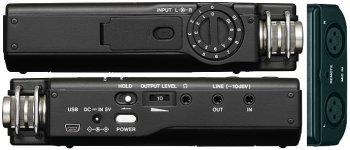
Is it possible to use a 3.5mm line for the Tascam DR-100?

What does "use a 3.5mm line" mean?
We are unable to answer you question because it is too ambiguous.

The Tascam DR-100 mkII has 3.5mm jacks for headphones, for Line In, and for Line Out.

Tascam_dr-100_LRB.jpg
 
First you want people to read the manual and NOW you want them to look at the labels on the jacks!!!
When will the torture end.

;~)
 
What does "use a 3.5mm line" mean?
We are unable to answer you question because it is too ambiguous.

The Tascam DR-100 mkII has 3.5mm jacks for headphones, for Line In, and for Line Out.

View attachment 99264

I don't have the MKII; just the regular DR-100. I have this wireless setup: http://www.bhphotovideo.com/c/produ...ica_atw_1701_l_system_10_digtal_wireless.html
I don't know if I need an attenuator, a 3.5mm to XLR adapter or if it will even work at all.
 
The 1st generation DR100 only has a 3.5 unbalanced line in (-10dB) as well. You would need an XLR adapter cable to feed the AT wireless system into the DR100. B&H states it doesn't have one included. You could try the Tascam's 3.5mm line-in but the level will probably be very low if usable at all. Otherwise get the optional XLR adapter cable designed for the System 10 Camera-Mount receiver.
 
I don't have the MKII; just the regular DR-100.
The DR-100 (without the MKII) appears to have exactly the same configuration.


The AT System-10 receiver has a 3.5mm TRS output that can be switched to either balanced, or "dual-mono" unbalanced.
And it has a built-in attenuator for either mic-level output, or line-level output.

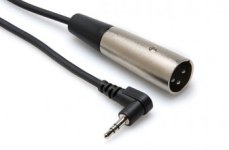
So, with the AT receiver switched to "dual-mono" output, and attenuated to mic-level, you can use a simple 3.5mm TRS cable to male XLR plug.
http://hosatech.com/product/xvm-100m/
XVM-100M_RGB_856-350x230.jpg

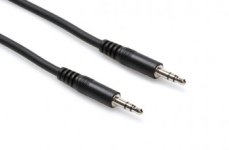
Or, with the AT receiver switched to line-level output, you can use a 3.5mm TRS to 3.5mm TRS cable into the "LINE IN" connector on your recorder.
http://hosatech.com/product/cmm-100/
CMM-100_RGB_856-350x230.jpg
 
Last edited:
The 1st generation DR100 only has a 3.5 unbalanced line in (-10dB) as well. You would need an XLR adapter cable to feed the AT wireless system into the DR100. B&H states it doesn't have one included. You could try the Tascam's 3.5mm line-in but the level will probably be very low if usable at all. Otherwise get the optional XLR adapter cable designed for the System 10 Camera-Mount receiver.

Thanks! I will give it a try!
 
The DR-100 (without the MKII) appears to have exactly the same configuration.


The AT System-10 receiver has a 3.5mm TRS output that can be switched to either balanced, or "dual-mono" unbalanced.
And it has a built-in attenuator for either mic-level output, or line-level output.

So, with the AT receiver switched to "dual-mono" output, and attenuated to mic-level, you can use a simple 3.5mm TRS cable to male XLR plug.
http://hosatech.com/product/xvm-100m/
View attachment 99295

Or, with the AT receiver switched to line-level output, you can use a 3.5mm TRS to 3.5mm TRS cable into the "LINE IN" connector on your recorder.
http://hosatech.com/product/cmm-100/
View attachment 99296

I tried with a 3.5mm to 3.5mm and the audio levels are very low. With the gain cranked all the way up, I'm only hitting at about -30.
 
I tried with a 3.5mm to 3.5mm and the audio levels are very low. With the gain cranked all the way up, I'm only hitting at about -30.
Can we assume that the receiver was displaying "normal" levels?
Can we assume that your recorder line input works properly and you have used it successfully with other gear?
At what setting of the receiver attenuator switch? What was the effect when you tried the different settings?
At what setting of the receiver balanced/unbalanced (dual mono) switch? What happened when you tried the other setting?
 
According to the System-10 compact receiver manual specs:
Maximum output level of +6 dBV unbalanced / 0 dBV nominal. This tells me feeding the Tascam's 3.5mm unbalanced line input should work. Re-check all your settings, including the transmitter mic gain.
BTW, the System-10 receiver output gain setting switch is illustrated on Page 3 /Figure D here: http://goo.gl/4bqWOY
 
Last edited:
Not sure why one would go to an XLR? The receiver has a 3.5mm output that can be set to unbalanced and so should match the -10 3.5mm unbalanced in on the recorder.

You should not need any kind of adapter, but you do need to set up the receiver to match the recorders input.

--- oops Richard already got there.

I would add that the instructions for going in Mic XLR are not correct. He has you switch to dual mono unbalanced, since you are going balanced mic in with the XLR you would want to be set to balanced and mic level. If you were set to dual mono the signals on the hot and cold leads would cancel and you would have an almost nonexistent level.
 
I would add that the instructions for going in Mic XLR are not correct. He has you switch to dual mono unbalanced, since you are going balanced mic in with the XLR you would want to be set to balanced and mic level. If you were set to dual mono the signals on the hot and cold leads would cancel and you would have an almost nonexistent level.
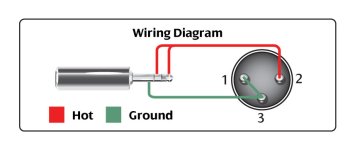
Actually, they are correct. As it turns out, that adapter from Hosa is NOT wired for true balanced. It is wired for "dual mono unbalanced" It has the tip and ring connected together, so it will only work if the receiver is switched to "dual mono unbalanced".

XVM-100M_diagram1.jpg

I was unable to find an off-the-shelf adapter cable from 3.5mm TRS balanced to XLR male. But I recommended that Hosa thing as the most likely to be available to the OP. And he is using the 3.5mm stereo line input to his recorder, so it is a moot point.

Of course the OP has not returned to reply to any of our questions, so who knows what is happening or where the problem lies? There's probably a dozen things that could cause those symptoms, and he doesn't seem to have much familiarity with audio gear.

I make my own cables (including for my System 10 receivers), so I don't follow store-bought cables and adapters much except as others ask about them on these forums.

I must say that adding that wiring diagram is a monumental step forward in proper documentation of the products. Without those, we are at the mercy of clueless copy-writers who don't know a balanced connection from their left elbow.
 
Last edited:
Ah. I was assuming a straight through cable. You are probably right that a straight through would be hard to find.

Judging by his description my money is he has the receiver set to a mic level output but???
 
Can we assume that the receiver was displaying "normal" levels?
Can we assume that your recorder line input works properly and you have used it successfully with other gear?
At what setting of the receiver attenuator switch? What was the effect when you tried the different settings?
At what setting of the receiver balanced/unbalanced (dual mono) switch? What happened when you tried the other setting?

For some reason or other, I thought this thread had died. I didn't see the new messages!

I've never had to use the line input in the past until now.

As for the settings, I tried different combinations with no successful results. My audio knowledge is very limited and definitely my weakest point in terms of overall video/audio production. I'm trying to learn though! I've read through everyones recent posts and now I'm more confused than ever.
 
OK. Break your confusion down in to simple questions.
We can't begin to guess what parts you are confused about.

Back to square one. What would be the proper solution to record audio onto the Tascam from the Audio Technica receiver with a 3.5mm cable. I had the output of the Audio Technica receiver running a 3.5 mm cable into the input of the Tascam. I had the attenuator of the AT receiver at 0, then -10, then -20. I also switched back and forth from dual-mono/unbalanced. The levels are very very very quiet if I blow into the mic.
 
Back to square one.
No, you are starting at square 5.
If you want to start back at square 1, then lets establish that you have the wireless kit set up properly.

Before we can connect the wireless kit to anything else, we must make sure IT is operating properly.
Else we have one equation and two (or three or seven) unknowns.

Do you get a "normal" level out of the receiver?
Do you see a "normal" level indication on the receiver display?
Can you get a proper level listening to the receiver with headphones?

Do you have previous experience with other wireless gear?
Are you familiar with what "normal" is for this kind of kit?
 
I don't understand all the discussion about 3.5mm to XLR, looking at the manuals for the wireless system and the DR100 it appears that all is needed is a straight thru 3.5mm TRS-M to TRS-M non-attenuating patch cable. The wireless is able to output dual mono on a 3.5mm stereo jack at a nominal 0dBv. The DR100 has a -10dBv stereo line input on a 3.5mm stereo jack. Where's the problem?

1: TRS male to TRS male non-attenuating 3.5mm stereo patch cable (since the OP's complaint is low levels what do you want to bet he has an attenuating line/headphone out to mic in patch cable)
2: plugged into output jack of
3: receiver set to dual-mono output, and I'd start with receiver output attenuator set to -10.
4: Cable into 3.5mm line input jack on DR100, input switch set to 'line'. Should be good to go.
 
Last edited:
Exactly Steve, this was what I stated in post #10:
"According to the System-10 compact receiver manual specs: Maximum output level of +6 dBV unbalanced / 0 dBV nominal. This tells me feeding the Tascam's 3.5mm unbalanced line input should work"

It's likely the OP doesn't understand how to set the wireless system's levels.
 
...

It's likely the OP doesn't understand how to set the wireless system's levels.
That's certainly a good possibility. But I can also see him asking a Radio Snak sales-droid for a mini-plug to mini-plug cable and being handed a dubbing cable intended to go from some playback device's headphone output into a recorder's external microphone input.
 
Last edited:
Back
Top