Internal SDHC Slog Vs. Cinegamma 4 grading test + original .MTS files

Gene Sung

Veteran
So here my pixel peeping S-Log Vs Cinegamma 4 tests shot to the internal SDHC card and graded in After Effects. All files are in Pro-Res 4:2:2 LT. I tried to expose both similarly in camera. The Cinegamma 4 was set to ISO 640 and the S-Log was ISO 2000. I might have done a few tweaks to keep the buildings similarly exposed in both movies.

Both tests are very brief clips to keep the file sizes down since they are Pro-Res 4:2:2 at 1920x1080 HD, but you get the idea. The Cinegamma 4 is on for 15 frames and then the S-Log is on for 15 frames. Both codec are labeled.

Test 1
http://www.builtbyugene.com/mov_tests/slog/SlogTests_0202a.mov

Test2
http://www.builtbyugene.com/mov_tests/slog/SlogTests_0202b.mov

For the very basic grade, I just restored the colors back to a normal-ish level, maybe pushed a little bit, but not much. I think the S-Log is graded a little less aggressively. To my eye, it's very apparent that the S-Log falls apart quickly in the the Pavement / Blacks area. There's a lot more artifacting going on than in the Cinegamma 4 grade. The S-Log looks so great un-graded, especially on the shot with all the phone wires going through. It just holds the highlights so much better. In the Cinegamma 4 as you can see, the phone wires vanish into the sky while the S-Log retains the phone wires.

I noticed that adding Saturation in S-Log is what really breaks the codec. Adjusting the levels does not do much harm, but saturation just kills S-Log. I think the 8-Bit just is not enough :( The Cinegamma 4 is much more robust for grading, obviously because it starts off with more information.

Here are the original S-Log .MTS files for you to test grade. They are zipped so you should be able to download them.

http://www.builtbyugene.com/mov_tests/slog/00097.MTS.zip

http://www.builtbyugene.com/mov_tests/slog/00092.MTS.zip

So download the files and grade away. I'm curious as to whether Resolves works better than After Effects, which I highly doubt since I am working in a 32 bit space and adding saturation is adding saturation no matter what program you are in. I'm also curious as to how much better it would be on a recorder. Maybe someone can test that since I don't have a recorder.

For me personally, I don't think the 8-Bit S-Log is really useable if recorded internally because of how bad the aritifacting happens with any saturation increase. It's a real shame as it has some much potential.

I'm really thinking the clumsy 4K module (which can be deemed a fire hazard) and the poorly implemented FS700 S-Log is just an attempt by Sony to give you a taste of the F5 and to get you to buy the F5 (half joking, but half serious). But it really just leaves a sour taste since neither the 4K or the S-Log is an ideal of a solution. I think if Sony just did some tweaks to the S-Log (maybe let us increase the Saturation level internally), then it could be a really good thing; kind of like how Canon adjusted C-Log to fit an 8-bit codec.

I think if you don't need the 4K, the S-Log is just not worth the $400 upgraded. It's a shame because like the 4K recorders, it's almost pretty good, but Sony once again keeps us FS700 users from crossing the finish line.
 
BTW, does anyone have an E-mail for Sony Support where I can send them this thread? Maybe we can get them to tailor the S-Log to the FS700 in a future firmware update. All it needs is the ability to add some Saturation in camera / picture profile and I think the S-Log 2 would be pretty good. Such a minor thing, but the Color Range perimeter has been disabled with S-Log.
 
Hey Gene...

In a way, I owe you a small apology. In this thread ( http://www.dvxuser.com/V6/showthread.php?311081-S-Log2-LUT-Adobe-Premiere/page2 ) I answered the macro-blocking problem you talked about with my own file. The files I'm shooting with Slog2 don't show the macro-blocking you're talking about. I neglected to mention that I'm outputting the the files to an PIX240 external recorder. This is a major difference because I believe the macro-blocking you're seeing is probably the result of the 4:2:0 internal recording color space of the FS700. When you record to an external recorder, the color space is 4:2:2. That's a huge difference when you start to CC/grade.

Also, the Pix 240 records in 10 bit, altho', I don't think you get any more color accuracy, since the FS700 is only giving me an 8-bit data stream. But, when I go to grade a 10 bit file, I get more color accuracy than grading an 8-bit file. You may want to try to grade a 10bit native file, but, as long as it was acquired in 422, 8-bit, I think you'll have the problems you're seeing.
 
Hey Curevo, quick question. With the firmware upgrade, can you record 60fps to the Pix 240? Does the Pix 240 even allow 60fps?

I think the only way to answer this 8-bit question is to have someone shoot the exact same scene at the exact same time, using a recorder and also using the internal SDHC card and compare the two. Otherwise, it's all speculation. The macro-blocking was way worse on challenging dynamic range situations. I shot the same street on an overcast day, and the blocking was way less than on a sunny day.
 
Last edited:
Gene,

That looks like AVC compression going on there. You can't change the profile in AE because it has an embedded one in YCrCb and that's not allowed to be changed. I would assume (famous last words) that AE is providing full range. AE is interpreting it as REC709 though, ideally you'd want a SLog LUT because just bumping up the saturation without the image being 'unfolded' into a known colour space won't be quite as nice as altering sat in a proper colour space.

Have you tried in Resolve? I can't right now but that's supposed to have an Slog LUT and i think you'd get nicer results doing saturation in there. Of course with an external recorder *and* a LUT then you should be much happier...

ISO2000 is noiser and the RAW images have a lot of noise too, this is fine so long as it's not or lightly compressed. I think the AVCHD encoder has no idea about a log curve and is applying compression to the wrong areas in the belief that it's not an important luma level.

cheers
Paul
 
Thanks Paul,

I'll down load an S-Log LUT and try that later. Do you have a link for an S-Log LUT?

Or if you could, take it into Resolve and work some of your magic on it and see what happens. I don't have Resolve. My main job is motion graphics and so After Effects is my tool. I've know it so well though, since I've been using it for 15 years and have graded countless shots for some huge jobs (such as the 2009 NBC Network Rebrand all graded in After Effects), that I think I could grade as well in After Effects as Resolve. But maybe I will learn Resolve soon.
 
Gene...

I tried to output several formats to the Pix240. It, apparently, will not record 60fps. Nor will it record 2k or 4k.
BTW, I'm shooting some very challenging outdoor scenes...shade/shadows with pools of direct sunlight shining thru the leaves. Still looks good when recorded on the Pix at 10 bit, 422, DNx175x.
 
Last edited:
Noise in SLog2 is what's likely hosing AVCHD (H.264) at 24Mbit/s. XAVC at a higher bitrate would not have this issue. If Sony had included it as they hinted in their talks, I'd pay the $400 for the upgrade. I have a Nanoflash, but don't want the extra weight and complexity for most shots, especially run and gun.
 
Noise in SLog2 is what's likely hosing AVCHD (H.264) at 24Mbit/s. XAVC at a higher bitrate would not have this issue. If Sony had included it as they hinted in their talks, I'd pay the $400 for the upgrade. I have a Nanoflash, but don't want the extra weight and complexity for most shots, especially run and gun.

I'm with you on the extra weight JCS, especially if the recorder cannot even do 60fps since one of the big reasons I bought the FS700 was for slow motion for shooting music videos and artistic type shots. I think for RAW, as you suggested the 5D3 is the way to go. Too expensive and too cumbersome on the FS700.

Well, at least I saved you $400. If I could go back in time, I wouldn't do the upgrade since I did it for S-Log.

At the end of the day even with the weak codec, the FS700 is still the best camera for my style of shooting and aesthetic. Well... an F5 would be better since it does 240fps, but a boy can only dream :)
 
Last edited:
I did a quick comparison between the internal AVCHD and an external Recorder Solution (in my case the Hyperdeck Shuttle2) shooting with SLog2.
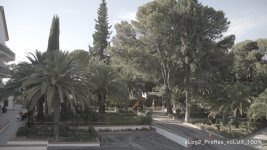
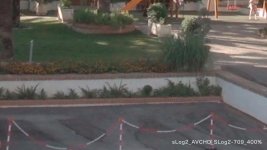
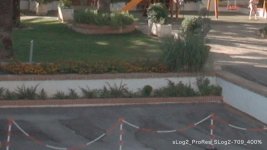
You can clearly see the difference - as some of you mentioned its because the 4:2:0 and the strong 24mbit/s compression issue - Applying the SLog2-Rec709 LUT makes the difference clear.

1-prores_sLog.jpg

2-prores_709.jpg

3-avchd_709.jpg

4-avchd_400percent_709.jpg

5-prores_400percent_709.jpg

even its 8 bit it improves the image a lot, you can see it specially on the red lower parts of the image
 
Hey McReedy,

Thanks for posting. The Recorder does look better, but in both cases I'm still seeing the color blocking in the pavement / blacks that happened on my S-Log tests.

I'm wondering what would happen if you did the same shot in 1) Cinegamma 4 - and use Cinegamma as the standard for comparison 2) S-Log Internal 3) S-Log to a recorder. My hunch is that the Cinegamma 4 will still have less blocking that S-Log even when done to a recorder. On it's own, it's a bit harder to spot stuff sometimes, but when you compare graded S-Log to a very clean codec like Cinegamma 4 side by side, then you can really see the flaws.

Or is there anyway you can have the original files for us to download? I'd love to do a grading test.

Sorry if I'm being a pest.
 
Last edited:
Hey McReedy,
Thanks for posting. The Recorder does look better, but in both cases I'm still seeing the color blocking in the pavement / blacks that happened on my S-Log tests.

I think the AVC compression is cleared up, but now what you're seeing is 4:2:2 colour sampling - especially in the reds which looks like blocking. Or perhaps the re-compression of the jpeg for web display (in fact there's some really odd artefacting going on in the image...).

If you're pixel peeping that much you really ought to figure on getting something like the O7. I think the sweetspot from that would be 2K 444 12bit linear (or mildly compressed) i have my fingers crossed on that front :), would be perfect...

The RAW output *is* quite noisy though, i've seen that with the sony RAW stuff but that's fine, can be dealt with.

Even the normal 700 output is really artefact-y when you start really examining it...

As for AE, if you've been using it that long (CoSA days?) then you're not going to get much better in Resolve aside from a LUT and baseline to work from. The biggest difference (for me) is the real time workflow in Resolve. Grading in AE would be too painful for what i need.

Ideally i'd like to use SpeedGrade embedded in Premiere - but we're not quite there yet...

cheers
Paul
 
Last edited:
yep....I've noticed some pretty severe macro-blocking in the shadows, even with an external recorder and cinegamma4. You can put 5 lbs of shxx in a 10 lb bag and you still got 5 lbs shxx. And I keep hoping the wizards at C-D can turn lead into gold. Either that, or my rich uncle buys me an XAVC equipped F5.
 
yep....I've noticed some pretty severe macro-blocking in the shadows, even with an external recorder and cinegamma4. You can put 5 lbs of shxx in a 10 lb bag and you still got 5 lbs shxx. And I keep hoping the wizards at C-D can turn lead into gold. Either that, or my rich uncle buys me an XAVC equipped F5.

Interesting observation, so where do you think the macroblocking is coming from?

If AVCHD is ruled out (which would introduce some big blocks) then are you seeing 4:2:2 blocking? If not that, then these blocks must be coming out of the camera which i think is unusual. When you say blocks, what are the luma values either side - are they single value luma differences in which case you could be seeing the 8 bit graduations which would make sense. But when people say macroblocking that screams compression problems, either capture or delivery.

I'd expect to see contouring issues in subtle graduations, especially when pushed but not blocks as such. Maybe something is breaking these contours up along the way.

CD would be pulling a different signal altogether and based on the sony RAW samples it should be considerably better, although as i maintain it's still quite a noisy camera - the FS100 was considerably less noisy.

cheers
Paul
 
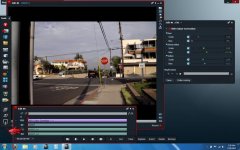
HSV-correction.jpg

HSV grade in Lightworks.

PS: Thanks for the clips. Useful learning tool.

I want to see what happens if I transcode the MTS compressed format to uncompressed broadcast 4:2:2 8-bit .WAV. No change other than going from a compressed to uncompressed codec.
See if it makes any difference in color bleed and macro blocking.
 
Last edited:
Interesting observation, so where do you think the macroblocking is coming from?

If AVCHD is ruled out (which would introduce some big blocks) then are you seeing 4:2:2 blocking? If not that, then these blocks must be coming out of the camera which i think is unusual. When you say blocks, what are the luma values either side - are they single value luma differences in which case you could be seeing the 8 bit graduations which would make sense. But when people say macroblocking that screams compression problems, either capture or delivery.

I'd expect to see contouring issues in subtle graduations, especially when pushed but not blocks as such. Maybe something is breaking these contours up along the way.

CD would be pulling a different signal altogether and based on the sony RAW samples it should be considerably better, although as i maintain it's still quite a noisy camera - the FS100 was considerably less noisy.

cheers
Paul

I use the term "macro-blocking" perhaps inappropriately. It looks more like noise, a grainy appearance rather than blocks. I always assumed that it was due to low S/N in the dark areas. And I always solved the problem by not underexposing(and having to raise the luma values in post) and by using a fairly low black level to clip the noise in the shadows. Since this works, I would assume the noise is generated in-camera.
 
I use the term "macro-blocking" perhaps inappropriately. It looks more like noise, a grainy appearance rather than blocks. I always assumed that it was due to low S/N in the dark areas. And I always solved the problem by not underexposing(and having to raise the luma values in post) and by using a fairly low black level to clip the noise in the shadows. Since this works, I would assume the noise is generated in-camera.

Tolerance for noise is a subjective variable, and there are other ways to deal with it. I find some small level of noise adds a sense of texture. Chroma noise can be filtered for a more pleasing quality. High compression low bit rate codecs don't leave much room for manipulation without artifacts, cross color errors being one of them. But I want to see how much information can be recovered from the camera's MTS S-log if one transcodes to a full bandwidth uncompressed codec before working with the image.

I don't think what Sony is calling raw is truly a pixel for pixel luminance readout of the sensor data with minimal processing for linear gamma correction and fixed pattern noise reduction, which is what a raw image should be.
 
Last edited:
High compression low bit rate codecs don't leave much room for manipulation without artifacts, cross color errors being one of them. But I want to see how much information can be recovered from the camera's MTS S-log if one transcodes to a full bandwidth uncompressed codec before working with the image.

I don't think what Sony is calling raw is truly a pixel for pixel luminance readout of the sensor data with minimal processing for linear gamma correction and fixed pattern noise reduction, which is what a raw image should be.

That's pretty much it. Sony's 8-bit AVCHD is a pretty good capture codec; but, it's an absolutely horrible grading codec. As a matter of routine workflow, I transcode to 10-bit ASAP. In fact, I don't use the camera's AVCHD internal codec, but, rather capture to DNx175x. Nevertheless, 8-bit in a 10-bit wrapper is still 8-bit. I can't create something from nothing. Editing in 10-bit affords me an advantage for transitions and FX, but, the native 8-bit stream is woefully lacking for serious color grading. And even tho' 422 is better than 420, it's still NOT a good color space to grade in.

There's practical reasons why an FS700 is 1/2-1/3 the price of an F5, besides Sony's profit motive. People buy an FS700 expecting F5 performance....ain't gonna happen. I bet the data processors on those F5's are twice the ones in an FS700. But it's human nature to BM&G when they expect something for nothing and don't get it.
 
Last edited:
Sony's 8-bit AVCHD is a pretty good capture codec; but, it's an absolutely horrible grading codec. As a matter of routine workflow, I transcode to 10-bit ASAP.

After 4K upgrade, Sony says FS700 outputs 12-bit RAW that Odyssey 7Q can record as DNG.

Do you know, what's the latest word from CD on Odyssey - does it actually capture 12 bit color as it comes out of the camera? Is it 4:2:2?
 
After 4K upgrade, Sony says FS700 outputs 12-bit RAW that Odyssey 7Q can record as DNG.

Do you know, what's the latest word from CD on Odyssey - does it actually capture 12 bit color as it comes out of the camera? Is it 4:2:2?

RAW DNG files are captured at whatever bit depth the camera's AD converter spits out. 4:X:X designations refer to the relative sampling rate of chroma to luma in a YUV component video codec. Does not apply to RAW in any way whatsoever.
A raw DNG image file contains luminance values captured by each pixel of the sensor only, the image data is monochrome corrected to a gamma of 1 to match human photometric visual response. The header metadata provides a description of the matrix and specific color bandwidths of the RGB filters over the sensor from which processing algorithms can construct and encode a color image.
The raw debayer processor in Adobe Camera Raw or Resolve (typically for motion work) first converts the image data to a color image in CIE XYZ color space to define the full color gamut and luminance range the sensor can capture. The CIE color image is then processed through a camera specific color profile and encoded to the component HD video format of choice in REC709 color space at whatever chroma sampling ratio, bit depth, and compression ratio is defined by the video codec chosen. The video data is corrected to the REC709 gamma of 2.4 to match the analog luminance range reference of the standard, which is still the 0-700mv analog CRT monitor range of NTSC.
If you encode to an RGB format, there is typically no chroma subsampling applied and bit depths can range up to 16 bits. RGB encoding with rare exceptions in specialty applications is done in sRGB color space with a gamma reference of 2.2. The analog reference for sRGB is also the luminance and chrominance value range of a standard CRT, so it is visually identical to REC709 when monitors are properly calibrated.
 
Last edited:
Back
Top