
faultiersid
Active member
Hi everybody. I've got a Pal GH13, recording in 50i. When i put the files in AE or Premiere CS5, I see some "stairway-effects" on diagonal lines. From what does this come from? They are noticeable even at 50%.
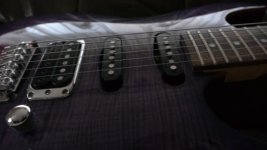
In the attachment is an outrendered frame in PNG format, look at the lower strings of the guitar. actually, the original AVCHD looks even worse, I think the rendering to PNG made it a bit better.
Is this normal, since the GH1 does line-skipping, or does it come from the 50i wrapper?
Also, how should I treat the interlaced wrapper in CS5? Shall I simply interpret the footage as 25p, or do I have to do an interlacing process?
I see no difference when I set the field order to progressive in the "Interpret footage"-window.
edit/ hm, the png-attachment has been scaled down, I'll upload the image somewhere else in fullres.
here it is: http://img829.imageshack.us/i/000280000806.png
In the attachment is an outrendered frame in PNG format, look at the lower strings of the guitar. actually, the original AVCHD looks even worse, I think the rendering to PNG made it a bit better.
Is this normal, since the GH1 does line-skipping, or does it come from the 50i wrapper?
Also, how should I treat the interlaced wrapper in CS5? Shall I simply interpret the footage as 25p, or do I have to do an interlacing process?
I see no difference when I set the field order to progressive in the "Interpret footage"-window.
edit/ hm, the png-attachment has been scaled down, I'll upload the image somewhere else in fullres.
here it is: http://img829.imageshack.us/i/000280000806.png
Attachments
Last edited: