FS7: Info About Hypergamma Levels

cameramanben

Well-known member
Hi All,

I took a bit of a break from geeking out over Christmas, but then decided to have a go at figuring out all the hypergammas for LUTCalc. I've added them all to the online testing version (LUTCalc Testing), plus recalculated Rec709(800%) with a reverse (to help if you accidentally bake it in amongst CineEI material).

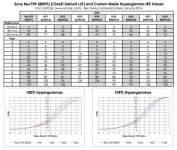
Anyway, in case it's useful to anyone I've made up a table with the black, 18% gray and 90% white values along with values at stops above and below mid gray. Dropbox pdf here, or a jpeg:
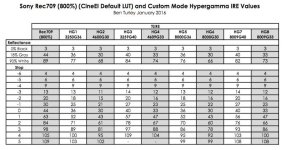
HypergammasChart.jpg

Ben
 
Last edited:
Hi Ben,

Thanks for this.

On a related note, is there a defined way to add custom Cameras, Gammas and Gamuts to LUTCalc (specifically the OS X version)? I suspect opening up the bundle and looking around would give some set up files but that might cause more damage than good!

thanks
Paul
 
Hi All,

I've updated the pdf on the Dropbox link to include a couple of charts showing the curves; one for the legal range (100%) curves, the other for the extended range (109%) curves, with Rec709(800%) on both for comparison.

Paul - at the moment it's not really set up for the user to add hard-coded gammas and colour spaces to the App versions. You can save all the settings to reload later if you have a customised setup you want to work from, and LUTs read by LUTAnalyst can be saved and reloaded, but the built-in options are a bit more involved.

All gamma curves and their calculations are set up in the file 'gamma.js', and all gamuts / colourspaces in 'colourspace.js'. The way they work is well organised, so it is straightforward for me to add new ones. If you can point me to publically available data you think would be a useful addition, I'm always interested in adding new options!
 
Ben

Sorry if im off the lutcalc curve.. I am.

Is this something that one could use to treat a HG as a log lite.. ie shoot a HG with a lut applied (external monitor) in an effort to create a route in post from HG to 'something pretty' - Ive always been interested in using more data levels than Slog 3 but still not going the in camera route.

S
 
Hi Sam,

Hypergammas aren't designed to look particularly good off the bat (if exposed as designed), but to offer more info in the tonally compressed highlights than basic Rec709, ie they don't take much to polish, but offer more flexibility than basic Rec709.

However, those highlights are still compressed in data terms; log is designed to spread the data evenly and offer the best option across the range within a limited data 'pool' (0-1023 values in 10-bit). At 10-bit each stop above mid gray of S-Log2 or S-Log3 offers plenty of range for manipulation beyond what your eye should see. If it's for a bit of spit-and-polish rather than a full-on grade, Hypergammas are great. My personal preference is HG7, though if you are after more spread above mid gray, HG8 would be the way to go (although skin tones will obviously be dingy).

I've deliberately not included Hypergammas as a recording option in LUTCalc. For one thing, they are a Custom mode thing, so and adjustments would completely mess around with the LUT, but for another if you try to dramatically change a hypergamma after the event in post (say go from HG7 to LogC) the midtones would have a reasonable fit in 10-bit values, but the de-compressing the highlights would not create new information to fill in the gaps. Mind you, in something like Resolve using 32-bit floats you wouldn't actually be losing information (provided the LUT isn't clamped), so I am now going to include Rec709(800%) as a recorded gamma since several people have talked about finger trouble burning-in Rec709(800%) when the bulk of a shoot has been log.

Ben
 
Last edited:
In order to properly grade something you ideally need to linearise your cameras gamma and so any Picture Profile that allows for manual manipulation of knee/blackgamma etc,. means you've basically created a custom curve with no method to linearise it. So one of the main benefits of log is the fact that it's pretty standard, an operator can't mess with it.

One of the beauties of LUTCalc is the myriad of camera gammas that are profiled in it.

This does beg the question whether there is any milage in having tools in LUT calc which mimic the custom settings on cameras so that LUTCalc can spit out a reverse LUT of what the camera has done.

That way as Sam says, you could manipulate one of your camera gammas but still be able to ingest the results correctly or even transform from that capture gamma to a more widely accepted standard like LogC...

Does that make sense or have i garbled my explanation?

Ben, i've looked through the source for colorspace and gamma but not had too much time with it. I believe that some of those basic gammas are stored as a chunk of data, 1D LUTs i presume? I will spend more time looking though.

cheers
Paul
 
Paul,

you make some very good points, and I have often thought about it, with a thought to adding things like black gamma. The trouble is that whilst a concept may be pretty standard - master black, Rec709 - the implementation of it can and generally does vary from manufacturer and in terms of what values mean from model to model. An example would be knees, which can vary from the traditional video version of an audio limiter which in the charts above would look like a straight line and a hard bend through to smooth cubic splines in log space (more like the charts).

Equally matrices. In theory, these should be applied to base linear data, but in most manufacturer 'looks' the matrix is actually applied after a tone curve and before applying a final gamma. This gives a much more complex and potentially nuanced response, but you need to know the tone curves. At the moment I've sidestepped that with colour space options like LC709A and LC709 by creating linear to linear 3D LUTs, but I'm currently trying to create a way of figuring out the base tone mapping from a LUT in the hope of improving flexibility (and potentially dramatically reducing the size of LUTCalc). Let's just say it's proving tricky! ;-)

I have a suspicion that that is why Custom Mode S-Gamut3 and S-Gamut3.cine matrices have 'like' on the end and aren't a direct match to proper CineEI with it's strict linear-space processing.

As it stands I know that the available recorded gammas are correct, but if I simulated all of the custom mode tweaks they would need to be spot-on and able to match other cameras and manufacturers. As a rule, you can't even enter a value in one Sony, then enter it in a different model and be confident of a match.

I could include the reverses of the base gammas, which would work fine in a pristine Custom Mode setting, but who doesn't make just a couple of tweaks? ;-)

Never say never, but I'm loathe to do something which will leave people grumpy that it's not-looking-quite-right. Plus, whilst LUTCalc has now grossed a couple of days camera work, I need to leave time for the day job! :-)

As for the format of gammas and colourspaces in LUTCalc, the bulk of gammas are generated from calculations, but the complex display ones (Rec709(800%), LC709, Canon WideDR, etc.) are stored as 1D LUTs, Log data range in, Gamma data range out. Colour spaces are either matrices generated at startup from their white points and primaries or 3D LUTs, log data in to log data out. I'm planning to add a tonemap-based option once (if) I've figured out some of them,

Ben
 
Last edited:
" so I am now going to include Rec709(800%) as a recorded gamma since several people have talked about finger trouble burning-in Rec709(800%) when the bulk of a shoot has been log."

Hi Ben.. could you explain what "finger trouble" is with burn in 709.800 in an otherwise Slog workflow.. I wonder what happens post wise if you have shot everything Slog.. but then burn in a 709.800 LUT if you have some low light shots /scene..

Thanks
 
Your suggestion for low light is an interesting deliberate use, but what I meant was that I have had several people message me (plus seen a couple of threads) about situations where someone has unintentionally turned on the SDI1&Internal option. Maybe absent-mindedly turning it on when they meant to just do SDI2, or where a camera person stepping into a shoot and unfamiliar with CineEI in the Sony cameras has turned it on without realising that it would be permenant.

'Finger Trouble' is an expression for when something goes wrong because fingers push something they shouldn't have! :-)

Ben
 
Hi Ben ok thanks.. my understanding is that REC 709.800.. up to around white is the same as REC709 STD.. and so for say a night ext or very low DR "dark" scene .. it would be better to give more data down there than waste alot of the bucket for non existent highlights in Slog..
 
Hi Ben ok thanks.. my understanding is that REC 709.800.. up to around white is the same as REC709 STD.. and so for say a night ext or very low DR "dark" scene .. it would be better to give more data down there than waste alot of the bucket for non existent highlights in Slog..

I've found it amazing how few times one actually needs SLog3 and baking to a LUT gives much better use of the available 10 bits with a fat juicy waveform as opposed to a thin sliver of data in SLog3. I've got one main LUT and a couple of choices for low contrast and high contrast scenes with an ALL File setup for SLog3 .

As long as the custom LUT doesn't overly compress the blacks or whites it's incredibly malleable in post.
 
I've deliberately not included Hypergammas as a recording option in LUTCalc.

Hi Ben,

this is very unfortunate :(
I'd really love to have them in order to linearize them properly. At the moment I'm doing this with curves in Resolve, which is working okay-ish, but not exact. For me personally (or my A7s), a HG4 => S-Log2 1D LUT would already be awesome, but there are other people in need as well.
I would not worry too much about the customizations. If you say it's for vanilla HG4 and people crush the blacks, well that's their issue. You can't bend 8 bit HG4 in post, but for small but precise adjustments (if you shot it properly), an accurate transformation is really worth a lot!

Just my 2c,
BR
Michael
 
Nevermind, I was able to build a HG4 => S-Log2 LUT via the LUTAnalyst! Didn't know how that feature worked exactly, but obviously you can do things like that. Now I have a proper 1D LUT!
Thank you very much! :)
 
Ben, Very cool of you to make and share this. Very handy. Interesting to hear that you shoot HG7 when not in proper Slog. I don't know any of the amazing math you (and others) obviously do… but i shot a bunch of tests and landed on HG7 as my "go to" for quick-and-easy shoots where I want to do very minor tweaking. That was based purely on what I saw on screen. Personally, I find the Custom Mode very useful over Cine EI in a number of ways: Custom white balance and ability to boost gain when necessary (yes, I know there are tradeoffs). Thus the desire to find a best solution that is also best looking. This helps. Thanks.
 
Back
Top