Improving GH1 audio: GH1 audio conditioner

crunchy

Well-known member
Last couple of days I have made some measurements of GH1 audio capabilities. I've found out (like almost anybody else who have tried it) that external mike can deliver better audio quality than internal one. However, due to relatively high internal audio gain of GH1, it produces some noticeable noise. Only when input signal becomes higher than exactly 0.2mV (sinus RMS value), GH1 gradually reduces audio gain and sound improves (less noise). GH1 remains in lower audio-gain stage only if some sound higher than 0.2mV (RMS) is present at mike input. However, as soon as signal drops (less loud speech, etc.), audio gain is gradually increased back to high level.

The existing solution is to attenuate external mike signal so much that signal never (or almost never) reaches 200 microvolts value (RMS). In this case audio gain is not changing and everybody is happy. Happy? Not so much, since there is still some audio noise present in a footage due to GH1's high audio gain. Moreover, attenuating mike signal usually reduces mike's signal/noise ratio as well.

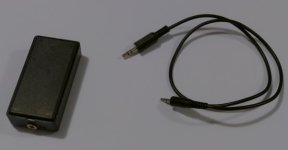
Therefore I've made a relatively simple electronics which keeps GH1 audio gain lower than usual (for about 20dB). Therefore, if you have a relatively good mike, you might get better sound. This electronics (see the picture) comes in between the mike and GH1 and does not require any internal power supply.

Attached are three measurements: Measurement with internal mike, measurement with external mike with deactivated audio conditioner and measurement with external mike with activated audio conditioner. You may hear some lower-frequency sounds which are mainly distant traffic from the highway and local roads.
External mike consists of mike capsule AKG CK91 and electronics/housing/amplifier/attenuator done by myself (I was not satisfied with original electronics from AKG).

If somebody is interested, I'll draw electric scheme, but it will take some time due to my injury (thumb was injured during drilling) :( and departure to shorter vacations.
 

Attachments

Honestly don't think it's worth it to attempt to fix the GH1s audio when you can find a used zoom h4n for $200, sometimes less. Modify the preamp and you have an AMAZING sync sound recorder.
 
Honestly don't think it's worth it to attempt to fix the GH1s audio when you can find a used zoom h4n for $200, sometimes less. Modify the preamp and you have an AMAZING sync sound recorder.
huh? I saw a post of yours where you reviewed the Zoom and called it the worst most unusable piece of trash ever invented since the dawn of mankind. Why the reversal?
 
How is this any different than just using a 20dB attenuator that's readily available? Also, different mics (wired and wireless) require different levels of attenuation going into the GH1. My audio mixer needs an additional 40dB of attenuation from its mic level output to the GH1 but you can hook up any mic to that and not have to worry different levels since you can adjust each mic input level to even things out between different mics. The output level from my audio mixer is always at the same level so that lets me use a fixed attenuation level also that won't cause problems.

Randy
 
Honestly don't think it's worth it to attempt to fix the GH1s audio when you can find a used zoom h4n for $200, sometimes less. Modify the preamp and you have an AMAZING sync sound recorder.

Besides mentioned AKG I own Sony PCM-D50 and Fostex FR2-LE sound recorders and a pair of Rode NT1A. However, what I would like to say is that it's certainly easier if you have already synched sound and picture. If the sound is good as well, then it's additional advantage. Besides, it's less complicated to take only external mike(s) and GH1.
 
How is this any different than just using a 20dB attenuator that's readily available?

It's already explained above. GH1 has relatively strong noise when it uses max. audio amplification (usual state). Whatever clean mike or preamp/attenuator used cannot help except slightly add their own noise. This is limitation. Even if there is absolutely clean signal coming from the mike, it will be spoiled by GH1's amplifier noise.

On the other side, if we reduce GH1's internal gain (and therefore less attenuate mike), we could considerably improve signal/noise (S/N) ratio (mainly due to lower internal audio gain of GH1).

Try to compare samples taken with external mike (use max. volume and good earphones) and you'll notice the difference. The difference is due to lower gain of internal GH1's audio amplifier.

My audio mixer needs an additional 40dB of attenuation from its mic level output to the GH1 but you can hook up any mic to that and not have to worry different levels since you can adjust each mic input level to even things out between different mics. The output level from my audio mixer is always at the same level so that lets me use a fixed attenuation level also that won't cause problems.

With audio conditioner you would need lower attenuation (about 20dB). Everything else remains practically the same, except that noise level should drop. However, without extensive testing I cannot judge and this task is waiting for me in the next several weeks.
 
Last edited:
You're not "internally" changing the GH1's gain either, you're doing it externally just like I am with an attenuator. Or did you take your GH1 apart and alter the audio section?

You stated in your first post:

"Therefore I've made a relatively simple electronics which keeps GH1 audio gain lower than usual (for about 20dB)"

That's a homemade 20dB attenuator which has already been invented and readily available in stores for $15.

Why is there so much echo in your audio samples?

Randy
 
Crunchy,
I downloaded and listened to your files, normalized them in Pro Tools and Sony Vegas. It seems you are getting the same low level hiss that I am during complete silence. Even the files recorded in MJPEG mode have hiss, less hiss, but similar to the AC3 file with eq filters. In my files I am under the limiter, there is no auto gain happening, the noise is constant for 10 seconds or more in many tests.

To get a proper signal without any noise, I would need equipment with a signal to noise ratio over 80db or more. Not possible, especially in the field. Even some of the best shotgun or studio condenser microphones are only 70db signal to noise ratio.

I can get semi-usable audio for quick and dirty jobs where I don't want to carry so much stuff, but super-clean and quiet when it should be quiet, I don't think it is possible.

I suppose it could be the internal GH1 electronics, but it seems to be unavoidable either way.

I will give it one more try using different sample rates with the GH13 hack, but the high sensitivity input is making things really difficult to achieve real professional results. Good enough for Rock n' Roll, but forget about Jazz or Classical.

CaveManDude, have you been able to achieve this with your mixer, it may have better noise floor than mine.

And is that a 55mm FD lens in your pic?
 
I still think the noise floor on the GH1 is very usable when attenuated correctly and once you are far enough below the limiter you even get some dynamic range back.

Listen to my audio sample when I get closer to the mic to get the audio level to go up 6dB. That wouldn't have been possible without an attenuator, the dynamic range would have been flattened out. In this case I was going from Line Level to Mic Level which took much more attenuation than going from Mic Level to GH1 Mic Level and probably introduced more noise.

I'll be doing some more simple Mic Level to GH1 Mic Level tests in a quiet room to check out noise floor levels but it's already low enough for me to use.

http://dl.dropbox.com/u/2204694/Panasonic_GH1_audio.wav

It's a Nikon Nikkor S.C. Auto f1.4 50mm lens on my GH1 which I prefer much more than my Canon FD 50mm S.S.C. f1.4 since I can use it wide open at f1.4 in more lighting situations to get a decent image compared to the Canon. The Canon flares out too easily and is soft at f1.4.

Randy

3.jpg
 
Last edited:
You're not "internally" changing the GH1's gain either, you're doing it externally just like I am with an attenuator. Or did you take your GH1 apart and alter the audio section?

Of course I did not take it apart. No need for now. :)
I am internally changing GH1 gain by feeding in external signals. Namely, I am adding approx. 100kHz signal to the mike input. This is enough that AGC reduces the gain. However, due to internal and A/D converter analog filtering, this signal is not pronounced (due to aliasing) in the final digital signal. However, you can hear some faint high-frequency noise in the final result (external mike with audio conditioner).

Of course, in order to improve sound quality, I'll have to make more tests and slightly modify design. However, you might expect that there is no free lunch. I just hope that a price for this lunch won't be too high. :)

On the other side, I hope that Vitaliy or anybody else would find a way how to set the highest allowable audio gain in GH1. This would be the best solution for me.
 
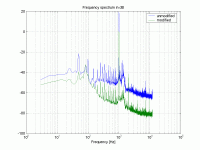
Here is frequency spectrum of original and "conditioner" approach. There was attached signal generator with approx 0.2mV RMS 1kHz signal. Note the difference between both spectrums. It seems that overall noise is smaller when using audio conditioner.

However, as I said, I'll try to make more measurements, tests and some modifications soon.

By the way, is there any available tool which automatically corrects audio taken with AGC audio system (to normalise sound level)?
 

Attachments

  • comparison_orig_mod01.gif
    comparison_orig_mod01.gif
    58.9 KB · Views: 0
OK, you're doing what this guy did which is similar to what the JuicedLink mixer does. I prefer using an attenuator since it is designed to be noise free and you don't lose an audio channel and can still use a stereo mic. By the way, this guy doesn't realize that what he is talking about is a limiter and not an AGC with his Canon DSLR just like the GH1. In his video below, you can hear what "hitting the limiter too hard" sounds like.

IMPORTANT NOTICE: No media files are hosted on these forums. By clicking the link below you agree to view content from an external website. We can not be held responsible for the suitability or legality of this material. If the video does not play, wait a minute or try again later.
I AGREE


Randy
 
Last edited:
I prefer using an attenuator since it is designed to be noise free and you don't lose an audio channel and can still use a stereo mic.

I am using BOTH channels (stereo), since the frequency is so high that there is almost no audio aliasing. This is the difference in both approaches. Of course, in post you can use only one channel if you want, but if you have stereo mike, rather use both channels. Moreover, audio conditioner does not need any power supply. I am not sure about JuicedLink.
 
huh? I saw a post of yours where you reviewed the Zoom and called it the worst most unusable piece of trash ever invented since the dawn of mankind. Why the reversal?

I changed the preamp.

The preamp is crap. Get a sound guy to put in a $50 improved preamp.
 
Wow, that's quite a good device there! The results certainly speak for themselves!


Yet another testimony that DIY rules. If this was built by some company specifically for DSLRs, they'd sell it at a rip-off price like they've been doing with so, so many 'enhancements'.

Blackout said:
Honestly don't think it's worth it to attempt to fix the GH1s audio when you can find a used zoom h4n for $200, sometimes less. Modify the preamp and you have an AMAZING sync sound recorder.

Talk sense. This probably cost £6 ($10) to make. This is probably more practical too because you a) don't need to worry about pressing record on the external recorder, and b) don't have to sink up in post, which can, although easy, be a bit of a pain.
 
It's a Nikon Nikkor S.C. Auto f1.4 50mm lens on my GH1 which I prefer much more than my Canon FD 50mm S.S.C. f1.4 since I can use it wide open at f1.4 in more lighting situations to get a decent image compared to the Canon. The Canon flares out too easily and is soft at f1.4.

Randy

Not to take over the thread, but I recently bought a Nikon adapter for my GH-1 and am looking for Nikon legacy lens ideas. I'll have to look for one of those.

Thanks.
 
I am using BOTH channels (stereo), since the frequency is so high that there is almost no audio aliasing. This is the difference in both approaches. Of course, in post you can use only one channel if you want, but if you have stereo mike, rather use both channels. Moreover, audio conditioner does not need any power supply. I am not sure about JuicedLink.

Well isn't that background tone the alias of the 100k tone? Seems like it has to be. That's pretty bad in my opinion. It is also clearly audible.

Why not use something in the "audible" range. How about a 16-17khz signal? That should produce no aliasing since it is under the standard limit of 20khz. The simple fact is that such a tone is inaudible for the vast majority of human beans. For the few that can hear it, you can simply use an audio filter in post to remove it. There just isn't much useful audio carried much above 15khz - especially for audio such as dialogue which is what we typically want from the camera's audio recording section. So a high cut filter to remove everything above 15khz should be very tolerable.

At the very least, find a tone above 20khz that produces an alias that is above 15khz.
 
I'm usually a fan of these DIY gewgaws but really, the onboard audio of both the GH1 and GF1 is inherently mediocre at best, and trying to improve it with band limiters, attenuation pads, etc. is never going to change the fact that it's a cheap mic element sunk into the camera body behind a tiny sliver to let audio impinge upon it. That's game over. It's fine for school plays, but not for pro shooting.

Do you have an iPhone? Get the cheap FiRe recording app. Start recording and set your iPhone down near talent, or even stick it in their shirt pocket. Turn the iPhone upside down, so the end you normally speak into during calls is facing up toward the talent's mouth. On a fresh charge, the iPhone will record hours and hours of surprisingly high quality mono 16/48K audio, which you can then get onto your PC or Mac with FiRe's handy built-in web server, and sync up with your video. Takes a few more mins but trust me, it annihilates the onboard mic on these cameras.

Is it a $500 Countryman lav? No. But the FiRe app costs $5 and you've probably already got the phone in your pocket.

Listen to an example here: http://vimeo.com/9785046

Be aware that this only works well with the 3G, 3GS, and 4G iPhones. The original 2G iPhone hobbles its audio recording for some reason, and sounds not so good when pressed into field recorder service.

I've been leaning on this trick since I got my GF1, and expect to continue at least until the Zoom H1 hits in August and I mount that $99 miracle of God on my hotshoe and be done with it.
 
I'm usually a fan of these DIY gewgaws but really, the onboard audio of both the GH1 and GF1 is inherently mediocre at best, and trying to improve it with band limiters, attenuation pads, etc. is never going to change the fact that it's a cheap mic element sunk into the camera body behind a tiny sliver to let audio impinge upon it.

The fact that there is an external microphone input makes the fact that the built-in mic is cheap largely irrelevant and makes the notion of a hack to improve the audio for use with an external microphone a pretty reasonable idea.
 
Ah, my apologies, I thought you guys were talking about ways to improve the onboard mic.

In the immortal words of Emily Litella, never mind..

Still, having seen those response curves and taking the AGC circuit into account, I'd bet dollars to donuts the iPhone/FiRe trick sounds lots better than any external mic that has to go through the GH1's audio chain.

The fact that there is an external microphone input makes the fact that the built-in mic is cheap largely irrelevant and makes the notion of a hack to improve the audio for use with an external microphone a pretty reasonable idea.
 
Back
Top