EVA1: Image Flip

Spotlight Media

Well-known member
Hello, I am looking at the EVA1 for Light Board productions but also for Green Screen and narrative work. I realize we can flip the image in post but we want the ability to do this in-camera. Does anyone know if the EVA1 supports image flipping?
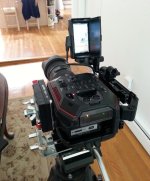
 
There's no setting for it in the camera, however there are 1/4"x20 threaded mounting sockets on the top just as there are on the bottom of the camera for tripod attachment. It would be extremely easy to mount the camera upside down on a tripod and then attach the LCD where the tripod plate normally attaches. There is an image flip switch on the LCD so that you can then view a "normal" image for operating. Or you could just physically flip the LCD, which is pretty easy in this configuration.
 
Hello Mitch,
Thanks for the reply. I am trying to find a camera for a large client and the EVA1 would work well but that flipping of the image vertically is the thing that I need. This sounds like a good solution. For my information, what exactly is this called in Panasonic world? It's not Scan Reverse because that flips the image upside down (like on an HPX250).
Thank you
 
Are you wanting to flip the camera or turn it on its side?

I'm in the middle of constructing a 'Home Depot' 90 degree rig for a head-to-toe green screen shoot next week. Of course I want to have then do the turning in post, since, the whole reason for the vertical rig is to get that much more resolution to achieve a cleaner matte (and to allow them to still get a good matte if they blow up sections in post)

EVA1_90degrees.JPG
 
Hey there, interesting rig.

What we have to do is shoot through a piece of glass, see here: https://www.youtube.com/watch?v=N1I4Afti6XE
In this example I could shoot normally and flip in post so the writing on the board will appear correct. HOWEVER we are going to overlay a powerpoint or excel screen for some shots so I would like to be able to flip this image either in camera or by physically flipping it.
 
Ok, I get the basic concept.
But I'm not quite clear on how much you actually are gaining by doing the flop live.
Are you trying to do a live overlay?
Is this something where the presenter needs to look at the video image at the same time?

A few things came to mind (though not in the camera...)

I know my SmallHD 7" monitor allows me to flop the image as well as flip the image. Many smaller monitors have the flop (h) option as well as the flip (v) option.

My old NanoFlash recorder also has flip and flop options for recording the image - though that's only 1080, not 4K... On the other hand, if you're going into a switcher to composite graphics files (and the switcher can't do the flop), something like the NanoFlash flop might meet your needs. I'm sure the Nano could be picked up for a song at this point...

Or (you can laugh, but it would work) you could rig a small front surface mirror to the front of the lens at a 45 degree angle to flop the image as it arrives at the camera.
Or if just for the presenter to see, you could use a larger monitor with a similar mirror rigged 45 degree angle next to the monitor...
 
Ah, now I see. reversing the image top/bottom is called a "fip" while reversing the image left/right is called a "flop". This is not something to do in-camera except for bigger kit that may have some 3D applications. Even there it is fairly rare. You could do as the post above suggests with a 45 degree mirror rig mounted sideways in front of the camera, or you could just perform the flop in post. I personally think the post solution is the easiest as you can apply it to whole chunks of the timeline once you have completed the edit. For on set monitoring, there are monitors with the flop function built in, or you could set up a mirror next to the monitor at a 45 degree angle and view the imae corrected there.

BTW, this Lightboard invention from that professor is something only a professor/engineer would think to do. It requires the presenter to write backwards! I had a Physics professor in college who wrote with two hands on the blackboard -- two separate sentences one above the other at the same time. Scary!
 
Hi there,
That is exactly the issue.
When the professor writes on his side of the board the letters are correct, the other side of the glass shows them in reverse. So if we flip the image and give them a confidence monitor it will look normal to the professor as he watches himself. Now if you add in a LIVE overlay of Powerpoint or something like that the professor will need to see that on the confidence monitor in the correct orientation. This overlay will be done with a device like an Anycast, so it won't be projected on the glass but only in the signal. Thus we need to flip the image live.

I do have to buy an external recorder so maybe that is the answer? I was looking at an ATOMOS. Would that work?
 
That's strange indeed as this is not what appears to happen in the video link you shared. It appears there that the presenter is in fact writing backward. That's what his hand movements indicate. How would the device distinguish letters from the circle he made overlaying a graphic chart so that one is flipped while the other isn't?

Anyway, you state that the professor would need to see a monitor with the "correct" orientation, but I don't know if that means flopped or not. There are some monitors that will provide a flop but off hand I can't state which. I'm pretty sure the Atomos products won't. And any monitor that does flop only does so for it's own screen, not in the video output to another device. Again my suggestion is to simply use a mirror next to the monitor at a 45 degree angle to see the image flopped.
 
Assuming you do not have to feed it out live as you shoot (e.g. projector, online webinar, etc.) and that you are just trying to devise a method for the talent to be able to accurately reference the overlayed material, here's another way to consider doing it (if you haven't seen this yet): https://www.youtube.com/watch?v=FYwXOLU4TKk ... skip to 08:35 where he talks about using black markers to make "invisible" reference points on the glass.

This lightboard idea is very interesting. I'd love to hear how it works out for you!
 
Hi Mitch,
You're right about the recorder output not flopping,,, I just tested my old nanoflash, and after setting it to record flopped, the output remained with normal orientation. (It did properly record and play back the flop though...).
I also checked the flop on my 7" smallHD, and the looped output is not flopped when the displayed image is.
I'm not aware of large monitors that will flop, though there may be some.

Jason -
Is this a live stream?
 
Hey Guys,
First off, thanks for all the responses. Let me clear up a few things and give a bit more detail:
#1. This is for a university and the presenter will be a number of different professors, most of them never being in front of a camera. Therefore it has to be simple for them.
#2. The Professor writes on the board in a normal fashion on his side of the glass, the other side of the glass shows his writing backward (ambulance in rear view mirror effect). The only trick they may want to employ is to write right to left so when the image is reversed it is left to right.
#3. This is NOT a live feed (yet)
#4. The only reason we want a LIVE reverse image is for a confidence monitor when there are overlays on the screen.
#5. At some point the background may be removed, so I have to figure in a possibility of green screen.

This may help a bit: https://www.youtube.com/watch?v=wCOuu0-o5YI

The way I see it my biggest problem is the confidence monitor. Maybe there are monitors that allow one to flip the image.
 
Seanlik,
That is a great idea if we had 1 or 2 people that could be trained. But with a variety of different professors that would be too much for them to handle. This has to be a quick process.
 
This may help a bit: https://www.youtube.com/watch?v=wCOuu0-o5YI

The way I see it my biggest problem is the confidence monitor. Maybe there are monitors that allow one to flip the image.

As you see in that YouTube clip explanation, he has the camera shooting into a mirror, which makes the image look correctly oriented.
If shooting into a mirror, my suggestion would be to create a small lens-mounted (or more likely mounted on support rails) rig with a good, small front-surface mirror.

As I mentioned previously, if a 7" monitor is big enough for presenter confidence, many or the portable camera monitors that size allow the image to be flipped or flopped. I have one from SmallHD and another from Aputure, both of which allow flopping the image. Many brands provide this feature.

There is one other thing to think about with a confidence monitor -- the fact that monitors are bright - and that you will need to position it carefully (away from the camera axis) to avoid seeing the reflection of the monitor in the glass. This may take some work unless it's fine for the presenter to change eyeline to look at the monitor.

Mu first suggestion would be to test using a pola filter. This has nothing to do with a reflected polarization from the glass - that will not be effective here since you are shooting at 90 degrees to the glass barely polarizes any reflections, and shooting with the glass at a 57 degree angle for maximum pola effect would make the setup look wrong. However, many LCD monitors are effectively polarized to begin with, so a pola filter might be able to eliminate almost all the light from it. This is something to test early!
If this is not the case, you might be able to place a polarizing filter sheet in front of the monitor to polarize the light one way, and use a rotating pola on the lens to counteract that.

Also, if the monitor is placed partially off-axis, a computer monitor 'privacy screen' could be used to minimize its off-axis visibility. (Something I've often done to eliminate seeing prompter reflections in multi-cam prompter situations in night scenes with windows.)
 
The easiest way to do this is the way described in the second link you sent. Point the camera at a mirror to then see the Lightboard and person behind it. Then the image is correct in the camera for recording and all that is needed is regular monitors for the professors. You will find that a confidence monitor for the professors will be a mixed bag. First off, nonprofessional talent will find this distracting. Second, the image will be flopped so instead of appearing as it would in a mirror one's left hand will appear on the right side of the screen and so forth, which is not normal for most people to see and make movements and motor skills awkward at best. My suggestion is to avoid this completely. If anything the talent need only look at the Lightboard itself to know what is on the screen.
 
Second, the image will be flopped so instead of appearing as it would in a mirror one's left hand will appear on the right side of the screen and so forth, which is not normal for most people to see and make movements and motor skills awkward at best. My suggestion is to avoid this completely. If anything the talent need only look at the Lightboard itself to know what is on the screen.

...actually, the opposite is true (if shooting in the opposite direction at a mirror, which solves your problem). The image in the confidence monitor will appear to the talent EXACTLY as a mirror would. Think about it again :) (Go look in the mirror and write your name in the air with your finger... note that the text writes L to R as it should). To your argument, this articulation (mirror image) is actually much more natural for the untrained on-cam folk.

The difficulty should be limited mostly to writing/annotating on the overlay (that isn't really there on the glass), and perhaps the talent shifting their eye focus from plexiglass to monitor and back again (you might get a few bobbing heads, lol).
 
Last edited:
...actually, the opposite is true (if shooting in the opposite direction at a mirror, which solves your problem). The image in the confidence monitor will appear to the talent EXACTLY as a mirror would. Think about it again :) (Go look in the mirror and write your name in the air with your finger... note that the text writes L to R as it should). To your argument, this articulation (mirror image) is actually much more natural for the untrained on-cam folk.

The difficulty should be limited mostly to writing/annotating on the overlay (that isn't really there on the glass), and perhaps the talent shifting their eye focus from plexiglass to monitor and back again (you might get a few bobbing heads, lol).

D'oh, yes you're correct. This feels like one of those things people overthink.

So when a PowerPoint or other video image is overlaid, where does it happen with this system? That first reference video included a chart that the presenter annotated. Is this projected onto the glass, at which point it would be visible to the naked eye, or is it a post-layering, perhaps on a switcher? Because then that's more gear needed. I would still argue that for a layperson presenter it would be best to NOT have a monitor to look to, as this wil prove distracting. If the image is visible on the board then just look at the board. If it has to happen electronically then this is a live video effect beyond what was indicated in the OP, but then yes, it would need a monitor for position reference.
 
Back
Top