iMac Fusion Drive for editing?

jaypass

Well-known member
I've been planning to purchase a new editing system for a while now, and recently decided on a new 27" iMac. I'm curious about the new fusion drive, and how it will work for video editing...

http://www.macrumors.com/2013/01/10/yields-of-27-inch-imac-displays-expected-to-improve-next-month/

I stumbled into this article today, and if you look through the comments, someone mentions that the fusion drive wasn't working out for editing, to the point that they were forced to return it. I was under the impression that having the fusion drive would speed up the editing process, but is this wrong? Should I opt for the typical HDD as opposed to the SSD/HDD combo? Does anyone have any experience with this setup?

I plan on running Adobe CS6 and probably FCP7 on this machine, and I already have plenty of externals to store my media files.

Thanks!
 
I have the new 27" iMac. My understanding was the Fusion drive was basically a regular hard drive with a small solid state drive, and that the most used files on the drive were automatically transferred to the fusion area of the drive. I opted for the normal 3TB boot drive in my iMac, along with external Thunderbolt drives for my edit footage as this is where the big speed gains happen compared to older external media drives. I am running CS6 and FCPX, but FCP7 would not install on this Mac running the latest version of Mountain Lion.
 
Gotcha. I thought having the Fusion would speed things up...maybe run the software off of the SSD? But maybe I'll be better off opting for the regular 3TB drive, especially since I'm having trouble wrapping my head around exactly how the Fusion works.

I wasn't aware that FCP7 couldn't run on the new iMacs with Mountain Lion...Not a huge deal for me, I'm planning on migrating everything over to Adobe anyway. I can just keep my old MBP around if I need access to my old FCP stuff.

Thanks!
 
I thought fcp7 and the rest of the suite did work on ML? That's what my research and asking others has revealed. I just got a refurb 2011 iMac and have been looking for a copy of fcs3 on eBay.
 
The way the Fusion drive works is that it melds a solid state and a regular drive into a single volume. The operating system is always stored on the SSD as well as the most commonly used programs, files etc. I can tell you from experience that having your OS and Adobe/FCP etc on your SSD makes a world of difference. I too purchased the 27 fully loaded for editing and opted for the 1TB fusion drive. I will let you know how it goes.
 
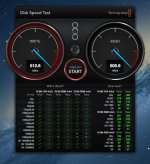
Yes as I posted in another thread, having your media files for editing contained on your Thunderbolt drives is the way to go as opposed to editing off the internal boot drive. Here is a screen shot of a speed test I did. This is a very low cost 9TB raid solution I put together while waiting for my large raid drive unit. It is simply 3 x 3TB Seagate drives with Thunderbolt interfaces.
 

Attachments

  • iMac Speed Test.jpg
    iMac Speed Test.jpg
    73.2 KB · Views: 0
I wasn't planning on editing my media off of the internal, just setting up my installation so that the software runs off of the SSD rather then the regular internal HDD, like Adam suggested. I'd like to see if the performance boost is worth the extra couple hundred dollars for the fusion drive configuration.

A thunderbolt drive is still a must-buy.
 
Back
Top