I'm kicking myself...

ryangschultz

Active member
Hey guys,

So I recently shot a ton of consecutive interviews with a Canon Mark II and VideoMic Pro. I tested it out with a shoulder mount and it looked, sounded, and worked great, so I took it on a gig. I am kicking myself and I would love ANY help....so on the shoot, everything went great, got back, backed up my cards, checked out the footage, and bam, it turns out one of the little rubber shock absorber bands came loose and I have this terrible noise in my audio. I knew the risk of going in without monitoring equipment, but after testing I went for it. Boy am I kicking myself, hard.

For you audio pros out there (which I am not), can anyone help me filter this noise out. I doubt it's possible, but I have to ask. Here are some test clips.

Clip 1 is raw video/audio:
http://ryangschultz.com/wp-content/uploads/2013/04/Clip-1-unfiltered.mp4

Clip 2 has a Parametric EQ thrown on it, getting rid of the noise, but also all my lower frequencies:
http://ryangschultz.com/wp-content/uploads/2013/04/Clip-2-filtered.mp4

I would truly appreciate any help. I know, I know, just shoot it right the first time, which I do 99% of the time, but it's been one of those weeks.

Ryan
 
Ouch... That is bad.

I'm not sure there is anything more you can do than trying to 'EQ' it out. I tried to do something quick with the EQ of Audition.
Here it is:

http://wikisend.com/download/365130/voice.mp3

It almost sounds like a telephone if you want to get rid of all of it, but that's what I would do now. Get some music with enough 'lows' to fill the spectrum and put the music on while people speak...
 
Because the "bumps" are rather broad-band, eliminating them with simple filters will make significant cuts into the frequencies of interest (the speech). And it will be worse with lower voices.

I suspect you could get rid of them with one of the sophisticated audio restoration products but it might be cheaper/easier to just go out and re-shoot.

Of course, now you know to NEVER record sound without monitoring. Note my signature line. It is not as frivolous as it appears.

I can't remember if they have a retro-fit fix for the slipping band problem, or if a new version eliminates the problem.
 
Stab, thanks for your efforts, but yeah sounds like telephone audio. I'm not sure how much music will cover it, but I have thought of testing that before I attempt to reshoot.

And Richard, you're right. As I was trying to filter it out I could tell it was a very "broad-band" noise. And yes, it was not professional of me. I checked the audio in camera in the field after the interviews, but the little camera speaker wasn't good enough for me to hear the bumping noise.

Ugh, I'm going to have to bite the bullet here. We interviewed about 20 students, but only need the 3-4 best, so it might not be a terrible waste of time to reshoot, just an embarrassing mistake to admit to.
 
Note that "monitoring" means decent-quality closed-ear (isolating) headphones (or high-quality IEM earbuds).
The little speakers built into cameras (ANY cameras), and iPod-style earbuds are NOT suitable for proper monitoring.
And "noise-cancelling" headphones/earbuds are NEVER to be used for monitoring during recording.
"Noise-cancelling" headphones will automatically remove some of the noise that you are recording and give you a false sense of security.

To give you an idea of what most of us use, the Sony MDR-7506 is one of the most popular headphones for field recording monitoring.
The (consumer) Sony MDR-V6 is virtually indistinguishable and somewhat cheaper. The Sennheiser HD-280 seems to be popular elsewhere.

In a pinch (and because I'm too cheap and don't have enough need for expensive audio restoration software), there have been times
when I have applied the rather broad-band filtering to only those spots where the noise occurs (and not the whole recording end-to-end).
It is less disruptive, especially if you have some music or wild ambient sounds to "cover" the "scars" in the audio track.
 
Alan, you are incredible. Everyone else, yes, thank you for the lecture, I have learned my lesson. I DO use professional grade monitoring headphones all the time when I shoot with my AF100 and Z7U. I am now looking into preamps with a headphone input for the Mark II so this doesn't happen again.
 
Or use an external recorder. If using cam youd need to be able to listen to the cam itself unless you KNOW the levels going to it cant overmodulate. I guess thats where a juicedlink comes in. Ultimately you want something you can monitor confidently and adjust the levels on the fly when needed.
 
We have a tight budget right now at the University, so a Mark III is out of the question. $3000 Mark III vs $250-500 preamp. So yeah, I'm looking at the Juicedlink line, also the Rolls MX124. I have to do more research though to see what will best fit my needs. I'll probably buy my own personal one because we don't get a new budget until July at work. Boo!
 
I take it that Alan cleaned out the bumps.

The tool you would use would be the spectral repair in iZotope's Rx. As others said filtering won't do it with out totally trashing the sound. Any that don't happen on words could be just cut out.

With the right tools and a bit of luck you should be able to get better than 90% of the bumps out.
 
He certainly did, and provided some more details as well. It sounds 95% better, which is definitely good enough for me on this one time mistake! I'll be playing with it Monday back at work. I'm glad I reached out here on dvxuser.
 
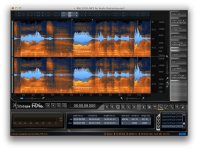
I stuck it into soundbooth and used the spectral display to have a look - and the clunks give pretty obvious vertical lines - removing these with the lasso works better than eq tweaks - It takes a bit of time to do, but worth trying. I could live with the results I think.
 
The bumps were the most noticeable ones. Not only were they creating specific fqy signatures, there were the baby ones singing in unison spanning 2 octaves. Lesson learned.
 
I stuck it into soundbooth and used the spectral display to have a look - and the clunks give pretty obvious vertical lines - removing these with the lasso works better than eq tweaks - It takes a bit of time to do, but worth trying. I could live with the results I think.

That is basically what Spectral Repair in Rx will do. It also looks at the "good' sound around what you want to remove and uses that to fill in where it removed something. When your done it's the closest thing to "magic" I have seen i sound.
 
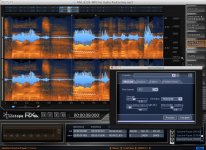
So now I'm trying to get successful results with spectral repair, but I'm noticing my main vocal audio is still turning very nasally sounding, similar to the sample I generated with a filter. I'm not sure what I'm doing wrong, but of course I'm not an audio professional.

I've tried removing those lines a little at a time, but it's still trashing the main audio. Any advice?
izotope02.jpg
 

Attachments

  • izotope02.jpg
    izotope02.jpg
    130.2 KB · Views: 0
I would probably use replace rather than attenuate. You also probably want to zoom in and be very selective. And I would talk to Alan since you liked what he did.
 
Back
Top