illegal (or otherwise toublesome) saturation levels?

rayortiz313

Active member
Hey guys,

So I'm doing an 80's grindhouse sci-fi spoof next, and I'm testing out turning up the saturation knob to 11 because I would love for it to look like and episode of Jem. (Test attached).

Is there anything on the technical side that I should be worried about? I realize that I barely understand what happens to video when saturation is increased, like whats happening to the rgb info? is it just getting shifted around towards more saturated versions of each color (ie pale blue becomes an electric blue)?

Just wondering if there's anything I should look out for.

Except for it looking tawdry and cheap and ridiculous, which is kind of the goal.

I do realize I will have to tone this back when people in the shot are involved.

Thanks!
 

Attachments
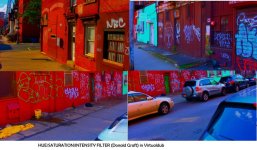
  • CvD location grading test.jpg
    CvD location grading test.jpg
    102.7 KB · Views: 0
Last edited:
Yep it looks horrid.. :)

But AFAIK any illegal levels are now clipped away in the digital world.. analog transmission could be blown by clipping but not digital.. so do what you want.
 
Is there anything on the technical side that I should be worried about?
At one point colors will go out of the specified color gamut, that means they can no longer be rendered correctly.

I realize that I barely understand what happens to video when saturation is increased, like whats happening to the rgb info? is it just getting shifted around towards more saturated versions of each color (ie pale blue becomes an electric blue)?
Saturation, in the RGB model, is the difference between the lowest and highest of the three values. Thus what happens when you raise the saturation is that the lowest and highest of the RGB values get pulled farther apart.

Just wondering if there's anything I should look out for.

Except for it looking tawdry and cheap and ridiculous, which is kind of the goal.
There certainly will be issues if you would for instance want to broadcast it. Delivered video goes through an automated QA process and out of gamut colors will be flagged and almost certainly rejected. Even if you distribute in other ways your video will likely be flagged.

To see if your footage is out of gamut you can use a Vectoscope. Most NLE's have a Vectorscope, with Virtualdub I think there is an Avi - or Vapour synth script to get it. Also many NLE's have so-called legalizers which bring footage within gamut the hard way and then there are also gamut mapping filters to gracefully put those values within gamut.
 
yeah, I had a feeling to get the look I want I would have to think harder than just turning the saturation all the way up. I guess that means I'm learning something.
 
Ray. You might not need to think hard :)

Cary maybe you want to expand about..

Also many NLE's have so-called legalizers which bring footage within gamut the hard way and then there are also gamut mapping filters to gracefully put those values within gamut.


Im guessing the legalisers are OK unless you are a hair splitter working for a clothing brand? What do they do that is bad?

The nature of this project absolute colour is not really a thing is it.

.. and even that is only relevant if the project is going to broadcast.
 
So I'm doing an 80's grindhouse sci-fi spoof next, and I'm testing out turning up the saturation knob to 11 because I would love for it to look like and episode of Jem. (Test attached).

Is there anything on the technical side that I should be worried about?

There are actually. I'm my tests against a Panny plasma, when you exceed legal gamut you make the TV "bloom" which causes the picture to loose resolution and gradation. Essentially, the region that's out of gamut becomes a big single color block of very bright color.

This is hard to look at because it's bright and ugly (the brain is interested because it doesn't look right). And of course it's equally hard to *not* look at because it's bright and ugly (the eye is attracted to the bright stuff first). This means that you as the director / DOP loose control of the audiences' eye -- you can't get them to look anywhere else. Is this what you want?

My advice is to use your vectorscope. Put the color right on the edge of gamut (Rec.709 for blu-rays and HDTV), but do not "turn up the saturation knob to 11". Turn it up to 10 and then stop.
 
How is it possible to exceed legal gamut in the digital era.

Our nles kick out 709 files.

If one was colouring in a wider space the export process would legalise.

Now this legalisation may involve non pleasant colour shifts when automated and that is where one can lose fidelity.

But if one grades in 709 and delivers 709 then all is 'good' ??
 
Cary maybe you want to expand about..

Also many NLE's have so-called legalizers which bring footage within gamut the hard way and then there are also gamut mapping filters to gracefully put those values within gamut.


Im guessing the legalisers are OK unless you are a hair splitter working for a clothing brand? What do they do that is bad?
I think you made a good point and I do agree with it!
 
How is it possible to exceed legal gamut in the digital era.
It has nothing to do with it being digital, each color model has a defined gamut, and is typically a trade off between color and brightness values and resolution.

If you grade in Rec.709 and render the video your values could still be out of gamut, even possibly after you legalize the output.
Most legalizers simply limit the 'Y to 100 IRE and allow some extra room for 'U and 'V, it is not exact enough to capture all out of gamut situations. Even your Vectorscope is only a guideline, unless you use a 3D vectorscope!

But again it is a bit of a hair splitting situation, but unfortunately they will be QA processes that hair split a lot! :)
 
Im not trying to pick a fight :) Im genuinely interested in how one can 'go wrong' in something like Resolve.

You export in video (for 709TV) or DATA for SRGb/web and all is good.. or is it?
 
It has nothing to do with it being digital,

Completely to do with digital?

My sketchy understanding of old school analogue was that 0-16 were for sound.. so if your picture had 0-16 values you got a (speaker blowing) distortion of the sound.. so it mattered.. lots.. but such days are long gone.

Just like motion picture film with sound down the side.. if your gate let light into that zone of the the sound was kaput.

S
 
Im not trying to pick a fight :) Im genuinely interested in how one can 'go wrong' in something like Resolve.

You export in video (for 709TV) or DATA for SRGb/web and all is good.. or is it?
No, Resolve does not automatically do this, but it does have a legalizer and also in Resolve 14, which is now production, you have a gamut mapping OFX.

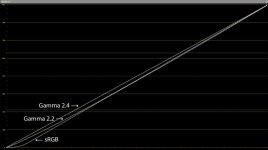
By the way I would strong recommend against using Resolve's sRGB but instead to use Rec.709 with either gamma 2.2. or 2.4.

Here is Resolve's sRGB ramp compared to Rec.709 with two gammas:

Gamma-straight.jpg
 
Last edited:
Afaik video levels are 16-235 or something - it doesn't actually matter for what follows.

Working in data one had 255 as an option but upon export 255 is converted to 235

Let us consider value 245 as well

So does 255 and 245 both get output at 235 or is 255 output to 235 and 245 put to maybe 232


You can legalise using a "saw" or a transform of the whole image - I assume the latter has been happening for at least half a decade?

The blobs of colour described above sound like a sawn not a transformed image.
 
Last edited:
ugh rapidly losing interest in this look.

Its funny because I'm trained as a painter and know s*%t tons about color theory but when it comes to my video work I actually have NO interest in color at all.

if it was really up to me I'd shoot black and white for everything for the rest of my life.

For this short might just grade everything cool, desaturate a bit and be done with it.

I hate (video) color.

Its an issue of the fundamentals of photography/image making...you want to restrict the number of colors or otherwise bring them into relationship with each other, not just blindly accept the random colors the scene offers.

I always wanted to do monochrome color schemes like steven soderberg does but I got distracted.

DVXUSER MELTDOWWWWNNNN

:\
 

Attachments

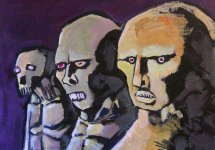
  • IMG_0484.jpg
    IMG_0484.jpg
    130.7 KB · Views: 0
Last edited:
Afaik video levels are 16-235 or something - it doesn't actually matter for what follows.

Working in data one had 255 as an option but upon export 255 is converted to 235

Let us consider value 245 as well

So does 255 and 245 both get output at 235 or is 255 output to 235 and 245 put to maybe 232


You can legalise using a "saw" or a transform of the whole image - I assume the latter has been happening for at least half a decade?

The blobs of colour described above sound like a sawn not a transformed image.
There is more to legalizing video than just looking at the levels, the other thing is gamut.
 
Why not play with the contrast control, you can make the colors seem more saturated without going beyond legal.
 
There is more to legalizing video than just looking at the levels, the other thing is gamut.

Can you (again dont want a war!) tell me about this..?

Im sure there is not (and Ill talke RGB numbers for now) a number between 000-000-000 and 255-255-255 that is illegal..

For example is 255-101-255 somehow illegal? I think not.

I beleive gamut is (or problems caused by gamut), are a thing that occurs during translations..

Let us consider

255-250-255 and 254-251-253 and try to translate them to values less than 235.. yes there are many ways of doing that and some may not be visually appealing or may merge the values together???
 
Every "legalizer" filter I've seen is a holdover from the days of analog TV. They only matter if you are dealing with BT.601 video that you intend to send to tape or broadcast. They have no relevance to today's digital video.

A digital "legal" signal is one with RGB values from 0% to 100%. A standard video file can encode RGB values below 0% and above 100%. Many cameras and common types of processing in your NLE could generate such values. But they will all be clamped by the display. So practically speaking, you don't need to worry about this at all. Everyone's TV clamps the same way. There is no issue of colors being out of gamut.

If you were handing video to a TV station, they *might* care about the video using legal levels. If broadcast is your target, then you might want to do something to clamp to 0%-100%. The best way to do that will depend on what video software you're using. You didn't mention what software you're using. A trivial LUT can do the job.
 
Back
Top