I think this is an important issue...

Cadence 1, which is 59.94 frames per second, has unique frames.

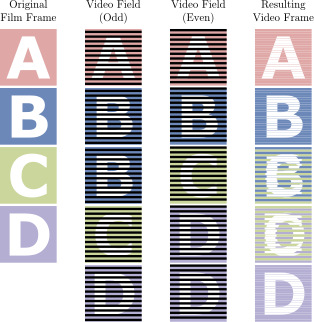
When you telecine a 23.976 progressive frames per second video you get a 29.97 interlaced frames per second video.
When you deinterlace and frame double this to 59.94 frames per second you cannot create unique frames unless you blend frames (exactly like the "soap opera" effect that everybody finds objectionable).
You can't even create unique frames for B/C and C/D in the group of five, because you would get A-A-B-B-B-C-C-D-D-D and that would break the cadence.
314px-32pulldown.svg.png


By the way, pull down is lowering the framerate from 24p to 23.976p, 3:2 telecine is what mangles 4 frames into 5 frames.

Cadence 1 really is not comparable to the "Soap Opera Effect" at all.

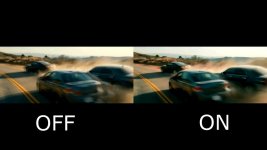
Watch the following video at 60fps, which has a side-by-side example of a clip from Drive:

The left hand (OFF) side is being converted to 60fps via some unspecified pull-down or frame-blending, albeit keeping the general motion cadence of 24fps, while the right hand (ON) side has motion-interpolation ie "Soap Opera Effect".

There is a clear difference between the two, with the motion-interpolation example looking far worse in my opinion.
 
Cadence 1 really is not comparable to the "Soap Opera Effect" at all.

Watch the following video at 60fps, which has a side-by-side example of a clip from Drive:

The left hand (OFF) side is being converted to 60fps via some unspecified pull-down or frame-blending, albeit keeping the general motion cadence of 24fps, while the right hand (ON) side has motion-interpolation ie "Soap Opera Effect".

There is a clear difference between the two, with the motion-interpolation example looking far worse in my opinion.
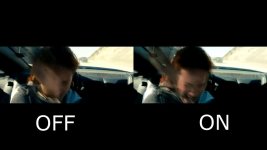
Both sides have horrible frame blending.

blending_1.1.1.jpg
blending 2_1.1.2.jpg

Why some people seem to insist on wanting to watch 24p at 60p and proclaiming it is good is beyond my comprehension.
I think the only right way to watch 24p is to watch it at 24p!
But I know, I must be strange. :)
 
Last edited:
Both sides have horrible frame blending.

View attachment 127269
View attachment 127270

Why some people seem to insist on wanting to watch 24p at 60p and proclaiming it is good is beyond my comprehension.
I think the only right way to watch 24p is to watch it at 24p!
But I know, I must be strange. :)
I am not advocating watching 24p at 60p, and I never have during this thread. I don't know why you keep bringing that argument up.

The point is to notice the difference between what is the "soap opera effect" and what is not. I already said that I don't know what conversion method was used on the left-hand (OFF) side of the video, but it is not motion-interpolation ("soap opera effect") like the right side of the image.

You insist they are the same, but if you watch the video... actually watch it, not step through it frame-by-frame... you should see a distinct difference in the motion.
 
You insist they are the same, ....
I did not insist they are the same, I wrote that both sides have horrible frame blending.

I find having an objection to frame blending 24p to 48p while at the same time not having an objection to telecining 24p to 60i (or 60p) an unsupportable position.
 
Last edited:
Cary, if pulldown is inserted properly, there IS NO frame-blending.
Yes, and even back when it was interlaced the much complained about B/C & C/D frames never really existed, because you only saw one field at a time on proper interlaced TV. The sequence would be more like A1, A2, B1, B2, B1, C2, C1, D2, D1, D2, where you are only see 1/2 of the image at the time. Yes, it was a COMPROMISE, but so was watching everything in fields instead of progressive images.

It was only when everything started being digitized and uploaded to Youtube or watched on computer screens that the blended frames became an issue if the studio never went back and created a true progressive version of the content.
 
It was only when everything started being digitized and uploaded to Youtube or watched on computer screens that the blended frames became an issue if the studio never went back and created a true progressive version of the content.
You mean 24p?

Anyone worth their weight in salt would upload a 24p source as 24p to YouTube, Vimeo, Netflix etc.
If someone would upload a 24p source as 60p to those delivery platforms then I think they are clueless.
 
You mean 24p?

Anyone worth their weight in salt would upload a 24p source as 24p to YouTube, Vimeo, Netflix etc.
If someone would upload a 24p source as 60p to those delivery platforms then I think they are clueless.

No but they may have uploaded as 60i because they didn't know or have the tools to handle the process. A lot of early "24p" cameras packaged the 24p inside of 60i and few knew how to remove the pulldown. Eventually some NLEs would detect the cadence in the DV stream and remove.

24p was packaged in 60i due to that fact that most people could only support the 60i broadcast standard and had no way to play native 24p on their TVs. This was also true of many HDV cameras that shot 24p. The theory was shoot 24p and edit in a normal 60i project and deliver as 60i for the most compatibility for 100% of users. For those who understood the process they could use tools to remove the 24p frames although this resulted in another ugly problem. Mpeg2 and H.264 interlaced encoding use a very ugly form of 4:2:0. Progressive 4:2:0 is far superior since it doesn't skip the chroma samples every other line so you have a 4:2:0 structure on each field vs each frame. Progressive 4:2:0 is really like pixels that are 2x2 in size. Interlaced takes some funky adjusting to get the chroma somewhat back to normal. Only tool I was ever able to pull that off correctly was AVISynth. Most software just assumed the video was interlaced so it treated the chroma as interlaced. This is one reason why 4:2:2 was so much more desired for broadcast sources.
 
Only tool I was ever able to pull that off correctly was AVISynth.
Yes, AviSynth, but also VapourSynth, which I prefer, are very flexible tools!

You can use modules to do inverse telecine but also deinterlacing of fully interlaced material, there is a module called QTGMC which is a very nice deinterlacer using motion compensation and denoising. Also you can process the planes (luma, chroma) completely separately and merge afterwards.
 
Last edited:
Being able to wrap true 24p footage in a 60i package, on the fly, to record to DV tape was the true revolutionary breakthrough of the DVX100. Which would have been enough to kick ass, but devising the 2:3:3:2 pulldown scheme for easy pulldown removal was stratospheric.

It cannot be overstated how much of a leap the DVX100 was. It's basically solely because of it and its resounding success that the floodgates for affordable 24p acquisition were opened.
 
Indeed, AviSynth but also Vapoursynth, which I prefer, can use a module called QTGMC which is a very nice deinterlacer using motion compensation and denoising.

You should never, ever deinterlace progessive material. If you have telecined 24p or 24 fps, you should do a reverse telecine, or pulldown removal, and retrieve the original, whole 24p frames.

Deinterlacing it as though it's just plain 60i is what gives you blended frames.
 
You should never, ever deinterlace progessive material. If you have telecined 24p or 24 fps, you should do a reverse telecine, or pulldown removal, and retrieve the original, whole 24p frames.

Deinterlacing it as though it's just plain 60i is what gives you blended frames.
Yes that is correct.

Although, never say never, I have encountered old archived footage that was originally 24p, then telecined but then incorrectly archived with progressive mpeg blocks.
An initial deinterlace before a reverse telecine might mitiate the problem.

Here is an example of an over 50 year (incorrectly archived kinoscope) old source having this problem:

 
Last edited:
Yes that is correct.

Although, never say never, I have encountered old archived footage that was originally 24p, then telecined but then incorrectly archived with progressive mpeg blocks.
An initial deinterlace before a reverse telecine might mitiate the problem.

If you deinterlace and THEN try to do a reverse telecine, you'll end up with a HUGE mess.
 
I like to use the right setting for the right things.
Movies I put in Theater mode (that's 24p)
Sports in Sports mode (I don't know how they got the settings right but the actual game play sound is clearer than the commentary)
and normal TV in General settings.
I've changed it so much the remote has stopped working properly :(
 
Back
Top