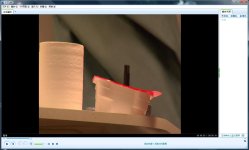
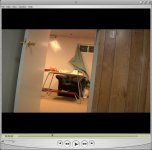
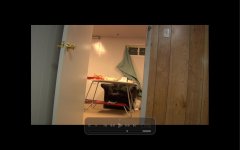
hvx200 footage dont look like 16:9 wutsoever , whywhywhy

SUPADOG

Member
The hvx footage look 16:9 in premiere, like shown in the 1st screengrab , but some how always look like some weird ration when i play it in so called "oringinal ratio", in all video players in my computer, wuts wrong?
 

Attachments
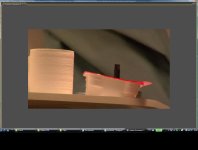
  • in pr.jpg
    in pr.jpg
    74.6 KB · Views: 0
  • in player.jpg
    in player.jpg
    90.6 KB · Views: 0
  • new 169.jpg
    new 169.jpg
    52.1 KB · Views: 0
  • new full screen.jpg
    new full screen.jpg
    66.1 KB · Views: 0
Last edited:
the pixel aspect ratio for native HVX footage is not 1 to 1. Therefore, if you are playing it in a program that doesn't know how to interpret different pixel aspect ratios, you will end up with squished footage.
 
THANKS WILLIAM , AT LEAST NOW I SORT OF KNOW WUTS GOING ON.
STILL WONDER, EVEN WIDOWS MEDIA PLAYER WOULD'T INTERPRET the different pixel aspect ratios correctly? cuz in my case all video players have the same result, even in after effects i have to use the toggle switch to manually correct the pixel aspect ratio.
honestly i am quite confused, does this problem only happen to hvx200 footage? wonder is there a thread or website to explain this issue better.
thanks man!
 
thanks Huy, your thread is really helpful, i , again, did test to render my clip out in square pixel, from the updated pix you can see that the quick time player can play the clip normally in 16:9 ratio, however, when i try to play it in full screen mode, as you can see from the last pic, it isnt really full screen , but rather with black bars sorounding the video.
do you know wuts going on with this issue? or did i miss some points from your instruction.
anybody? thanks !
 
It looks like you rendered as square pixel at 4:3, not 16:9. The screen shot of the Quicktime player shows it's being displayed as 4:3 with letterbox bars; the fullscreen shot shows the same thing.

If you want a 16:9 file, render with square pixels (1.000) and make the width a multiple of 16 and the height a multiple of 9. So, if you want the width to be 720, make the height 405.
 
thanks David and Huy, by adjusting the numbers of width and height i finally got the glorious 16:9 ratio in the rendered video.

one more concern, does it damage the video quality tho?
 
Last edited:
Not in the sense that you're asking, no. Merely changing the pixel aspect ratio will not.

But rendering anything at a different frame size than the original footage (such as rendering SD footage as HD, or smaller than SD) will affect the image, yes, not to mention all the other compression factors which may affect it as well.
 
Back
Top