HVX 1080 24p...what sequence settings in FCP

blando3

Well-known member
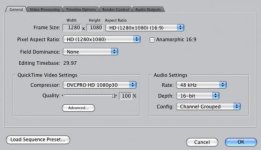
I've been shooting for a client in 1080 24p (at the client's request) and the footage in FCP had some horizontal interlacing going on. In Log and Transfer, the Remove Advanced Pulldown and Duplicate Frames box is checked. After capturing, I let FCP set the sequence settings according to the clip. The sequence settings are in the attached freeze frame. However, I get this weird interlacing effect, and I can't figure out why. Should the Advanced Pulldown box be unchecked? Does it matter if I'm not shoot 1080 24pA?

After exporting to Quicktime, the interlacing goes away, but the client is bothered by those lines in FCP.
Any thoughts?
Thanks,
Andrew
 

Attachments

  • Picture 17.jpg
    Picture 17.jpg
    19.3 KB · Views: 0
  • Picture 23.jpg
    Picture 23.jpg
    13.8 KB · Views: 0
1080/24p vs. 1080/24pA makes a huge difference in what's going on. If you're not shooting 24pA, then FCP cannot removed the advanced pulldown (that's what the "A" stands for).

24p adds a 2:3 (non-advanced) pulldown that records as 60i (29.97) and can be edited at 29.97. Yes, it will have some interlaced frames due to the pulldown. To remove that pulldown and get true 24p (23.976), you'll need to take all the footage through Cinema Tools and use the reverse telecine.

In the future, if you want to work in 24p, shoot in 24pA. That flavor adds an advanced 2:3:3:2 pulldown that FCP can remove automatically. It's still recorded as 60i (29.97), and it still has interlaced frames due to the pulldown, but it's easier to remove the pulldown in FCP.

Last, once you've removed pulldown, your sequence's editing timebase should be 23.976.
 
Last edited:
So if I shoot 24p, do I check the Advanced Pulldown box or uncheck it or does it matter? Should I shoot 24pA?
This is for web viewing only.
 
Whether it's for web viewing or DVD/Blu-Ray distribution, it's treated the same. If you edit what you have at 29.97 (without removing pulldown), you'll have interlaced frames that won't be noticeable on DVD but will be noticeable on the Internet and on your computer's screen.

For the footage you've shot, you'll need to take it through Cinema Tools. In the future, shoot 24pA so you can use FCP's "remove advanced pulldown" feature.
 
Thanks for the tips. It's funny - I've had different people tell me different things. Shoot 24p, shoot 24pA, etc, but I've just been doing some tests between 24p and 24pA and 24pA looks better and seems like a smoother workflow.
I'm still not sure I entirely understand it though! Thanks again.
 
Back
Top