
My hpx170 has been flawless. It has about 800 hours on it and it has never let me down. A strange problem just came up - and then it went away.
I recorded 1080 24p footage all day (90min across 4 P2 cards - a series and e series) and when I brought the footage to my computer it had errors and problems. In avid and premiere all the clips have garbled info on them. It comes and goes and does not follow any patterns. When trying to play the clips, both applications (avid and premiere) both crash after a few minutes.
** See the attached photo for a screen shot of the problem **
The thing is, the clips play back fine on the camera, and through the P2 viewer software. The results are the same weather I use the footage straight off the cards or if they are transferred to my computer.
I have used the camera many times after this problem, and everything has been fine. I just want to see if anyone has had a similar experience and if I should send my camera to panasonic to check it out.
The shooting conditions were normal and indoor.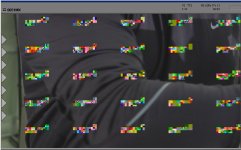
I wound up playing the clips out and capturing from SDI to an Avid Adrenaline and the footage looks fine.
I recorded 1080 24p footage all day (90min across 4 P2 cards - a series and e series) and when I brought the footage to my computer it had errors and problems. In avid and premiere all the clips have garbled info on them. It comes and goes and does not follow any patterns. When trying to play the clips, both applications (avid and premiere) both crash after a few minutes.
** See the attached photo for a screen shot of the problem **
The thing is, the clips play back fine on the camera, and through the P2 viewer software. The results are the same weather I use the footage straight off the cards or if they are transferred to my computer.
I have used the camera many times after this problem, and everything has been fine. I just want to see if anyone has had a similar experience and if I should send my camera to panasonic to check it out.
The shooting conditions were normal and indoor.
I wound up playing the clips out and capturing from SDI to an Avid Adrenaline and the footage looks fine.