HPX-370 Back Audio Unputs

Flash Beaver

Well-known member
[THAT'S BACK AUDIO INPUTS!] :cheesy:

I'm about a week away from pushing the button on an HPX370.

The question I can't seem to find an answer to is if the back audio inputs that are labeled "AUDIO 1" and "AUDIO 2" will in fact route to recorded channels 3 & 4 if I set the third and fourth audio switch to "REAR" and take in my two wireless mic receivers.

What I want to do is:

Put my shotgun mic on the Front as Channel 1 (AUDIO IN Ch.1 Switch Set To FRONT)

Have a Unislot wireless mic for our main talent as Channel 2 (AUDIO IN Ch.2 Switch Set To W.L.)

And finally have our two Sennheiser G2 wireless receivers plugged in to the back XLR inputs and placed on Channels 3 and 4 (AUDIO IN Ch.3 and AUDIO IN Ch.4 switch both set to REAR)

This would allow me to have 1 shoutgun and three discreet audio channels for the host and two more people.

The XLR inputs on the back only say "AUDIO 1" and "AUDIO 2" and not "AUDIO 1/3" and "AUDIO 2/4".

So before I assume that I can do what I want to above, I wanted to double check here before we spend a lot of $$$ on a 370 outfit.

Because right behind image quality boost and shoulder stability, 4 discreet audio channels for my subjects is the biggest reason for my desire to switch up.

I've looked through the manual and everywhere else and I'm hoping one of you out there would know.

Thanks!
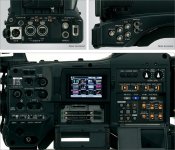
rear.jpg
 
Last edited:
If I understand your question correctly, you can have 3 discrete channels
using the 3 XLR inputs. The only way to have 4 discrete channels is by
using the Unislot. The Unislot has 2 channels. I suppose you could hard
wire a plug for the Unislot to another XLR female plug to have 4 channels.
The limitation for 4 channels is because only 3 XLR plugs are available the
Unislot making up the rest. I hope this helps. Buy the way it’s a great camera.
 
The audio is superb on this camera and very flexible, I have hot wired the uni slot to a 3.5mm flying lead so I can hook up a sennheiser G2 receiver. That then gives me all four inputs available and with the comprehensive switching matrix you can assign things easily if required.

So if I am doing a pres piece with just a radio Lav plus cam mic I can select things to go where I wish.

I think what you need to do is think of the XLR and uni slot as input channels and then think of the four audio capability on the camera as tracks.

So if I wish to take ch1 (the cam mic) I can switch it to go to any of the tracks using the switching matrix, I can also send it to all four tracks if I wish.

In the example of the pres piece I can assign the cam mic (front input ch) to track 2 and assign the unislot flying lead to track 1. Or if I wanted I could put the uni slot pres radio mic on tracks 1+2 and put the cam mic on tracks 3+4.

Moving up a level I could put the pres on track 1 the cam mic on track 2 and then assign the rear XLR inputs to receive the output from my mixer and put them on tracks 3+4.

Or if I feel the mixer is the main source I could use the switching matrix to assign the rear XLR's to tracks 1+2 and put the cam mic on track 3 and the pres lav on track 4.

Hope this all makes sense but what you basically have is a set of inputs that consist of three XLR's and a uni slot that can be modified to give a fourth XLR or 3.5mm flying lead as I have done, they can then be switched on the camera to go to whatever of the four audio tracks that you have available with the P2 system.

There are some limitations as certain XLR's have to go to certain tracks ( as you correctly say audio 1 on the rear goes to tracks 1 or 3 and audio 2 to tracks 2 or 4) but I find it a superbly flexible system and most useful on location.

As for your question you can do what you need and assign the tracks as you have said as I have worked this way many times with the following track assignments

Track 1 radio mic 1 (rear audio 1)
Track 2 radio mic 2 (rear audio 2)
Track 3 radio mic 3 (uni slot W/L)
Track 4 camera mic (front)

Or you could also go:

Track 1 cam mic (front)
Track 2 radio mic 1 (uni slot W/L)
Track 3 radio mic 2 (rear audio 1)
Track 4 radio mic 3 (rear audio 2)
 
Last edited:
Gary! Thank you so much for clarifying that! This is exactly what I needed to know. I'm in a constant shooting situation where a smaller chip is absolutely beneficial and to get shoulder stability and discreet audio is a sale alone for me.

Thanks again to Gary and Scott both for helping me out on this!
 
You are welcome Travis and I have had my 301 for two and a half years now and it is a superb camera as is the 370/371.

If you have any further questions I am more than happy to help.
 
On my 300 the one drawback is you cannot manually set the record level on tracks 3 and 4. They are auto-level only. Usually that's not an issue, but if, for example, you're using an audio mixer that has a built in limiter, you would want to manually set the audio levels in the camera, and let the mixer do the limiting. When I use it that way, I always use channels 1 and 2 connected to the back XLR's to the mixer.

The 370 may allow for manual levels on channels 3 and 4.... someone with that cam can verify.
 
You may not be able to set the levels on 3+4 but you can turn off the auto gain circuit, the inputs are set-up for std broadcast levels where .775v 0db PPM(-4db VU)=-18dbfs in the Uk or -20dbfs elsewhere, I use my mixer to feed 3+4 most of the time and as you also want use the limiter in the mixer rather than the auto gain circuits in the camera.
 
Back
Top