How will this laptop cope with native AVCHD footage from the AF101 in PPro 5.5?

CraftyClown

Active member
(I am posting this here for the second time, as for some unknown reason the thread posted an hour ago has disappeared! I don't believe I have broken any forum rules, as my questioning relates to working with material shot on the AF101)


Hi guys,

I need to fork out for a laptop for mobile editing of native AVCHD footage from my AF101 and I was wondering if anyone here using Premiere CS5 or 5.5 could give me a heads up as to whether they think the following spec is up to the task.

Intel Core i7-2630QM – 2GHz Quad Core with Hyper-Threading.
15.6” 1920x1080
8GB DDR3 memory
nVidia GT 540M 2GB Graphics
1 x E-Sata port

I will be using a 120gig SSD internally for the system drive and a 4TB raid 5 G-Drive via e-sata. I was also considering connecting a separate USB2 drive for my scratch disc.

I'm aware that the GT 540m is inferior to the highly recommended GT 460m, but the price difference makes that difficult for me to stretch to, having invested so much in other production equipment recently. I can get a laptop with the above spec for just under £800.

Will this be enough? Or do you think I will struggle?

Cheers

Rich
 
Should be ok depending on the size of the project. I always transcode my AVCHD footage just because I like the smoothness and easier color correction.

The only thing that strikes me with your post is using a USB 2.0 disk for scratch. Don't use USB for anything other than your mouse, keyboard, and perhaps an offline backup.
 
I don't think I will always have the convenience of time to transcode my rushes beforehand, however I still want to be able to play back multiple streams of AVCHD without stalling the entire system. For bigger jobs where I have the time I will probably transcode to DNXHD as I have always had to do with Avid.

Regarding the USB2 drive as a scratch disc, I was concious of it being a bottle neck, but I wasn't sure if it was better to have a dedicated drive for my scratch, or to place it on the E-sata raid 5 with all the other data? Do I have any other options?
 
Intel Core i7-2630QM – 2GHz Quad Core with Hyper-Threading.
15.6” 1920x1080
8GB DDR3 memory
nVidia GT 540M 2GB Graphics
Those are currently top-of-the-line specs for a Win7 laptop. I recently recommended a similar Dual-Core laptop to a friend for editing AVCHD video in Adobe CS5 and it is working flawlessly for her. Absolutely no need to even consider transcoding any AVCHD footage.

In my view, the era of transcoding ended with the termination of Final Cut Studio.
 
I currently have a very similar laptop and it works fine. if you can go higher on the ram I would. I have 8gb and if I could have gotten 16 I would have, CS5 occasionally chokes on loading projects with a lot of media, when I say chokes it just takes a minute to load all of your source video and sound. Otherwise it basically flies through everything.
 
...CS5 occasionally chokes on loading projects with a lot of media, when I say chokes it just takes a minute to load all of your source video and sound. Otherwise it basically flies through everything.
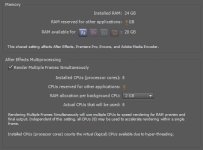
Pr, Ae, En, and Me share memory settings in CS5.x. Users need to understand how to optimize memory among other things. There is a number of online resources covering this topic including Adobe own KB articles. I found these settings work best on my system:

cs5.5_memproc_settings.JPG

Also, remember that multi-threading, media- and disk cache play their parts. It is important to have a decent CPU, fast storage, and nVidia GPU with at least 896MB available for best overall CS5.x performance.

You list some of the best notebook specs currently available. CS5.x will work well. Oh, unless you have no choice, you may want to rethink that USB scratch disk strategy.
 
Last edited:
In the end, the machine I was after sold before I had a chance to purchase it. Kinda glad it did though, because I managed to find this beauty instead, which is being delivered before 1pm tomorrow. I'm more excited than a kid at xmas! :)


  • Intel 2nd Generation Core i7-2630QM Quad Core Processor 2Ghz with Turbo Boost to 2.9GHz Processor (4 Cores with 8 threads, 6mb cache)​
  • 17.3" Full HD 3d capable WLED Truelife (glossy) 1920 x 1080 display ​
  • 500GB Hard Drive 7200 rpm​
  • Bluray Rom​
  • 16GB 1333MHz DDR3 Ram​
  • 3GB Nvidia GeForce GT 555M graphics ​

It also has a second hard drive bay, so I can use my SSD as the system drive and the 7200rpm drive as my scratch disc, as well as connecting my G-raid via e-sata. All this came in at £1000. A bit more than I had originally intended, but an absolute bargain none the less.
 
Back
Top