Philip Bast
Member
Sorry if this question's redundant, but I can't seem to find an answer anywhere else. Also I'll apologize in advance for a long description of this problem, but I want to try to articulate it clearly.
I managed to damage the tail end of about 90 minutes straight capture of a live performance (a celebrity roast/variety show). This was my own stupidity, which I'll explain before posing the question, just in case the explanation of what triggered the damage may help in solving the problem.
This was the second act, which ran from one P2 card to another. It was a long show, and as a song ended my battery was dying, so I swapped batteries during audience applause. As it turns out, it was the final song. I probably would have had enough power to capture the last minute or so of thank you and good night and wouldn't have needed to swap. That's the background.
Now to describe my foolish mistake.
Since I have sometimes in the past made a quick battery swap, turned the camera back on and hit record before it was ready to function, I have been caught a couple times with the camera still on pause while I thought I was recording. So ... I'd shut off the camera and was putting it away, when that thought hit me.
To quickly reassure myself I'd actually recorded the last portion, I hit the Rec Check button, just as I'd done so often when shooting on mini-DV before switching to P2. I think I hit it twice before it hit me ... that button simply backs up the tape drive. And ironically, I still had a tape in there 4 months after going totally P2.
When I attempted to upload the approximately 200 minutes of footage to Final Cut from my camera, it wouldn't take the continuous second act which spanned the two cards. Eventually it occurred to me to pull out card 1 and see if I could upload card 2. That caused the continuous clip to break into segments, and I was able to download the bulk of Act 2 that way, from both cards.
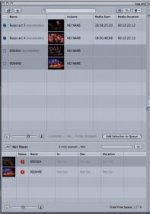
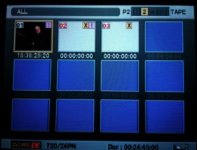
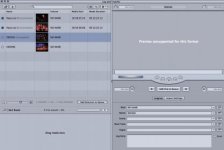
However I'm missing the climactic moment, the rousing finale, the last minute of the final song. It's on one of the clips that registers the stop sign and exclamation mark in the log and transfer window (see attached screen shot). In the HVX200 view finder I get a white clip with an X in a yellow box and an exclamation mark in a pink box.
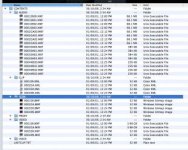
I also tried doing the transfer through a P2 card reader and as direct file transfer into a PC laptop in case it was just a camera transfer glitch. No luck there, but I did get a file size on the last two clips. They're each 32KB, which I figure is the size of the icon in the log & transfer window.
I've heard it's possible to recover data from a P2 card as long as it hasn't been recorded over yet, which I haven't done. At least not intentionally, unless the Rec Check button had exactly that effect.
So again with apologies for being long winded ...
Is it possible to recover these two files?
If so, how?
Thanks
I managed to damage the tail end of about 90 minutes straight capture of a live performance (a celebrity roast/variety show). This was my own stupidity, which I'll explain before posing the question, just in case the explanation of what triggered the damage may help in solving the problem.
This was the second act, which ran from one P2 card to another. It was a long show, and as a song ended my battery was dying, so I swapped batteries during audience applause. As it turns out, it was the final song. I probably would have had enough power to capture the last minute or so of thank you and good night and wouldn't have needed to swap. That's the background.
Now to describe my foolish mistake.
Since I have sometimes in the past made a quick battery swap, turned the camera back on and hit record before it was ready to function, I have been caught a couple times with the camera still on pause while I thought I was recording. So ... I'd shut off the camera and was putting it away, when that thought hit me.
To quickly reassure myself I'd actually recorded the last portion, I hit the Rec Check button, just as I'd done so often when shooting on mini-DV before switching to P2. I think I hit it twice before it hit me ... that button simply backs up the tape drive. And ironically, I still had a tape in there 4 months after going totally P2.
When I attempted to upload the approximately 200 minutes of footage to Final Cut from my camera, it wouldn't take the continuous second act which spanned the two cards. Eventually it occurred to me to pull out card 1 and see if I could upload card 2. That caused the continuous clip to break into segments, and I was able to download the bulk of Act 2 that way, from both cards.
However I'm missing the climactic moment, the rousing finale, the last minute of the final song. It's on one of the clips that registers the stop sign and exclamation mark in the log and transfer window (see attached screen shot). In the HVX200 view finder I get a white clip with an X in a yellow box and an exclamation mark in a pink box.
I also tried doing the transfer through a P2 card reader and as direct file transfer into a PC laptop in case it was just a camera transfer glitch. No luck there, but I did get a file size on the last two clips. They're each 32KB, which I figure is the size of the icon in the log & transfer window.
I've heard it's possible to recover data from a P2 card as long as it hasn't been recorded over yet, which I haven't done. At least not intentionally, unless the Rec Check button had exactly that effect.
So again with apologies for being long winded ...
Is it possible to recover these two files?
If so, how?
Thanks