Need help! The company I work for has just bought 2 Sony F5s and we are now trying to update them to firmware v4. The camera is now on v2.10. At the store they told us to just download the firmware and copy it to the SxS cards and then the camera would recognize it and ask us if we want to update. This isnt happening. We have tried different methods, but no luck yet. The problem is that we need them to be in firmware v4 as soon as possible. Any advice?

Navigation
Install the app
How to install the app on iOS
Follow along with the video below to see how to install our site as a web app on your home screen.
Note: This feature may not be available in some browsers.
More options
You are using an out of date browser. It may not display this or other websites correctly.
You should upgrade or use an alternative browser.
You should upgrade or use an alternative browser.
F5: How to firmware update Sony F5
- Thread starter Kandre
- Start date
Thomas Kist
Active member
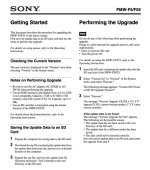
do not copy to your SxS cards but to an SD card and put that into the SD card slot.
should do the trick. Use a big battery or DC power for the camera and let it take time to do the upgrade.
DO NOT SWITCH OF!!
should do the trick. Use a big battery or DC power for the camera and let it take time to do the upgrade.
DO NOT SWITCH OF!!
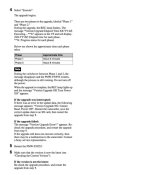
If it's not obvious, steps 4, 5, 6 follow steps 1,2,3 from the "performing the upgrade column on the right of the first page. As Thomas said, do not switch off until it tells you to, there is also a pause between the 2 step update. Be patient and let in run it's course. You may also want to do a All Reset after the update.
Last edited:

Thomas Kist
Active member
Me too, no hanky panky all mechanic