Navigation
Install the app
How to install the app on iOS
Follow along with the video below to see how to install our site as a web app on your home screen.
Note: This feature may not be available in some browsers.
More options
You are using an out of date browser. It may not display this or other websites correctly.
You should upgrade or use an alternative browser.
You should upgrade or use an alternative browser.
How to connect F35 with ethernet?
- Thread starter SJX
- Start date

SJX
Veteran
Same with F35. But menu was turned off on monitor out. This is the problem. I need a sony evf or do it by ethernet. I can't get hold of sony evf. So must try ethernet. I read it was easy. Maybe I'm missing some detail.
I also found this tip from yachacha and tried it too. But didn't work. I guess it was not last menu changed:
I don't know if there is some way of resetting to factory settings without the menu. I read doing firmware update reset to factory. But my camera is already latest firmware. So don't know if doing it again would brick the camera or something.
I also found this tip from yachacha and tried it too. But didn't work. I guess it was not last menu changed:
And one more thought-
The F35 always saves your menu so i'm assuming the last menu you went to was to make the SDI output clean.
If you were to press the buttons to open the menu, even though you can't see it, you are in the last menu you loaded.
Click the clicker once and then spin it, with some luck you can blindly turn the overlay back on because the menu should still be the first to open.
I don't know if there is some way of resetting to factory settings without the menu. I read doing firmware update reset to factory. But my camera is already latest firmware. So don't know if doing it again would brick the camera or something.
Last edited:

rbirnbaum
Well-known member
Same with F35. But menu was turned off on monitor out. This is the problem. I need a sony evf or do it by ethernet. I can't get hold of sony evf. So must try ethernet. I read it was easy. Maybe I'm missing some detail.
I also found this tip from yachacha and tried it too. But didn't work. I guess it was not last menu changed:
I don't know if there is some way of resetting to factory settings without the menu. I read doing firmware update reset to factory. But my camera is already latest firmware. So don't know if doing it again would brick the camera or something.
I had the same problem when I received my camera. You need the Sony evf. BTW did you try the ip address that’s in the manual? Mine was changed by a previous owner, but yours may be on the default. Also check the side screen on your camera. Sometimes the output menu has been included and you can add monitor data using the jog wheel. But that’s a custom option, unless the previous owner added it, it won’t be there. Where are you based? If I’m NYC stop by and I’ll unlock it for you.
SJX
Veteran
You mean that example number they give on page 69 of manual? I think starting with 192. No I didn't try it. I thought the number was empty and this was just example. I didn't know there was an ip address from the factory. I must try it then. Unfortunately I'm not in NY. Not even close. The other side actually.But thanks. Will check side screen too. I guess you mean the 1,2,3 memory buttons.
rbirnbaum
Well-known member
Yes, the 192. number... after you connect the ethernet to the camera, and to your workstation, you have to put that IP address on your internet browser. That should take you directly into the camera settings.
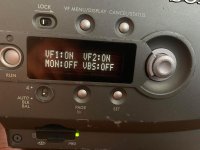
I don't mean the 1. 2 ,3 buttons. When you press the 'Page' button the info on the screen cycles to a different menu. If you find one that has the output of VF1 VF2 Mon1 Mon2 it should say on or off. Turn monitor 1 to on. Then connect via sdi to Output Mon 1 from the camera, not the IF box. But like I said. That is a custom option. So it may not be available in your camera. My recommendation is to enable that menu.
Start up the Web browser on the PC and enter http://
then the IP address you set on the <IP ADDR SET>
page (e.g.: http://192.168.0.1)
This is the default IP... but it may have been changed. Try .2 .3 .4 .5 in case they changed it.
If both of these options don't work, you need a viewfinder.
I don't mean the 1. 2 ,3 buttons. When you press the 'Page' button the info on the screen cycles to a different menu. If you find one that has the output of VF1 VF2 Mon1 Mon2 it should say on or off. Turn monitor 1 to on. Then connect via sdi to Output Mon 1 from the camera, not the IF box. But like I said. That is a custom option. So it may not be available in your camera. My recommendation is to enable that menu.
Start up the Web browser on the PC and enter http://
then the IP address you set on the <IP ADDR SET>
page (e.g.: http://192.168.0.1)
This is the default IP... but it may have been changed. Try .2 .3 .4 .5 in case they changed it.
If both of these options don't work, you need a viewfinder.
G
Guest
Guest
Does reseting everything give tou menus out the sdi?
Can one of us upload user settings and let you download them and install via SD card?
Can one of us upload user settings and let you download them and install via SD card?
rbirnbaum
Well-known member
Does reseting everything give tou menus out the sdi?
Can one of us upload user settings and let you download them and install via SD card?
I don't know of any button combination that resets the camera. I tried to find one but had no success.
Let us know if you have any luck.

Mike Krumlauf
Award Winning Filmmaker
Not to segway the topic slightly of this thread but, does anyone know if you can control the menus of the F900 on a computer via a miranda dvc 800? RS232 port perhaps?
Mike Krumlauf
Award Winning Filmmaker
Hey good news. I actually have a friend who has a F900 for paper weight I never knew. He shoots F55 and FS7 now but the F900 is stuffed somewhere. Didn't even know he has this. F900 evf should work right? We will meet.
To answer your question yes, the EVF on an F900 will plug into an F35 as they both share the same HDVS specs. an HDVF20 B&W finder would even work.