FS7: How I choose between Resolve, Premiere Pro and Sony Catalyst.

You may want to consult with an operation that builds edit and audio workstations (ie: Eric Bowen at ADKVideoediting.com). I put together an X99 Asus MB based system last year (because I've been building most of my PC based systems)- and the basic build was buggy. I did hire Eric as a consultant and he recommended a number of unpublished beta drivers to fix known issues. He also setup the bios remotely and Premiere 2015 CC has been bug free for me. I'm a dp and my post projects are small, and I have heard large, convoluted projects can start crashing on a regular basis, so Premiere is a work in progress. (Editors with these problems also tend to NOT consult with a specialty shop BTW).

OTOH some shops with expensive, fully loaded Mac trashcans are also having major system problems, so I don't know what the solution is- just a fast PC build is still cheaper than a fast Mac build.

Just to say the obvious, if you consult with a PC shop locally, they should be building edit workstations full-time, and constantly testing, benchmarking, and sorting gear that works together. This is not a task for someone building gaming workstations. Our needs are specific, as are the solutions.
 
I've been fiddling and farting around for months with several projects, using native XAVC Intra 100 on a Prem Pro CC2015. Computer is a MBP Early 2013 15 Retina 2.7 i7 with 16 Gigs RAM - the highest spec they did at the time.

Context: for the past two years, I've been cutting 1080P/25 ProRes 422 HQ on this computer with absolutely no issues.

With the XAVC Intra projects, I've experienced all of the stuttering, audio dropouts and crashes that people allude to. I've spoken with Adobe and a couple of dealers and they've tried to steer me down the "buy a bigger computer" route.

Today, I finally got around to transcoding all the clips from an XAVC project to ProRes 422HQ and re-linking the timeline to the ProRes clips.

The result - smooth playback and faultless editing at full res with LUTS on the clips.

Having convinced myself that XAVC Intra should edit smoothly, it's looking like I need to transcode to ProRes or buy the bolt on battery plate/ProRes processor.

Cheaper than another editing PC, though.
 
With the XAVC Intra projects, I've experienced all of the stuttering, audio dropouts and crashes that people allude to. I've spoken with Adobe and a couple of dealers and they've tried to steer me down the "buy a bigger computer" route.

Next time Adobe suggest you spend more hard earned money to cover their shortcomings maybe suggest they take a look at FCPX and how well it works with XAVC footage. Also remind them that FCPX has an idiot proof proxy workflow for those codecs that are particularly joyless to work with. At a flick of a switch FCPX will render proxies for the troublesome media, you finish your edit then switch back to camera originals for output at a flick of a switch.
 
Sure - I guess I'm saying one can enjoy all of that FCPX smooth voodoo with PP - as long as one goes with ProRes.

Won't help the PC users, but may be a useful steer for other Mac users.
 
Sure - I guess I'm saying one can enjoy all of that FCPX smooth voodoo with PP - as long as one goes with ProRes.

Won't help the PC users, but may be a useful steer for other Mac users.
I start looking at FCPX more and more. For someone that was never using FCP as a main NLE could you point main differences to PP? No color correction tool, I know that (Color finale as a savior), what else?
Thanks!
 
I start looking at FCPX more and more. For someone that was never using FCP as a main NLE could you point main differences to PP? No color correction tool, I know that (Color finale as a savior), what else?
Thanks!

It's a totally different tool. Biggest mistake is comparing PP (or FCP7) with FCPX. If you expect it to be PP like with some variations you will end up in frustration sooner or later. I can highly recommend to invest into a training from ripple, lynda or colorgrading central.
 
Last edited:
What is "a powerful PC?" Nobody can give any advice if you don't tell the details.


Possibly this? https://www.youtube.com/watch?v=b8PCtW2FrLI


I modeled my workstation after a cross between this and the top end workstation that Puget Systems builds for $30K.

CC 2015 can be forced to work on dual Xeon machines. But you have to be willing and patient to tinker with forbidden, hidden debugging console entries. I found out that, out of the box, it's not compatible with SSD drives and dual CPUs until you make certain adjustments to three parameters that control how Premiere pre loads and buffers video frames. After a month of experimentation and tweaking, I found the (non-obvious) solution to the problem, which improved performance in 4K XAVC by 900%. But it was counter-intuitive, so I didn't try it for a long time thinking that reducing the number of frames buffered would only hurt performance. On the contrary, it was causing the delayed startup and causing dropped frames along the way. The way it's tweaked now, it actually plays 4K better than it plays XDCam HD material.

MY CS6 installation can handle five 2160P streams without breaking a sweat, if they're Prores, output to a 4K monitor, plus the smaller preview 25% size in the GUI 2.5K monitor. I don't know what the limit is, but playing the five streams, the CPU utilization was around 2-3% and the GPU was around 40-50%. I don't anticipate needing to have more than four 4K source PiP overlays on a 4K full field image though, so that ought to be enough.

I built a system for an associate of mine, an i7 4770 with 16GB RAM and it is able to handle one stream of 4K XAVC-I with 40% CPU utilization. System build with SSD HDs cost him about $1700.

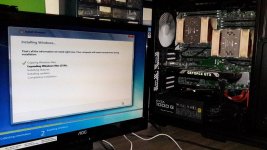
Below is my dual Xeon PC with temporary VGA monitor, setting up Windows installation.

Dual Xeon PC setup.jpg
 
I start looking at FCPX more and more. For someone that was never using FCP as a main NLE could you point main differences to PP? No color correction tool, I know that (Color finale as a savior), what else?
Thanks!

It's really a good editor now. When it first came out, it was lacking a lot. Nowdays, pretty much anything
it is lacking, you can get a plugin for (Color Finale as mentioned or download the free Resolve). Even Track X
and Slice X which are amazing plug ins. Amazing multicam. Fast, even on my upgraded 2009 Mac Pro,
yeah, it works like a dream on a 6 year old computer! Hard to wrap your head around the new editing ways at first,
but just do some video tutorials and you'll pick it up. It's honestly not as hard as some people say, you just have to
get used to it like anything new.
 
Then there's always Resolve 12 as an NLE. I've been looking for feedback from real editors in the field about it - not too much yet. Looks pretty good and I haven't seen much that's negative unless you are a very high end editor. Any thoughts out there? I'm still on FCP7 but have considered switching to Resolve but its a scary idea unless there is more feedback.
 
I start looking at FCPX more and more. For someone that was never using FCP as a main NLE could you point main differences to PP? No color correction tool, I know that (Color finale as a savior), what else?
Thanks!

As I said earlier if you combine FCPX+Color Finale+TrackX you'll probably never need to leave FCPX and grade in Resolve.

FCPX's native color board is basic but deceptively powerful. Colour Finale adds LUTs, curves and vectors. TrackX adds Mocha planar tracking and will track Color Finale corrections onto footage.

To get the best out of FCPX you MUST get into Motion which you will build your plugins and useful tools, transitions, titles and generators. We have stacks of our own content which doesn't look like every other plugin and transition pack out there.

The magnetic timeline is awesome especially when you start exploring compound clips and auditions.

It looks like it's a one off payment for FCPX as Apple look like they've no intention of charging for upgrades so the cost of ownership is negligible.

If you have any specific questions I'd be happy to answer.
 
I'm also a huge fan of FCPX, and tend to use it for projects I edit in the field or clients want prores.

It's cheap, powerful, and I find you can easily do basic color grading in it with ease.
 
The magnetic timeline is awesome

Funny. The magnetic timeline is exactly what makes me loathe it. I feel totally trapped into a claustrophobic and alien paradigm, dreamt up by some beardy weirdy hipster in Cupertino. And I'm not normally resistant to change - I've gone the whole journey so far, from Steenbeck to tape, to Lightworks, Media 100, Avid and then FCP.

I worked with the Apple Pro Apps team during a time when I happened to be work-flowing post production processes for the BBC, just prior to them releasing FCPX. I found them to be insufferably smug.
 
I hated it too, but you get use to it. What really use to frustrate me is how to just have some space inserted between clips. Took rocket science to figure that one out.

:shocked:
 
I'm also a huge fan of FCPX, and tend to use it for projects I edit in the field or clients want prores.

It's cheap, powerful, and I find you can easily do basic color grading in it with ease.

I agree. It truly has gotten better with each free update. Color Finale makes working with S log a truly fun experience from my perspective.
As someone who has used Premiere, Avid, DPS Velocity, Canopus and FCP 6 & 7 and even peeked at Vegas (very briefly) ... I can honestly say that I work much faster using X. It does take a bit of getting used to... but then they all do, don't they?
 
Then there's always Resolve 12 as an NLE. I've been looking for feedback from real editors in the field about it - not too much yet. Looks pretty good and I haven't seen much that's negative unless you are a very high end editor. Any thoughts out there? I'm still on FCP7 but have considered switching to Resolve but its a scary idea unless there is more feedback.
I've used Resolve 12 and it was horribly slow (I have an old 2009 quad core
Mac Pro). Then I upgraded to a hex core CPU and put in a 980 Ti (6GB) GPU
and suddenly everything is great. My only gripe with it, is the current lack
of plug ins compared to FCP X (understandable as FCP X has been around as a
NLE for 5 more years than Resolve) and very basic titling. If they beef up those
things, it going to be another great option in my opinion. I could certainly
edit an entire video in it but I may need to create titles in Motion or
something.
 
Thanks ,
So besides the plug ins are you pretty happy with the program?
One thing I like is that it looks quite similar to FCP7. I was looking at plugins though.
I've got a late 2013 iMac that's pretty fast with 4G's Nvidia video RAM & Quad Core Intel 7 , so I think that ill run it but I would need to upgrade my ;laptop if I wanted to be able to travel.
One issue for me with PPro is that I'm a shooter not an editor but I have my own projects. However at 67 I my not want to keep paying for this thing 5 to 10 years out. If you stop paying then you just lose your projects right? Can you just pay up when you need it now & then?
 
Funny. The magnetic timeline is exactly what makes me loathe it. I feel totally trapped into a claustrophobic and alien paradigm, dreamt up by some beardy weirdy hipster in Cupertino. And I'm not normally resistant to change - I've gone the whole journey so far, from Steenbeck to tape, to Lightworks, Media 100, Avid and then FCP.

I worked with the Apple Pro Apps team during a time when I happened to be work-flowing post production processes for the BBC, just prior to them releasing FCPX. I found them to be insufferably smug.

Each to their own. I didn't say it was perfect and certainly FCPX has come a long way but has a long way left to go.

I like the magnetic timeline because it's the most accurate depiction of how my mind thinks about editing. In my mind's eye images are organised by associations with sound, music and other images it's just the running order that changes. I don't think in terms of tracks which seems and alien and ass backwards way of approaching things after FCPX.

The power of the magnetic timeline revealed itself to me when we had one particular client who could not make up their mind about the running order of a particular training package. The timeline was very complex with lots of titles, motion graphic overlays and B roll etc etc so we got the client in to get a decision. With FCPX a complex editing nightmare was no more difficult than selecting the clips on the main storyline and dragging them to the new position and all the nightmare in the "layers" above and audio below simply came along for the ride and sorted itself out and we could quickly go back and forward until the client made the decision. It was at this moment I drank the FCPX magnetic timeline koolaid, I don't think even the most skilled editor of a tracked based system could've done the same thing as quickly and effortlessly.

I do send a lot of feedback via the Feedback form and had quite a lot of direct contact from the FCPX team and they've always been extremely polite and very grateful for suggestions and bug reporting in communication. They do tend to start from the position of they are right but if you provide them enough info they certainly act upon the information.
 
Last edited:
Thanks ,
So besides the plug ins are you pretty happy with the program?
One thing I like is that it looks quite similar to FCP7. I was looking at plugins though.
I've got a late 2013 iMac that's pretty fast with 4G's Nvidia video RAM & Quad Core Intel 7 , so I think that ill run it but I would need to upgrade my ;laptop if I wanted to be able to travel.
One issue for me with PPro is that I'm a shooter not an editor but I have my own projects. However at 67 I my not want to keep paying for this thing 5 to 10 years out. If you stop paying then you just lose your projects right? Can you just pay up when you need it now & then?

Yup Resolve is a great program and I do like it a lot. It's strange because
it is very similar to FCP 7 AND FCP X. After I used Resolve 12,
I started to realize that FCP X wasn't as far off of FCP 7 as I had
initially thought. Resolve is this blend of them, and I'm willing
to bet that they keep making it better and better as a NLE. It's so
much improved over 11 that it's not even funny.

As for CC, yeah you can just 'rent' it for a month here and there
when you need it, but the monthly charge goes up. Think of it
as 'leasing' month to month instead of signing a long term lease.
You can do it, but you will pay more each month. I personally
refuse to 'rent' software and it's why I moved back to FCP. I had
switched from FCP 7 to CS6 but I switched back to FCP X after
CC came out....and found out that 'surprise' it had improved a ton.
 
I do send a lot of feedback via the Feedback for and had quite a lot of direct contact from the FCPX team and they've always been extremely polite and very grateful for suggestions and bug reporting in communication. .

please please please ask them to bring back the burn in source timecode. This feature was cancelled in 10.0.3 afair and even the recently published TC by fxfactory is not exactly brilliant
 
Back
Top