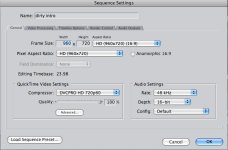
in FCP my footage doesn't have duplicate frames when i move the scrubber frame by frame, but after exporting i notice my footage has duplicate frames which makes my footage look choppy when adding visual fx, etc.
here's the footage: http://www.dirtymartinithemovie.com/video/dirty_intro_choppy.mov and if you move frame by frame you'll notice the video frames are duplicated but the muzzle flash (done in after effects) plays normally as it should.
does anybody know how i can remove the duplicate frames in the video footage? is this something that needs to be done in compressor?
here's the footage: http://www.dirtymartinithemovie.com/video/dirty_intro_choppy.mov and if you move frame by frame you'll notice the video frames are duplicated but the muzzle flash (done in after effects) plays normally as it should.
does anybody know how i can remove the duplicate frames in the video footage? is this something that needs to be done in compressor?