FS7: How do you polish s-log3 in Resolve?

Martin.G

Well-known member
So im new to Resolve, no secret. But the online course i took does not really go into advanced polishing and sharpness.

Often i see footage that is percieved as much sharper than mine, even though we have used the same camera, the same resolution, and the same lenses. So im curious what the secret sauce recipes in Resolve is. How do you sharpen, contrast, or clarify your footage? If we exclude the quality of present light, how do you make your footage appear tack sharp?

I can relate to this ;-)
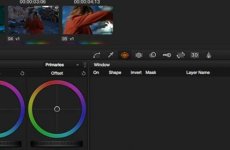
 
Sharpen in colormodus,
resolve.jpg
Choose most right button, above 'layer name' there you can sharpen your image with radius etc
 
Thanks! Is this the only method you use for increasing the percieved sharpness in the image?

There is some techniques in Photoshop, like liftiing the fog by using the black points and white points. In Lightroom there is Clarity and the on defog option now in the latest release. Whats the angle to do these tricks in Resolve? Just curves?
 
If you have to apply sharpening in Resolve . . . get a better lens or do a better job focusing. I never have to use the sharpen control with S-LOG or any other profile with the FS7.
 
If you have to apply sharpening in Resolve . . . get a better lens or do a better job focusing. I never have to use the sharpen control with S-LOG or any other profile with the FS7.

Agreed. While sharpening in Resolve has its place (particularly Red footage which doesn't apply any sharpening in camera), the FS7 is sharp out of the camera.
 
Log does not add sharpening - expecting it to be added in post. I would consider it to be a basic part of a general workflow.

Resolve 12 sharpness slider 47.

Actually you should choose your sharpening when creating your deliverable.. if you are delivering 4k or 720 the settings will change.

If you are a really tricky cat you can sharpen on a separate qualified node and keep sharpening only to the 'important' tonal areas of the image. No need to sharpen your shadow noise if you have any. You may also choose to soften/bloom your highlights but that only really works when also adding grain.

S
 
Hi Martin,

Your question is better suited in a professional colourist forum such as www.liftgammagain.com. I've been spending some time there myself the last little while to improve current techniques in Davinci Resolve, but also to learn more advanced ones. The colourists there are absolutely brilliant, knowledgable and willing to share lots of information. Much like here on DVX.

Sharpening, high pass sharpening, and even frequency separation for skin smoothing are all techniques used in digital still processing sometimes for effect and other times for enhancing aspects of a scene, and also "beauty" type of grading for example "fashion look". Despite what people say, you can not get these looks in-camera or by paying more money for an expensive lens. These are advanced effects and techniques used by digital artists.

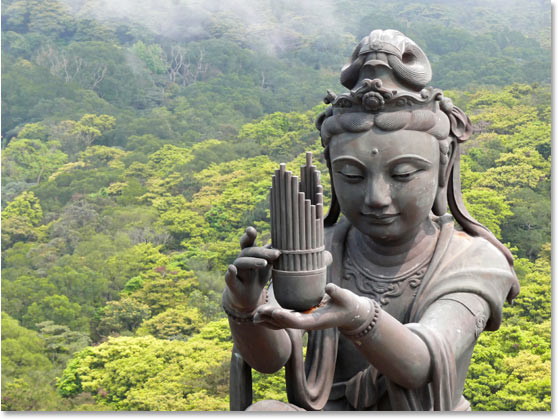
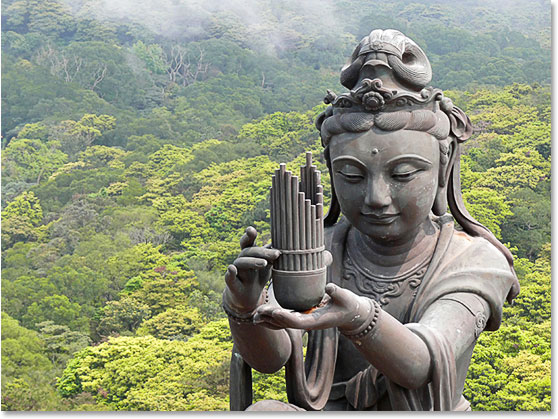
High pass sharpening is basically a method of selectively selecting what you want to sharpen in an image. Generally this is done where there are large areas of fine detail. Leaves in trees appearing far away in a shot, or perhaps the lines and detail of a statue in your foreground. It can be used to add a sense of clarity to an image.

High pass sharpening examples:

Example 1:
Sharpening-for-detail.jpg


Example 2:
original.jpg

final-result.jpg


Doing this technique in Davinci Resolve is far more complex than adding a node and using the sharpening panel. One advanced method of doing it involves creating a node that blurs the image and then adds a negative version of the blurred image to the original image using a layer mixer. This method works really well and I've been playing with it recently on footage from the F35 and other cameras.


Next you have the opposite application which is to smoothen detail out but only on select parts of the image using a technique called frequency separation. This is used for smoothening rather than sharpening. Check out this example, it is done in Davinci Resolve and really impressive.

http://www.vimeo.com/96743549
 
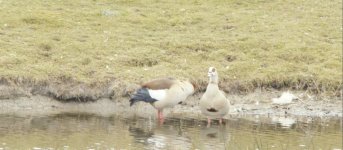
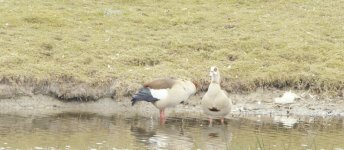
Just posted this in another thread. Same still, only changed 'Radius' from .50 to .45 in Davinci Resolve (second picture). Seems sharper to me. I know an editor who does this standard.
ganzen 3.JPGganzen4.JPG
 
Last edited:
judging the effect of sharpening on a still image might be misleading to the effect on motion picture.

here's the thread at LiftGammaGain that might help:
http://www.liftgammagain.com/forum/index.php?threads/building-a-better-sharpen-in-resolve.278/

For me personally I rarely use a highpass sharpening filter in FCPX and if so mostly masked for the parts which needs a little sharpening. In the sample above the sharpening on the buddha statue might help but it's counterproductive for the wood in the background.
 
There are plenty of examples of high pass sharpening being used on actual video, again, one just had to spend some time in the right forums looking. The images I posted are for illustrative purposes. If you don't want to affect the whole image then you use a qualifier or power window. Trust that it works on video all the same but of course it has its limits - if your doing a whip pan sharpening is probably the last technique you should be thinking about.
 
Last edited:
I think you guys are over complicating.

IMO a twissle of sharpness will help.

1) it just brings it back to where a camera would be with in camera sharpening

2) I think you can basically get a bit tech but simply the oplf limits sharpness and it is entirely usual to counteract this in post.

Of course there are a million other fancy tricks to be done.

S
 
Hi Martin,

Your question is better suited in a professional colourist forum such as www.liftgammagain.com. I've been spending some time there myself the last little while to improve current techniques in Davinci Resolve, but also to learn more advanced ones. The colourists there are absolutely brilliant, knowledgable and willing to share lots of information. Much like here on DVX.

Thanks for the tips Dennis, and wow at your samples. I will check it out.

If you have to apply sharpening in Resolve . . . get a better lens or do a better job focusing. I never have to use the sharpen control with S-LOG or any other profile with the FS7.

I have to confess i was trying to bait you into revealing how your stock photography from Florida looked so good ;-)

Mine does not look as good, and i have sharp Canon lenses too.

Just posted this in another thread. Same still, only changed 'Radius' from .50 to .45 in Davinci Resolve (second picture). Seems sharper to me. I know an editor who does this standard.

Definetly see an improvement, thanks for the tip!
 
Just posted this in another thread. Same still, only changed 'Radius' from .50 to .45 in Davinci Resolve (second picture). Seems sharper to me. I know an editor who does this standard.
QUOTE]

Why? Does he work with camera operators who can't focus often?
 
Why? Does he work with camera operators who can't focus often?

Is it not 'normal' to have in camera sharpening when shooting 'baked'? - Slog this would happen in post.. seems natural to me that to match the sharpness of a typical baked look one would sharpen Slog in post.

It is about defeating the inherent blur of the OPLF not the standard of the operator.

S
 
Is it not 'normal' to have in camera sharpening when shooting 'baked'? - Slog this would happen in post.. seems natural to me that to match the sharpness of a typical baked look one would sharpen Slog in post.

It is about defeating the inherent blur of the OPLF not the standard of the operator.

S

It's not normal for me to have any sharpening either in cam or in post with the FS7. I'm more inclined to soften the image with lens filters or post because the FS7/F5/55 are not exactly short of sharpness.

How much blur do you think there is from a 4k OLPF that would require sharpening?
 
Hey guys with respect to Martin's thread, I think his post is about achieving specific aesthetics in post production and various techniques in Davinci Resolve to achieve them. I don't think he is talking about blanket all around image sharpening. At least that's not how I read his post personally.

The discussion on soft focus, applying image sharpening on whole image, and whether operator needs glasses or not should probably be discussed in Publimix's original 2k crop pushing limits thread: http://www.dvxuser.com/V6/showthread.php?345519-2k-crop-pushing-the-limits-need-better-lenses
 
How much blur do you think there is from a 4k OLPF that would require sharpening?

more than a 6k raw DSLR.. which needs sharpening

In general as I said in my first post.. 47 on the resolve slider adds a little ping that IMO that is suitable for corporate work.

Of course depending one the subject matter and desired final look one can do anything.

S
 
I would think about sharpening a wide shot of a city but not a portrait for example. Thats why you do it in post and not in camera. Nothing strange here.
 
Back
Top