How do you keep blown highlights from looking so bad?

Time for a serious controlled side by side test with a couple of cameras, same settings, light etc. No point in anymore conjecture really.
 
The only way to sort the "issue" out is for people to post their PP settings so they can be picked apart.

It looks to be like incorrect setting of knee is causing an overly sharp highlight transition. I saw it recommended earlier that knee should be set to 105! It's not surprising that people are getting ugly results! This combines with any in camera "enhancement" will cause a bad situation to look even worse.

Another problem I see is the incorrect matching of picture profile to lighting condition. You should have vastly different profiles depending on whether the scene has a wide dynamic range (bright sunlight) or low dynamic range (overcast day).

It also seems to be in vogue to shoot the subject back lit by a strong light source, since when has this been good practice? I know the huge dynamic range of the new cameras makes this possible but just because you can doesn't necessarily mean you should. I saw someone complaining (elsewhere on the web) that it cause sensor flare! Frankly, I'd be surprised if it didn't!

These highly sensitive LSS camcorders need the operator to understand how to control the light entering the lens. Once you've controlled the light, you then need a PP that best suits that lighting condition. I would start with lowering the knee with a more gentle slope. Where you set the knee is scene dependent. A fill light or bounce card would also greatly improve the situation as has been already suggested.

I have also noticed some rather terrible Profiles being publicised on blogs and Twitter. There is one in particular that is particularly poor. It's not my place to publicly out the author but just beware of what advice you're taking. This profile not only destroys detail in the blacks but also limits the dynamic range of the camera by 15%-20% and produces ugly highlights. It's everything you want to avoid rolled into one profile.
 
My theory is that the knee curve induces wierd colours and tones as the light in to light out response is being artificially flattened

Any portion of the image where Knee is being used will have poor color rendtion

That poor colour rendition HAPPENS at some point

You can put the knee at 80 meaning you get your distortion at 80 meaning that anything 80 and above is unsable

you could put it at 90 meaning your are throwing away 10% of your usable dynamic range

Or you could put it at 105 and use the full DR of the camera - and that full DR is not that wide

IMO knee just doesnt work to increase DR, its like adding water to Coke, yep you get more liquid to play with .. but it is disgusting :)

Edit..
Have a watch of this - the highlights just die with various profiles - actually doesnt really seem to make a difference what profile - they die the same way - a quick and painful death
Its not when they die but how they die IMO
https://vimeo.com/27878451
With the knee on you see even worse banding before death.. admitidely the death happens later.. but im about avoiding the banding and colour shifts - not avoiding death - you cant do it

IMO only such tests on graduated surfaces create good understanding of what is happening

I admit my testing is to a poor standard - it would be great to seem some one with more time do it better and present it better


S
 
Last edited:
:)

Edit..
Have a watch of this - the highlights just die with various profiles - actually doesnt really seem to make a difference what profile - they die the same way - a quick and painful death
Its not when they die but how they die IMO
https://vimeo.com/27878451
With the knee on you see even worse banding before death.. admitidely the death happens later.. but im about avoiding the banding and colour shifts - not avoiding death - you cant do it

No one can make any conclusions based on that video because you don't state what gamma settings you have beyond the stated knee position. Knee is just one parameter of many.

It rather looks to me like you're trying to solve over exposure with knee setting which is never going to happen.

I'm really not sure what you are expecting other than it's possible to overexpose an image if you really want to.

PS.

Colour shifts and banding near the highlights is caused by the different sensitivities of the rgb photo sites (or chips in 3ccd cams) i.e different photo sites hit over exposure at different light levels and enough to see a colour shifts and posterisation towards the highlight. Any matrixing you have engaged could have a negative impact on those areas too by accentuating the problem. Colour correction in post will help although it's better done in camera like my Canon XHA1 does.
 
Last edited:
To me the video shows that the over exposure clip is very steep - not a rich smooth roll to white - filming a graduated surface like this shows that roll to white.

Also with PPoff and knee at 75 (seperte shots) we can see wierd banding - which we cannot in my profile or franks first profile (before GlLog)

What I want is an image that can include blown highlights but no funny colours, or banding

Good colours for minimal grading

Ill take lower DR to get it

Those PPs the gammas are pretty unchanged from standard settings

Feel free to share your profiles test footage and real world footage .. sounds like you are an expert in this

S
 
Feel free to share your profiles test footage and real world footage .. sounds like you are an expert in this

S

If you really are interested and weren't being facetious try,

If you intend to shoot a backlit subject depending on the strength of that back light and the light falling on the subject you have to make a decision what you expose for the light (unlikely) or the subject (most likely). By way of compromise you can try and limit the huge dynamic range of the scene by adding fill to the subject. We all know this. If for any reason you don't have fill available you can use the Black Gamma RANGE and LEVEL (not BLACK LEVEL that's different) settings to lift or stretch the blacks and darker mid tones up in exposure. The effect of the black stretch will change depending on the gamma curve you are using. For obvious reasons it's better to alter the gamma response in camera as the internal maths are at 12 or 14 bit 444 usually rather than in post after the image has been crunched to 8 bits 420 or slightly less crunched to 10 bits 422.

For a high contrast scene your PP needs to bring up the blacks so you can come down on your exposure at the white end. Obviously there are limits to what can be achieved but you want to get as much data between both ends of the histogram as possible for a given scene. I wouldn't worry too much what it looks like on the VF as the amount of data you are getting between the bottom and top scale of the histogram is the important. This is not about capturing reality but giving you as much data to work with in post on a compromised lighting setup.

The other thing to bear in mind is that you can only save so much highlight and it may be a case of not trying at all may yield better results by adding post effects like hazes round highlights.

I was shooting a doc in the souks of Morocco and most light is very diffused apart from when the sun breaks through and it's white hot. No amount of PP was going to help in those circumstances. IIRC, I had 6 PPs for outside Hi Con, outside overcast, inside, dusk, lowlight and lowlight with bright lights. None of the footage matched on the timeline until it was graded but we gave the colourist as much info as we could squeeze out of the camera.
 
Last edited:
Im was being semi fecetious - You wade in criticizing (possibly me) heavily after a couple of posts and making comments on 'how to shoot' - we all have our own way!

Actually IMO there is some very very bad info on certain blogs - we agree on that

You are talking sense so Im listening :)

It makes sense to stretch the black internally as you say rather than do it in post

My journey with the FS100 profiels has concentrated on understanding the highlights

Obviously they cannot be seen in isolation

My next mission is to experiment with lightening the blacks to enable stopping down to protect the highs a little more

I think (as I do not shoot in fully controlled studio) that every scene can be considered to be a high contrast scene for my purposes

Im not sure that I can see fiddling with (as yet un nameable) PPs on set a practical option - I would consider different PPs if I could name them Studio, Foggy - Sun whatever (as my EX1)

I agree about the monitor (I use a DP6) - really only the histo is to be trusted IMO but the histo is so small that some chunks can be missed

As for the posterization I have been trying killing that in post as linked before.. https://vimeo.com/34622682

Best

S
 
As for the posterization I have been trying killing that in post as linked before.. https://vimeo.com/34622682

Best

S

The beauty of the FS100's low light performance is that any stretching to the lower end of the gamma curve comes with little noise as the sensor is so sensitive. By stretching the blacks you're just adding a localised bit of gain to the values. We know adding gain doesn't add much noise in this cam.

Be very careful of the Black Level setting as I believe that is just a threshold and you'll clip black info if it's too high. I need to do more testing myself.

As for that posterisation it'll be due to the knee and the slope trying to smooth out an exposure point that is just in range to the next one that is way over exposed and it just gives up. Cinegamma 1 will hold onto more highlights than rec709 but if the halo persists you know it's a highlight not worth saving. Hypergammas or Slog won't help either if you point the camera into the sun.

Yeah, the VF/LCD is just a means of framing. It would be nice if you could have the Histo full screen and superimposed over the footage to see max detail.
 
It's very obvious which profile it is if you use scopes. Actually you can see it without scopes but the scopes show very clearly the damage done to your footage.
 
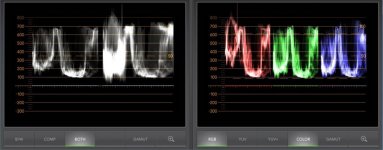
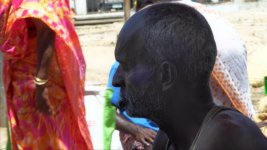
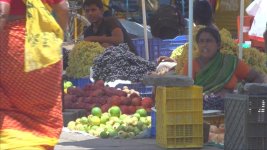
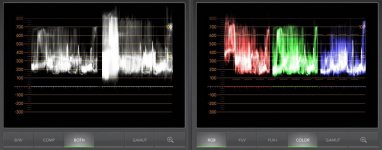
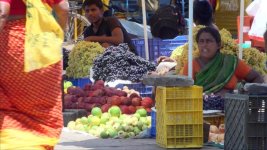
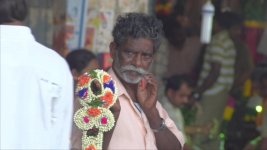
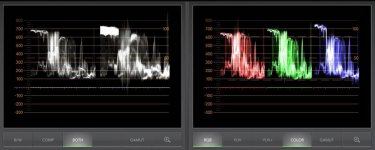
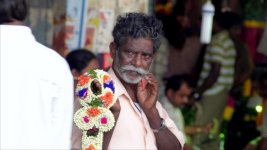
I used AbleCine's Techstyle, and set the knee to 105/0 for these shots - the set up is - i was asked to be A cam op on a doco shooting in Tamil Nadu a few weeks ago, i splintered off from main unit for an hour or so to get some B reel at a flower market, mid day sun, 100 degree + heat, and steath mode.. shooting with the FS / 70-200 / monopod by myself... here's three frame grabs of how the shots looked when injested, the scopes on injest, and a fast first light cc on them;

Shot # 1, is a flower seller in shadows, and a woman in a bright red sari behind in screaming sun and a huge DR;
highlight demo 1.jpg
highlight 1 ungraded.jpg
highlight demo 1 cc .jpg

Shot # 2 is some fruit sellers outside, again screaming sun, deep shadows, and nothing really harshly clipped;
highlight demo 2.jpg
highlight 2 ungraded.jpg
highlight demo 2 cc .jpg


and shot # 3 is a guy selling something kinda cool, i was in the shadow of a vendor's stand shooting and a guy in a white shirt walked through frame, way over exposed... but not a harsh clip;
highlight demo 3.jpg
highlight 3 ungraded.jpg
highlight demo 3 cc .jpg

that's what i've been using, seems OK so far.. BTW, they are graded for broadcast legal, not full range, so the presentation on a computer screen is sub-optimal.
d
 
Last edited:
so... I'm a little confused. Is setting the knee to 105 a solution or a no-no?

I've been playing between abrange, glogA, and cpf-log. To be honest, none of them really do it for me and they all have issues of turning plasticky towards the highlights. Watch her hair coupled with the out of focus background in the 3rd shot: https://vimeo.com/39382509
 
so... I'm a little confused. Is setting the knee to 105 a solution or a no-no?

I've been playing between abrange, glogA, and cpf-log. To be honest, none of them really do it for me and they all have issues of turning plasticky towards the highlights. Watch her hair coupled with the out of focus background in the 3rd shot: https://vimeo.com/39382509

What are the settings for the CPF-LOG PP? Is that posted anywhere?
 
so... I'm a little confused. Is setting the knee to 105 a solution or a no-no?

It is my theory that knee at 105 is the way to go

I think you get better quality/gradation less plastic (which IMO is caused by knee flattening the highs in a manner that does not read to the eye or my eye anyway) .. but ultimately a lower DR and more need for fill

Just the opening frame of the crooked blog shows plastic grass in the background - IMO a result of 80% knee

Of course he manages to keep some detail in the bloke in shadow which a less knee-ed profile would probably lose, unless you lit it

S
 
Hard to say .. change it all the time but I think.. Im settling aroudn this

Knee 105
Red +2 (less red)
Cinetone2 - allows superwhites, but the shadows are deep requring a reflector (to be investigated pulling the shadows up as discussed above)
Sat (colour level) not changed/reduced or reduced by one click

Everything else as per out of the box

Operating the camera..

Manual WB, 200k colder than reading (to kill the reds)
Skins at 50-60% not 70% .. aka mild under exposure

Tiffen VND, nikkor 80s glass

S
 
Back
Top