artofsuntzu
Active member
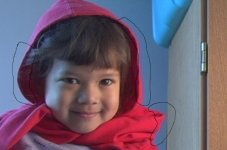
I'm running some light tests for my Panasonic DVX-100A. I'm running it in wide 24p mode. An image is lit with sunlight on the image-left and PAR light on the image-right.
The left-side circle of the image is more-or-less fine. The two right-side circles of the image are showing artifacts where Red is bleeding over the image and causing red pixels over the background.
http://www.dvxuser.com/V6/attachment.php?attachmentid=516&stc=1&d=1149872884
How can I avoid this?
Stop lighting with 2 temperature light sources? Limit my use of the colour red? Camera miscalibration?
The left-side circle of the image is more-or-less fine. The two right-side circles of the image are showing artifacts where Red is bleeding over the image and causing red pixels over the background.
http://www.dvxuser.com/V6/attachment.php?attachmentid=516&stc=1&d=1149872884
How can I avoid this?
Stop lighting with 2 temperature light sources? Limit my use of the colour red? Camera miscalibration?