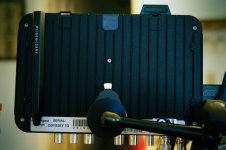
horror short "Feedback" shot in 2K raw with O7Q...

blackdogdylan

Active member
hey gang-

just thought I'd share this with the community. found out about a contest that bloodycuts.co.uk was having called the "Who's There" film challenge very late in the submission process. decided it would be a great opportunity to test the 2K raw workflow and also blow the dust off an old idea that I'd had. so with less than a week to submit, I cobbled it together. it had to be uploaded to YouTube for the contest, but I certainly prefer the Vimeo encoding. either way, here are both links:

https://vimeo.com/dylansanford/feedback

http://www.youtube.com/watch?v=cC68khjuF3s

a bit of technical info. shot entirely in 2K raw (24p) rated at 2000. did a "pre-grade" in Resolve to make 1080 DNxHD clips that Avid could handle. then used those for the final grade.

I was extremely happy with the process. the 2K raw looks really great. no question. the latitude. the resolution. I found the clips VERY much like an Alexa, but more flexible than ProRes... more like ArriRaw. any noise or artifacts you pixel-peepers spot was introduced in the encoding and uploading process. I wish you could see how great the footage looked on a PVM. still some weird quirks to work out with Resolve's handling of the Cinema DNGs. but I'm sure they'll get there. the Odyssey really does provide a hefty upgrade to the FS700.

happy to answer any questions about the shoot or how I have my kit rigged. hope you enjoy.

-d
 
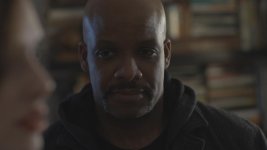
On the Man's face I noticed that the highlights appear to look blown out, and brought down pretty low. Is this how the image looked in camera?

When the lights go out, the highlights look fine and bright. Is this just an issue of not doing a full grade?
 
Good stuff, here! YouTube sequence shows some pretty distracting artifacts on her black blouse. The artifacts were MUCH less on the Vimeo sequence, so, I assume those are compression artifacts from web compression. I didn't see shadow noise, per se. Mind sharing how you set exposure?
 
On the Man's face I noticed that the highlights appear to look blown out, and brought down pretty low. Is this how the image looked in camera?

When the lights go out, the highlights look fine and bright. Is this just an issue of not doing a full grade?

hmmm, not entirely sure I know what you mean, Alexander. are you referring to the African American actor? or the masked man? if you're talking about the masked man, the answer is complex. his exposure was never in clip. but there's also a lot going on with him. the "feedback" effect on his face was a practical effect (with a second camera feeding a pico projector that was mounted on top of it, shooting the same scene it was projecting.) as such, he was getting additional illumination from the projector, which, by the nature of feedback, amplifies the exposure as it moves inwards. on top of that, there are additional composite layers of static on top of that. so not sure if that answers your question, but there was a lot going on with that effect.

and to be clear, there was most definitely a proper grade (a very involved one with lots of windows & finesse.) by "pre-grade" I simply meant that the raw was "processed" before I began editing to "legal" and "accurate" 10bit DNxHD files that became the masters used in the final grade. I never returned to the raw.
 
Good stuff, here! YouTube sequence shows some pretty distracting artifacts on her black blouse. The artifacts were MUCH less on the Vimeo sequence, so, I assume those are compression artifacts from web compression. I didn't see shadow noise, per se. Mind sharing how you set exposure?

thanks! yeah. YouTube. not my favorite. take my word for it, the original footage and final grade are very clean...

as for exposure, a lot of that was feel. the skin tones generally were between 40 & 50%. hottest highlights around 80-85. in general, I overlit (with minimal lighting- not hard at 2000 ISO) and disregarded my gut. I erred to the right, knowing much of it would be buried in the shadows on the grade and focused instead on managing ratios. I really only looked at the scopes at the start, set my exposure (at a 2.8) and then just kept it consistent to my eye. thus far, I've found much of it to be "noise management" since the dynamic range is there. to me, it's really just about where your final grade is going to land.
 
looks great. well paced editing, good lighting, good grade, good sound.

The highlights on the dude @ 1:58 seem a little on the hotter side, but honestly that's the only critique I have.

Good luck with the contest!
 
looks great. well paced editing, good lighting, good grade, good sound.

The highlights on the dude @ 1:58 seem a little on the hotter side, but honestly that's the only critique I have.

Good luck with the contest!

thanks!

if you mean the "moonlight," yeah, it's a little pushy, I know. partially a look to still have separation in "darkness" and partially how reflective the actor was... bald + dark skin = strong kicks ; )
 
Dylan, nice job and lovely concept. If i had one criticism it would be to have cut after just seeing the guy in the room and left it at that. More what you didn't see than what you saw. But that's a personal thing.

What post workflow did you use with the RAW then, and how was your experience of the shoot and workflow with the O7Q?

cheers
Paul
 
Just curious, how did you set up the 7Q to only capture 24p in 2K RAW? I've been using mine primarily as a monitor until ProRes is released, but have captured some 240fps 2K RAW clips. I didn't realize you could do 24p RAW.

EDIT: Thinking about it again, did you mean that you had the FS700 in standard HD 24p mode and only the 7Q in "FS700 RAW" mode? Did you notice a substantial difference capturing RAW? The camera is still only putting out 8-bit through the SDI, right?
 
Last edited:
Dylan, nice job and lovely concept. If i had one criticism it would be to have cut after just seeing the guy in the room and left it at that. More what you didn't see than what you saw. But that's a personal thing.

What post workflow did you use with the RAW then, and how was your experience of the shoot and workflow with the O7Q?

cheers
Paul

thanks, Paul. and duly noted. I tried different iterations of the ending (including the one you describe) and went back and forth on the "how little is too little to see" matter. a tricky balance to strike.

as for workflow, I shot everything in 2K raw, 24p, framing for a 2.35 crop. I fed the O7Q external LTC with a lockit box and embedded audio over SDI. I have 2 256GB SSDs and filled one and a little of a second. I used the O7Q as more of a confidence monitor and operated with a DP4 EVF, taking the HDMI feed from the camera for the EVF.

after we wrapped, I transferred all the clips to a USB 3.0 LaCie formatted in ExFat. I then took that drive to my colorist (who also happens to be my dad) and using Resolve, we "processed" the footage. we didn't use the CD LUTs, but instead aimed for a kind of best light that would preserve the maximum range without losing anything in shadow or clip. I had originally intended to use the full 17:9 aspect, but in the rush, overlooked the "crop" box. ah, well. from there, we output the footage (as individual clips) in DNxHD 175x. I then took that drive back to my system (a PC- Resolve is on a Mac, hence the ExFat drive) synced the master audio (with isolated tracks,) and edited a standard 1080 timeline in Avid MC7. I did discover a 2 frame offset between the smart slate and what was recorded on the O7Q- not sure if that's a bug or if the lockit was just a little out. used to encounter something similar with my nanoFlash.

once I locked my picture, I did a video mixdown and an EDL. took that back over to Resolve and we did a final correction. then we output that and I took that back into Avid, where I finalized my sound mix and any final FX and the mask. all in all, not an overly complicated process, but then again, I never went back to the raw (a deliberate choice since I knew I was tight on time.)

the Odyssey performed flawlessly (though, I'm eager for the firmware updates.) I'll be happy when the color temp is accurately reflected on the Odyssey (in 2K raw) and my sound mixer will be happy to have some VU meters and headphone volume. but minor gripes. the 2K raw really DOES represent an increase in IQ over the 1080 out of camera (as I believe you've concluded as well.) the picture is quite pleasing and I find the noise to be organic and minimal. is it right for every job? no. but then, I'm not aware of any camera/recorder that is.
 
Just curious, how did you set up the 7Q to only capture 24p in 2K RAW? I've been using mine primarily as a monitor until ProRes is released, but have captured some 240fps 2K RAW clips. I didn't realize you could do 24p RAW.

EDIT: Thinking about it again, did you mean that you had the FS700 in standard HD 24p mode and only the 7Q in "FS700 RAW" mode? Did you notice a substantial difference capturing RAW? The camera is still only putting out 8-bit through the SDI, right?

shot entirely in 24p 2K raw. see the post above for more specific details...

the only way to record standard HD on the O7Q (at this time) is in DPX stacks... you have to reboot it out of the FS700 raw mode to do so.

let me know if the post above doesn't answer your questions... happy to elaborate.
 
shot entirely in 24p 2K raw. see the post above for more specific details...

the only way to record standard HD on the O7Q (at this time) is in DPX stacks... you have to reboot it out of the FS700 raw mode to do so.

let me know if the post above doesn't answer your questions... happy to elaborate.

Ahh, after tinkering around in the menu, I just realized you could change "Output Format" to 2048x1080/24p in the REC SET menu. I had always left that at the default 4K setting. When it's left on 4K resolution, the only 2K recording option I could ever see was the 2K Super Slow Motion at 120/240fps.

Thanks for piquing my curiosity. I knew that some features hadn't been enabled yet so I incorrectly assumed 2K 24fps was one of them. I'll have to give this a whirl soon!
 
thanks, Paul. and duly noted. I tried different iterations of the ending (including the one you describe) and went back and forth on the "how little is too little to see" matter. a tricky balance to strike.

as for workflow, I shot everything in 2K raw, 24p, framing for a 2.35 crop. I fed the O7Q external LTC with a lockit box and embedded audio over SDI. I have 2 256GB SSDs and filled one and a little of a second. I used the O7Q as more of a confidence monitor and operated with a DP4 EVF, taking the HDMI feed from the camera for the EVF.

after we wrapped, I transferred all the clips to a USB 3.0 LaCie formatted in ExFat. I then took that drive to my colorist (who also happens to be my dad) and using Resolve, we "processed" the footage. we didn't use the CD LUTs, but instead aimed for a kind of best light that would preserve the maximum range without losing anything in shadow or clip. I had originally intended to use the full 17:9 aspect, but in the rush, overlooked the "crop" box. ah, well. from there, we output the footage (as individual clips) in DNxHD 175x. I then took that drive back to my system (a PC- Resolve is on a Mac, hence the ExFat drive) synced the master audio (with isolated tracks,) and edited a standard 1080 timeline in Avid MC7. I did discover a 2 frame offset between the smart slate and what was recorded on the O7Q- not sure if that's a bug or if the lockit was just a little out. used to encounter something similar with my nanoFlash.

once I locked my picture, I did a video mixdown and an EDL. took that back over to Resolve and we did a final correction. then we output that and I took that back into Avid, where I finalized my sound mix and any final FX and the mask. all in all, not an overly complicated process, but then again, I never went back to the raw (a deliberate choice since I knew I was tight on time.)

the Odyssey performed flawlessly (though, I'm eager for the firmware updates.) I'll be happy when the color temp is accurately reflected on the Odyssey (in 2K raw) and my sound mixer will be happy to have some VU meters and headphone volume. but minor gripes. the 2K raw really DOES represent an increase in IQ over the 1080 out of camera (as I believe you've concluded as well.) the picture is quite pleasing and I find the noise to be organic and minimal. is it right for every job? no. but then, I'm not aware of any camera/recorder that is.

The feed into the EVF, did you have the O7Q overlays on it, like waveform etc.? I've been looking at whether to use the O7 as a massive viewfinder or whether it's too bulky, haven't had my mind up yet. The potential is there, i'd like to be able to control some functions on the monitor from a handgrip and use an EVF.

Personally i find all the round tripping between Resolve and whatever a bit cumbersome, i've got a pipeline i've been using, although not for RAW. I presume Avid won't open cDNG at all? The adobe products will, but the insane workflow there means opening the RAW viewer, picking a look and then that's processed in realtime but you don't get all the data. So if you take that file and grade it you don't have full latitude, just whatever look you made in the ACR part. At the moment i find myself transcoding to log files and using cineon convertors to get full range into Premiere + SpeedGrade. But it sounds like you're avid based anyway?

When you output to DNxHD you must have baked in a basic look at that stage, right? Unless you output as log from Resolve (i.e. Log within DNxHD)?

Any reason why you didn't edit with the AVCHD proxies from the camera and conform everything at the end in Resolve?

Yes, the 2K is good in most situations. I find in very geometric scenes with strong high contrast lines that you can see the sampling but for people it seems good. Still can't wait for the updates though!

cheers
Paul
 
The feed into the EVF, did you have the O7Q overlays on it, like waveform etc.? I've been looking at whether to use the O7 as a massive viewfinder or whether it's too bulky, haven't had my mind up yet. The potential is there, i'd like to be able to control some functions on the monitor from a handgrip and use an EVF.

Personally i find all the round tripping between Resolve and whatever a bit cumbersome, i've got a pipeline i've been using, although not for RAW. I presume Avid won't open cDNG at all? The adobe products will, but the insane workflow there means opening the RAW viewer, picking a look and then that's processed in realtime but you don't get all the data. So if you take that file and grade it you don't have full latitude, just whatever look you made in the ACR part. At the moment i find myself transcoding to log files and using cineon convertors to get full range into Premiere + SpeedGrade. But it sounds like you're avid based anyway?

When you output to DNxHD you must have baked in a basic look at that stage, right? Unless you output as log from Resolve (i.e. Log within DNxHD)?

Any reason why you didn't edit with the AVCHD proxies from the camera and conform everything at the end in Resolve?

Yes, the 2K is good in most situations. I find in very geometric scenes with strong high contrast lines that you can see the sampling but for people it seems good. Still can't wait for the updates though!

cheers
Paul

for the EVF, lately I've actually been using the HDMI out of the camera (instead of the output from the O7Q- I guess mainly to reduce latency.) I have used the O7Q as a giant viewfinder but, honestly, personally find that less than ideal for handheld work. for tripod work, absolutely. but for handheld, it makes the balance a little funky. every time I set the camera down, I have visions of it tipping onto those delicate SDI ports on the bottom of the Odyssey or cracking the screen.
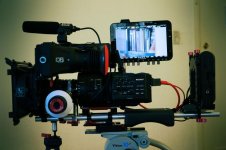
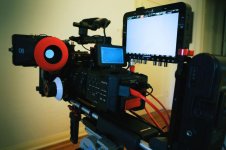
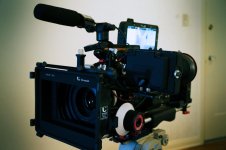
so this is my current "handheld configuration" that's really quite pleasant to operate for extended periods of time:

DSC01965RE.jpgDSC01971RE.jpgDSC01974RE.jpg

it's easy for me to glance over at the O7Q and check for record status, it's "protected" from damage, and has the added bonus that the boom op can peek over my shoulder and get frame lines.

I mount it to a noga with a CineLock so it's really easy to break it off for travel. I also velcro a stylus to the back of the Odyssey so that I have that handy.

DSC01969RE.jpg

as for the roundtripping, yeah, it's currently a bit clunky. increasingly, for better or worse, I think one of the big job responsibilities of the DP is to manage workflow with the post department. and this is no exception.

Avid doesn't open cDNGs natively. and even if it did, timelines are still limited to 1080 so, not huge gains in that respect. for this project, since it was only going to live on the web and likely never be projected, I decided there was no point in returning to the 2K raw. I didn't use the AVCHD proxies since TC wasn't slaved on the camera as it was with the Odyssey. my system is very capable of handling many streams of DNxHD 175x, so in Resolve, we baked-in a basic look that just preserved the maximum amount of data (but not log.) that way, those became the "masters" that I worked from and they didn't have very far to go for the final grade. the framegrabs I included earlier in this thread are from those original transcodes. they contain plenty of range and color information to get pushed around. so for this, that was enough. but, obviously, in other cases it might be necessary to return to the cDNG. but Avid is notoriously slow on codec uptake. they only last year were able to take above 1080 raster (for resizing or scaling into a 1080 timeline- FlexFrame.)

and I agree, I wouldn't want to shoot a product shot of a chainlink fence with the FS700 2K. but then again, I don't know if I'd want to shoot that product shot anyway ; )

may the updates arrive soon so that our options can be more plentiful!

- Dylan
 
Back
Top