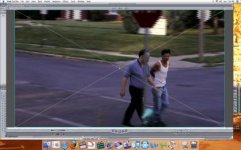
I am having a problem with horizontal lines on my footage on playback.
I have been working with multiple sequences, then nesting them and placing them in a master timeline.
The lines are only visible after I nest a sequence and drag it into my master timeline. The lines are visible in the master timeline but not the original timelines.
The only clips that have the lines are ones that I scaled over 100. This includes footage that I shot in 4:3 and then resized to 16:9.
I have tried putting a de-interlace filter on the footage but it does not help. I have also tried burning to a DVD, but the lines are visible there too.
I've attached a screenshot to show what the lines look like, as these lines are not the same horizontal lines that can be removed with the de-interlace filter.
I would greatly appreciate any help, I've been scouring the net for months with no solution.
Thanks,
Paul
I have been working with multiple sequences, then nesting them and placing them in a master timeline.
The lines are only visible after I nest a sequence and drag it into my master timeline. The lines are visible in the master timeline but not the original timelines.
The only clips that have the lines are ones that I scaled over 100. This includes footage that I shot in 4:3 and then resized to 16:9.
I have tried putting a de-interlace filter on the footage but it does not help. I have also tried burning to a DVD, but the lines are visible there too.
I've attached a screenshot to show what the lines look like, as these lines are not the same horizontal lines that can be removed with the de-interlace filter.
I would greatly appreciate any help, I've been scouring the net for months with no solution.
Thanks,
Paul