Honest suggestions on AF-100 screen grab...

Kindredmachine

Well-known member
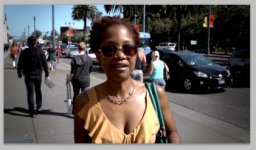
I'm in the middle of editing some street interviews recently shot with an AF100. Here's a screen grab from one of the interviews and I'm looking for honest suggestions/opinions on how to improve the color or if it looks OK as is?. I'm terrible at grading so any comments would be very welcome. Thanks!
AF-100_Example.jpg
 
That's looking pretty good imho :) Decent skintones and nice rich colours. You could push the curves a little in post but I don't think you should be worried about anything, especially as it's a street vox pop with no lighting control or makeup.
 
It looks like a sunny California day :)
Maybe curves, contrast, but it is a nice image.
 
I love Magic Bullet Colorista II. In secondary you can use a mask and color correct a specific area. It's great for shots like this because you can almost add a light to subject then bring down the BG. Really fast and easy. Don't be afraid of CC. It's fun and Colorista works as a plug in with Ppro and FCP.
It looks like you have a little vignette already. Is that from the lens?
 
The vignette is from Looks II but it's too much, I have to bring it down to about 25%. I'm very new with CC but I've been eying Colorista II for quite some time. I did notice a lot of tools in Looks II are also in colorista II... except for secondary CC tools. Do they pretty much do the same job or is colorista II really that much better?
 
Yeah hard to tell without seeing it on the scopes but it's a pretty solid looking image. I'd want to punch up the contrast and make sure I'm hitting the highs and lows of my dynamic range but the shooting is spot on.

-Noah
 
Overall looks great to me. Skin exposure looks spot on, but the background might be a tad bit dark and de-saturated. I'm sure the vignette accentuates the darkness too, though.
 
The vignette is from Looks II but it's too much, I have to bring it down to about 25%. I'm very new with CC but I've been eying Colorista II for quite some time. I did notice a lot of tools in Looks II are also in colorista II... except for secondary CC tools. Do they pretty much do the same job or is colorista II really that much better?

Looks has the three way but no mask or power masks. Having the masks is a game changer for grading. Colorista II is like the gateway to color correction. Three different rooms to work in and again the masks are really great. You can add what looks like a light on your subject that looks totally natural. Until you show someone what it looked like before. That’s my favorite thing to do. HSL adjustments can isolate a color so you can adjust only skin tones or how much saturation the sky has. Very cool. Add a second Colorista effect to the clip and then you have a second mask to control. This is a very powerful plugin.

I use Colorista II 90% of time. It’s just great. I know it isn’t cheap but it’s a non-intimidating way to learn since you don’t leave your NLE and you don’t have to round trip only render.
Magic Bullet also has great tutorials on Vimeo.
Once you start grading your footage it will look so much better. It’s like still photographers. They always edit their images. So should we.
Download the trial and learn the basic fundamentals of color correction and you will be able to use any grading tool. You just need to know the GUI.

Pep talk over. Do It!!!! :) Oh and it’s fun!

http://www.redgiantsoftware.com/products/all/magic-bullet-colorista-II/compatibility/
 
Try this.

Take the image into Photoshop

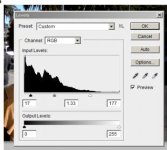
Image>Adjustment > Levels (CTRL-L)

Use 17: 1.33 : 177 (shadows, gamma, highlights)

See if you like how that "pops" it for a start position.


Do the same in Levels in what ever your NLE is.


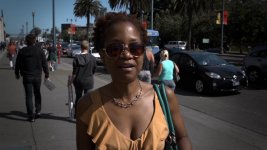
Grade af100.jpglevels.jpg


I would call that an Erik Naso Look. :)
 
Last edited:
shooter, i think your look would be way to contrasty in my opinion, kindredmachine's look is more natural, soft - i like such pictures...
 
Thanks Erik. All good points. I'm gonna download Colorista II in the morning. Getting better skin tones alone, especially with AF100 footage, would be worth its weight in gold. I tried playing around with that using cosmo but never really liked the results.
 
Thanks Erik. All good points. I'm gonna download Colorista II in the morning. Getting better skin tones alone, especially with AF100 footage, would be worth its weight in gold. I tried playing around with that using cosmo but never really liked the results.
Cosmo is great if you want to take a few years off people. Softens the skin. It works great but don't use to much or it looks fake. Colorista has a skin tone overlay that you can turn on. It show a grid when the balance is correct. I like that feature a lot.

Here are several tutorials by Stu Maschwitz. I think I watched each one four times. He moves fast you get a good idea how powerful this plugin is.

https://vimeo.com/channels/coloristaii

This overview is great.

https://vimeo.com/13271908
 
Last edited:
Back
Top