
Navigation
Install the app
How to install the app on iOS
Follow along with the video below to see how to install our site as a web app on your home screen.
Note: This feature may not be available in some browsers.
More options
You are using an out of date browser. It may not display this or other websites correctly.
You should upgrade or use an alternative browser.
You should upgrade or use an alternative browser.
GH2 High dynamic range test: raw 5DMKIII vs. GH2
- Thread starter GMC
- Start date


maranfilms
Veteran
Jim Simon (drew network) did a video that clearly shows if you expose for highlights, you can get a great deal more info out of the shadow areas. You have to know what your doing to keep it from falling apart, but with the proper finesse, the info's there. This comparison is another version of more less the same logic. I find when exposing the gh2, you almost have to go with your gut instinct, because the camera wants to blow out highlights. So when your looking at the exposure, and it hits center, adjust till it falls a stop to the dark side of the scale, this is when I find I get the most info from the shadow areas. The lcd will look dark and like your under exposed by a stop.This of course is my own way of shooting with this cam.
Hi PaPa, yes, i used RGB curves. The curve looks funny indeed. Let me see if I have the time today in the evening to post the curve ;-)
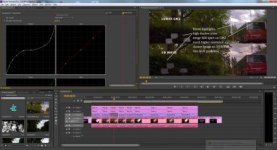
Sorry guys, I was crazy busy recently. Here is a screenshot of the scene in Premiere Pro and the curves for the GH2 file. Looks really funny though ;-)
Carlos_E._Martinez
Well-known member
I am also looking forward your comparison tests with the BM Pocket when it's available.
It's quite likely the Pocket will take the slot that Panasonic has and it's too stupid to preserve with their policies.
It's quite likely the Pocket will take the slot that Panasonic has and it's too stupid to preserve with their policies.
Bassman2003
Veteran
Yes, interesting comparison and what I am also interested in with the 5DRAW shooting. Thanks for posting. Using the 5D cameras shooting RAW stills, I always expose for the sky and do a massive shadow/mid lift to end up with a well balanced image. I am eager to download ML and see how much or how little one can get away with compared to still shooting. To be honest, I expected a lot more shadow room in your video compared to what I can get with stills using Lightroom.
RAW on the 5D is exciting...for the existing 5D owners! Now the camera is right up there where it used to be soft.
RAW on the 5D is exciting...for the existing 5D owners! Now the camera is right up there where it used to be soft.

PaPa
Major Contributor
Sorry guys, I was crazy busy recently. Here is a screenshot of the scene in Premiere Pro and the curves for the GH2 file. Looks really funny though ;-)
View attachment 73260
Thanks for posting this. I have done similar curves before to boost the range, but as soon as skin is present, the image quickly falls apart. Have you tried this with people?
Thanks for posting this. I have done similar curves before to boost the range, but as soon as skin is present, the image quickly falls apart. Have you tried this with people?
No, I have not tried it, but I totally agree that these curves would not work with skin tones. You can see the midtones falling apart even in this example.
Carlos_E._Martinez
Well-known member
How do you deal with this "falling apart"? What do you do?
Carlos_E._Martinez
Well-known member
You simply don't try to bring back too too much detail in either the brights or the darks.
Available detail in the brights and shadows, with no skin tones falling apart, is still what film still has a considerable edge on over video, 1K, 4K or whatever.