I hope this is the proper lace to post this, being the HVX uses a fair amount of HDD Space, and that most everyone by now probably has dozens, if not more HDD's they use for long term storage, I thought this would be appropriate.
If you are like me, you just buy Raw Sata Hard drives and use a Drive socket of some sort, to connect it to your Puter. We have well over 120 Raw Drives To date, and storing them safely and securely has become an issue. I found the answer.
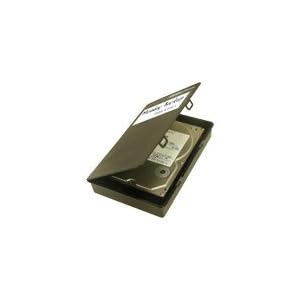
Make use of all those old BetacamSP Small Cassette Tape cases you may have. With a 1 minute modification, a Standard 3.5 inch raw hard drive fits in the case like it was made for them. See Pics, pretty self explanitory. I found the Maxell cases to be a little better in construcion than the Sony Cases. All You need is an Exacto Knife, or Carpet knife.
Anyway, you can stick your Raw Hard Drives in a Standard Cassette Case for long term dust-free storage. On the PC, I do a simple Print Screen of the contents of the drive, fold it up and stick it in the clear plastic sleeve on the outside like most of us used to do with our Time Code/Contents lists. If you number your drives, the contents list, and the Case, you will have a pretty decent system for long term storage.
P.S Trim only the BACK strip of plastic, near the spine, NOT the front or it will no longer snap shut. Standard 3.5 inch Drives are about 1/8th on an inch too wide, or they would fit in with next to no modifications, (except trimming off the hub-holders, BTW: sony cases dont have hub holders but the plastic at the back end of the case is a little more tricky to cut quickly, but it can be done)
I hope this helps someone.
If you are like me, you just buy Raw Sata Hard drives and use a Drive socket of some sort, to connect it to your Puter. We have well over 120 Raw Drives To date, and storing them safely and securely has become an issue. I found the answer.
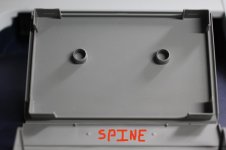
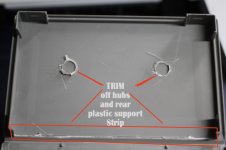
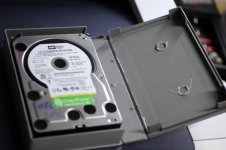
Make use of all those old BetacamSP Small Cassette Tape cases you may have. With a 1 minute modification, a Standard 3.5 inch raw hard drive fits in the case like it was made for them. See Pics, pretty self explanitory. I found the Maxell cases to be a little better in construcion than the Sony Cases. All You need is an Exacto Knife, or Carpet knife.
Anyway, you can stick your Raw Hard Drives in a Standard Cassette Case for long term dust-free storage. On the PC, I do a simple Print Screen of the contents of the drive, fold it up and stick it in the clear plastic sleeve on the outside like most of us used to do with our Time Code/Contents lists. If you number your drives, the contents list, and the Case, you will have a pretty decent system for long term storage.
P.S Trim only the BACK strip of plastic, near the spine, NOT the front or it will no longer snap shut. Standard 3.5 inch Drives are about 1/8th on an inch too wide, or they would fit in with next to no modifications, (except trimming off the hub-holders, BTW: sony cases dont have hub holders but the plastic at the back end of the case is a little more tricky to cut quickly, but it can be done)
I hope this helps someone.
Last edited: