Here's My Fav Scene File/Camera Settings

John Froton

Well-known member
Hi all,

I just though I would share the scene file settings and such that I just tested out at the Columbus Zoo with nice results :)

This is for a clean and colorful filmlook that is pleasing to the eyes.

Operation Type: FILM CAM
Framerate: 24
Synchro Scan: 160 degrees (yes, not the default 180 or the sometimes suggested 200 - a little less blur works very well and even seems to smooth out the appearance of judder to my eye)
Detail Level: +1
Vertical Detail Level: 0
Detail Coring: +3
Chroma Level: +3
Chroma Phase: 0
Color Temp: 0
Master Ped: -3
A. Iris Level: 0
News Gamma: Off
Gamma: B Press (Looks brighter, more saturated, less noisey -- switch gamma settings while viewing subjects through the viewfinder and choose what you think looks best for you )
Knee: High
Matrix: Cinelike
Skin Tone Detail: Off

I used the Zebra exposure setting of 95% and typically dialed exposure to where very minimal zebras were showing up if any (along with judging the primary exposure subjects by eye). I aimed for shooting between f2.6 and f8 on the lens and switched on the ND filter settings as required to get optimal exposure in the mid f-stops.

This is just something I thought might be helpful for those who have't tried experimenting a lot on their own. Give the settings a try and see what you think.

Cheers

Edit - Another tip: Always make sure to white balance AND black balance (by holding longer) prior to shooting in new environments. Black balncing helps insure less noise.
 
Last edited:
John,

Thanks for taking the time to post these settings, Can't wait to try then I'll get back to you thanks.

Rob
 
im new to this , any info that i can use with my hvx im so greatfull , i tried your setting yhe only things that i couldnt change was - knee : high , its on normal and even if i press on it it wont open and zebra how do you chang it to 95 all i do pres zebra , is off , press is 80 press is 100 ....but i couldnt get it to 95 , sorry if im asking stupid question but theres a lot to learn with this baby
 
im new to this , any info that i can use with my hvx im so greatfull , i tried your setting yhe only things that i couldnt change was - knee : high , its on normal and even if i press on it it wont open and zebra how do you chang it to 95 all i do pres zebra , is off , press is 80 press is 100 ....but i couldnt get it to 95 , sorry if im asking stupid question but theres a lot to learn with this baby

You might try changing the gamma and/or matrix settings until the knee becomes adjustable and then switch it back -- I remember the knee was locked when I was changing settings as well, but now I am unable to get it locked again. In any case, having the knee set at mid might be just as well as having it set to high --- it will just compress down the highly exposed areas a little bit more.

as for the Zebra setting, just go into the Display Setup from the main camera menu and the top two lines will be your "Zebra Detect" one and two.
 
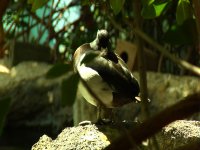
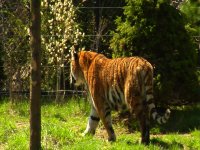
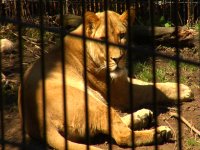
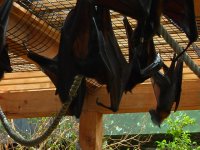
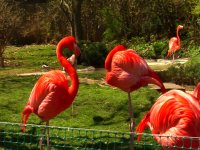
Here are a few pics straight from the footage. Sorry but did not take time to correct pixel aspect ratio :)
 

Attachments

  • Duck.jpg
    Duck.jpg
    220.6 KB · Views: 0
  • Tiger 01.jpg
    Tiger 01.jpg
    295.5 KB · Views: 0
  • Lion.jpg
    Lion.jpg
    273.7 KB · Views: 0
  • FoxBats.jpg
    FoxBats.jpg
    259.6 KB · Views: 0
  • Flamingo.jpg
    Flamingo.jpg
    301.3 KB · Views: 0
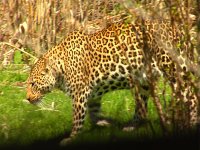
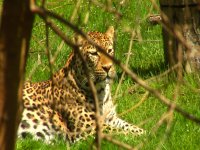
Here's a few more ... footage was shot in 720 24p
 

Attachments

  • Leopard02.jpg
    Leopard02.jpg
    299.1 KB · Views: 0
  • Leopard.jpg
    Leopard.jpg
    290.6 KB · Views: 0
  • Otter.jpg
    Otter.jpg
    286.7 KB · Views: 0
  • Hammerhead.jpg
    Hammerhead.jpg
    231.3 KB · Views: 0
  • Canapy.jpg
    Canapy.jpg
    288.4 KB · Views: 0
do you think the same setting would be good if i have a redrock m2 with nikon lenses , and do you have any indor shots. by the way nice footage
 
do you think the same setting would be good if i have a redrock m2 with nikon lenses , and do you have any indor shots. by the way nice footage

Thanks.

I think the same settings would probably work in the same way with the Redrock M2 and lenses with the exception of having to raise the exposure a bit to compensate for the slight loss in sensitivity.

These settings provide somewhat of a clean look and the gamma looks to me like somewhere between video and film. Switching to one of the Cinelike gammas instead of B Press might make footage look more like film originated but will also be a bit flatter and noisier. Really the best thing to do is take a good starting point, like perhaps these settings, and start tweaking and viewing the differences in real time on a monitor or through the viewfinder and go with what looks good to you.

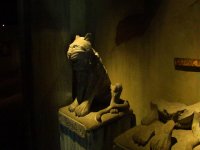
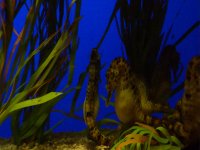
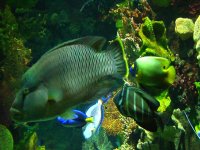
The only real indoor shot I took was in a dark area where I boosted the gain up a full 12db. It might look pretty harsh. Also here are a couple of other indoor shots at the aquarium and the one with the sea horses had the gain at 12db also.
 

Attachments

  • Indoor 01.jpg
    Indoor 01.jpg
    203.5 KB · Views: 0
  • Seahorse 01.jpg
    Seahorse 01.jpg
    241 KB · Views: 0
  • Fish 01.jpg
    Fish 01.jpg
    304.5 KB · Views: 0
Please keep in mind that some of these shots are blurry in the details because I went through the zoo holding the HVX200 with mattebox and follow focus completely handheld - many shots were not as stable as they could have been.

I would like to have shot at 1080 24pa but needed the space that 720 24pn provides :(
 
Hey John, what's up bro, I like these settings, they would work well in a very happy scene, a couple falling in love, or for news, or some documentaries... very vivid, works well in direct sunlight and low light
 
john. did anyone take a pic of the BHS? Id like to see how you looked with your HVX, FF etc.. I was shooting a wedd past weekend and pple were like "man, they higher $$ pple to come and shoot their wedd. Just curious if got attention with your cam set up as you shot footage.. thanks! I'll try your settings..
 
John,

do you have to put frame rate at 24? Or can i just leave it at default? Why would it be necessary to put frame rate at 24 if I'm already shooting at 24p?
 
John,

do you have to put frame rate at 24? Or can i just leave it at default? Why would it be necessary to put frame rate at 24 if I'm already shooting at 24p?

Leaving it at DEFAULT is totally fine. Mine says DEFAULT also. I just specified 24 to point out what the value of the default was :)
 
john. did anyone take a pic of the BHS? Id like to see how you looked with your HVX, FF etc.. I was shooting a wedd past weekend and pple were like "man, they higher $$ pple to come and shoot their wedd. Just curious if got attention with your cam set up as you shot footage.. thanks! I'll try your settings..

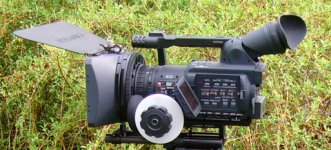
I don't have a shot with me holding the camcorder but here is what it looks like with the matte box and follow focus ... and yes there were a few people who seemed to think they were going to be on TV as they passed in front of the camera :2vrolijk_08:
 

Attachments

  • myHVX200.jpg
    myHVX200.jpg
    222.6 KB · Views: 0
would you recommend these settings for a outside shoot for a film?

I'm filming a short film this summer and not really sure about shooting outside yet.

does it have a good film look to it?
 
would you recommend these settings for a outside shoot for a film?

I'm filming a short film this summer and not really sure about shooting outside yet.

does it have a good film look to it?

I think it works great for outdoors :) It basically gives some saturation to the colors, balances the detail settings to look more filmlike and deepens the darks and blacks to make for a more vivid picture overall.

I am wanting to try using these settings and just switching the gamma to Cinelike-D instead of B-Press and see if the Cinelike-D has more of a filmlike gamma look to it. Without comparing the two, I do think that these settings give a great film look that seems clean and sharp, like a high quality film stock.
 
Back
Top