Help with DVX strange degradation digitilzation stuff

jsauce

Active member
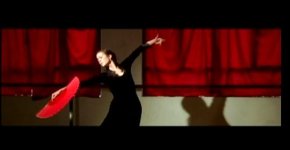
im working on a piece for a tv network and its coming out beautifully except in spots.
sometimes upon fine inspection i get these really pixelated crappy looking shots as if there's scan lines running through. ive been shooting with the dvx for 3 years and never really had to worry about this but it seems to be happening more often now...

is it something with the camera or am i exporting wrong? i exported this clip at ntsc 48 KHZ quicktime movie...the standard for american tv....

you can see it in especially in the red where it touches the black of her skirt.

please help! thanks, josh
 

Attachments

  • Picture 1.jpg
    Picture 1.jpg
    11.5 KB · Views: 0
I export from Final Cut Pro "Export to Quicktime MOvie" DV NTSC 48 KHZ as the option.

all the shots with high red and black values look wacked.
 
FINALLY.... whats up jsauce. not that its a good thing, but i've finally run into someone who is having the same problem as i am with the dvx. i have no frigging clue as to why i am getting the squiggly line movements with that camera. its frustrating because i have no motivation to edit until i can figure it out. anyways, good luck. if you hear anything, maybe you can let me know, and i'll do the same. im getting those funny images on creases in clothes, ceiling tile, etc. talk to u soon.
thanks
mike
 
I export from Final Cut Pro "Export to Quicktime MOvie" DV NTSC 48 KHZ as the option.

all the shots with high red and black values look wacked.

In the quicktime settings, are there any advanced options that you can see?

The reason I ask is that you can compress to .mov using a number of different compression algorithms - things like H264, Photo JPEG, Sorenson Spark, MPEG-4 etc...

I'm guessing that maybe the quicktime compression is doing it - Does the weirdness show up in your monitor panel in FCP?

Maybe try exporting it as an AVI or different type of file format to possibly rule this theory out :)

Let us know how you go :)
 
whats an NLE plus one more still

whats an NLE plus one more still

chroma blur sounds like a good solution. im assuming thats one of my many blur filters in final cut. i also have magic bullet so im sure they have some nifty filters for me too...

the problem is I cant export as anything but uncompressed quicktime which is required by the tv network im doing this for.

here's an even better still to show what im talking about. look at her left arm where the black meets the red. a friend of mine thought it might have to do with gamma setings in camera...
 

Attachments

  • Picture 3.jpg
    Picture 3.jpg
    11 KB · Views: 0
I FIXED IT!!! Plus a nice tip for people with this problem

I FIXED IT!!! Plus a nice tip for people with this problem

For those of you getting those swigly lines.

a couple of things.
i watched back on an ntsc tv/monitor and they are much reduced and/or non existent,
BUT, if you want it to play nice in quicktime/ on your computer

use the "Color Smoothing, 4:1:1" filter. i searched dozens and this gets rid of it the best. of course, blurs will do the trick but you lose your sharpeness on wanted sharp areas. this filter is magic. i am very content.
i really only got color bleeding/lines with deep deep reds and blacks clashing.

phhewww
 
Back
Top