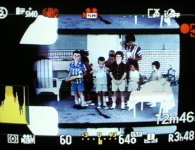
Help with capturing footage from a super8 mm film!

I am attempting to capture some footage from a projected super 8mm film.
Obviously I could simply send it off to be scanned! but I still like the "projector" feel - the sound the atmosphere - which is critical for its final use! (+cost!)

Just looking for some hints from the forum on what aspects of the AF100 I should be focusing on for best capture- has anyone done this before?

For the record I am using 18 fps projection (at 1 meter distance) from a super8 mm film (kodachrome and Etachrome)

I am using the Voigtlander 25mm lens.

So I am asking myself:

If I am filming film should I use AF100 "film" settings? or "video" as the subject already has a film feel! + what settings are relevant to this? (obviously there are a lot to play with!)
What frame rate? or should I focus on shutter speed or both?! (thank goodness for the F0.95 lens!)

I would like to "control" the flicker (not necessary to eliminate it ;)

Any help would be great - I'll post up you tube links as I go along if you want! (I have had a look around the forum to see is this has been covered but cant find anything - if I have missed a thread please advise!)

regards

Christopher
 
Set up in a completely dark room, project on a movie screen or white poster board. Put the projector on the floor and the camera just above it so image is square. Set the AF on "film" with VFR at 18fps (since you are not dealing with sound) for the least flicker. Shutter at 180 or "off". Play with the exposure until the finished product looks good. Be aware that under exposed film will be exaggerated on video- what is visible on the screen in the dark room may not show up well on the video.

Edit: I suggested 18fps because that is Super 8 film rate- but it would have to be exact to work. After Googling it, looks like a lot of people are shooting at 24fps and slowing down to 18 in post.
 
Last edited:
Also, the closer the projector is to the "screen", with as small a projected image as practical using the 25mm, the better the image.
(ie, you don't want to shoot an IMAX size Super 8 projection :happy:)
 
:thumbsup:Thanks Guys - so far so good! I'm totally blacked out and nice and close as you recommend...

like the idea of putting camera above (Im presently beside which, as you guessed, means horizontal "key stone" (or what ever it is called!)

have been filming at 25fps and shutter at 1/60 which seems to control the flicker, but will do second run at 18fps and shutter off to compare.

any ideas on the scene file settings?:undecided
 
So I am running on:

Film Cam
PH 1080/25P
VFR on - but set at 25
Syncro Scan 60.0 (i.e. shutter speed?)
Detail 0
V Detail 0
Detail coring +2 (keeping an eye on noise)
Chroma 0 (based on the idea the super8 carries the chroma level)
Chroma phase 0 (ditto)
Color Temp 0 (ditto)
Master Ped 2 - I need help here - what do you recon black control interesting with a projected source)
A Iris 0
DRS - 1 - again help here please!
Gamma - Cine-V like
Knee - auto (greyed out option due to cine + DRSing!)
Matrix - Cine - Like (but should I go norm2 an let the super8 handle the colours?)
skintone off

what do we reckon? no rush- I think I will be at this for some time - just to make sure Im not making any obvious mistakes...!

cheers
 
Not sure about the suggestion of filming at 18fps.

Digital Playback will speed up the motion.

Trial and error this.
 
I agree
The 18fps caused strobing (whilst moving in an out of a close sync)
The 25fps with shutter at 1/60 seems best so far-

I'm defiantly on the Trial and lots of error approach!
 
It makes me miss my Kodachrome! The film stock colours are still very tantalising!
(has anyone found the best set up to emulate Kodachrome in normal filming on a AF100?)
 
All optical with an enlarged film gate to capture 100% of the image. Here's what it looks like (Pic shot off a video monitor) while transferring and before I crop it in Adobe Premiere.

FilmGate_sm.jpg
 
Actually, I was still using a Panasonic GH1 (hacked) in that YouTube video but now use GH2's (hacked). I use the entry-level MovieStuff film transfer systems.
 
Randy - V nice - V pro!

Im using a Sankyo 700 - which is working fine (cant see if its 5 blade) - Thanks for the help -
Its the AF100 file setting which Im struggling with! It would be great to set up and safe them so I can run and gun when I need to transfer any film....
I think I'm getting there slowly - I'll edit and upload soon

Chris
 
Are you trying to offer film transfer as a service to customers or are you just doing it for your own films?

To eliminate the screen flicker the projector must be equipped with the right kind of shutter. Secondly, it must be operated at the correct speed. At 15fps the projector must have a 4-blade shutter. At 20fps the projector must have a 3-blade shutter. (Most 8mm projectors use a 3-blade shutter.) At 24fps the projector must have a 5-blade shutter and is most commonly used with 16mm film transfer projectors. The reason for these factors is that they must of course be compatible with the TV rate of 30fps. Examples: A 4-blade shutter rotating at 15 rpm equals 60 (4x15), a 3-blade shutter operating at 20 rpm equals 60 (3x20), and a 5-blade shutter operating at 24 rpm equals 120 (5x24).
 
Are you trying to offer film transfer as a service to customers or are you just doing it for your own films?

To eliminate the screen flicker the projector must be equipped with the right kind of shutter. Secondly, it must be operated at the correct speed. At 15fps the projector must have a 4-blade shutter. At 20fps the projector must have a 3-blade shutter. (Most 8mm projectors use a 3-blade shutter.) At 24fps the projector must have a 5-blade shutter and is most commonly used with 16mm film transfer projectors. The reason for these factors is that they must of course be compatible with the TV rate of 30fps. Examples: A 4-blade shutter rotating at 15 rpm equals 60 (4x15), a 3-blade shutter operating at 20 rpm equals 60 (3x20), and a 5-blade shutter operating at 24 rpm equals 120 (5x24).


While that is one method to eliminate flicker when transferring to 29.97, it's not really necessary any more, with the af100 you can just set the shutter angle (in film cam mode) or the scan rate (in video cam mode) to eliminate the flicker. Just hook your camera to a monitor and adjust those settings till the flicker disappears. You may get the occasional flicker as the speed of the projector fluctuates slightly, but it will work for the most part.
 
Even with a variable scan camera, you'll need to be running at 20 frames per second or faster with a three-blade shutter to completely get rid of flicker.
 
I'm only doing this as practice - I have filmed a public speaker (on two AF100's) and they refer to some super8 footage - so I simply want to incorporate it.

+ I still film on super8 so it would be good to able to archive my own films before I trust them to a professional telecine service! (or the post for that matter!)

If I ever had some spare cash I would buy a optical transfer rig.... one day!

Note: We are in PAL land, so we run at 25P - But most of my stuff ends up on youtube / vimeo and websites at the moment so i'm not factoring this in. (unless it becomes a issue later on!)

The variable shutter speed idea seems to work the best - even on a simple trial and error basis - I could see the flicker go in and out of phase - I played around until I eliminated it. (at 60)

Again thanks for the help - I can tell your transfer is far superior - but I quite like a little flicker to remind the view that this is the flicks!

With the flicker sorted (ish) exposure is my next main concern...
 
Back
Top