HELP : Premiere to After effects CS5 (T2i .mov files)

tiborr

Member
Hi,

I am pretty new with HD editing and after looking several hours for a simple step by step tutorial, everything looks still very confusing to me...

My question is :

What is the best solution to apply smoothly effects on T2i files in After effects ?

My workflow is : editing in Premiere CS5 (that works pretty well, besides when reversing speed), exporting my project as one .mov file (same codec as T2i files) and working in After CS5 on this main file. This is where my editing/effects time line shutters a lot, even with 8GB of ram.

I have red that H.264 is a good codec for capturing but, beeing a higly compressed codec, it slows down a lot the editing/effects work.

In simplier words I am looking for the fastest codec to edit my files, without any quality loss.
In wich codec should I export my Premiere CS5 project to work on it in After effects ?

Thanks a lot for your help !!! ;)
 
Thanks for your reply,

yes I tried to download the free version, but the problem is that I already edited my project with the genuine .mov files into Premiere,
so I tried to export the project using the cineform codec (destructive?) but it didnt allow me so, because my plateform is 64bit...
 
I've been doing effects on T2i footage in CS5 recently. What I've been doing is opening the original clips from the camera in After Effects, performing my effects on the one at a time and then exporting them as Photo JPEG .movs at quality 100. Then I've been replacing the old clip in the timeline with the rendered clip. CS5 seems to be able to play 1080p Photo JPEG back pretty easily on my i7 MacBook Pro.
 
I do not undestand... You first apply your effects in After effects & then (step1), recompress the project into 1080 Photo jpeg, what for ?! (step2)
I am triing to find a way to apply my effects faster in After effects (step1) before the final output ... (step 2)
 
Last edited:
Your question is really twofold: What's the best way to go from PP to AE? Should I convert my footage prior to editing?

I'm still on CS3 but can't you still simply copy and paste from Premiere to AE in CS5 or use Dynamic Link? You should not be compressing your footage prior to applying effects in AE. Even when you save it in its original codec, as you mentioned, it's getting compressed. I believe only a straight cuts edit would avoid that.

Whether or not you should use Cineform or DNxHD can best be determined by whether or not your graphics card is recommended by Adobe for use with CS5.

By the way, I've found that although PP makes organizing clips a lot easier than AE, sometimes it's best to just use AE from start to finish.
 
I do not undestand... You first apply your effects in After effects & then (step1), recompress the project into 1080 Photo jpeg, what for ?! (step2)
I am triing to find a way to apply my effects faster in After effects (step1) before the final output ... (step 2)

Well, I was doing some complex effects which wouldn't render in real time on my system. So, I apply the effects and then render them into a format which can be played back for the purposes of editing.

If you want to perform the same effect on the whole timeline, it might be easier for you to conform in After Effects instead. Open up your Premiere project in After Effects and it will do its best to create a composition which matches each sequence in your project. Check them carefully, though, sometimes things get lost in translation, especially effects, titles, speed changes e.t.c. Then you can do whatever you like to the project with adjustment layers or to individual clips and add the project to the render queue to produce your final output.
 
Well, I was doing some complex effects which wouldn't render in real time on my system. So, I apply the effects and then render them into a format which can be played back for the purposes of editing.

If you want to perform the same effect on the whole timeline, it might be easier for you to conform in After Effects instead. Open up your Premiere project in After Effects and it will do its best to create a composition which matches each sequence in your project. Check them carefully, though, sometimes things get lost in translation, especially effects, titles, speed changes e.t.c. Then you can do whatever you like to the project with adjustment layers or to individual clips and add the project to the render queue to produce your final output.

Thanks, I see, indeed many people seem to apply effects prior to edit in Premiere. I did the reverse thing and also use the bridge, but my problem is that either way (editing or appliing effects first), my after Effects timeline stays very choppy regarding the one in premiere CS5, using genuine .mov files. While my timeline in premiere stays extremely fluid, the one in after is sticky and choppy even without any effects added. (I set my ram to 6GB of use)

I also tried the cineform codec (I recompressed myu edited footage from premiere) but it does not seem to improve anything when transfered to after effects. So my question was to know 1st : why ? and then : is there any lossless codec that can handle fluid editing-effects in after effects ? or is it the program structure which slows down the process vs premiere ?

Many thanks to all ;)
 
Thanks, I see, indeed many people seem to apply effects prior to edit in Premiere. I did the reverse thing and also use the bridge, but my problem is that either way (editing or appliing effects first), my after Effects timeline stays very choppy regarding the one in premiere CS5, using genuine .mov files. While my timeline in premiere stays extremely fluid, the one in after is sticky and choppy even without any effects added. (I set my ram to 6GB of use)

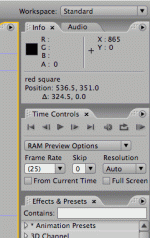
That's the thing about After Effects, it's not intended for on the fly realtime playback like Premiere is. That's why we need both. There's a dropdown box near the monitor in AE which lets you set the resolution of the preview to full, half, third or quarter resolution. I adjust this setting depending on the nature of the work, the resolution of the composition and the complexity of the effects. It's rare that AE will play back footage in realtime which hasn't been rendered, even in quarter resolution, and this is where the RAM preview comes in. In the image below, the RAM preview button is the one on the far right of the top row in the Time Controls panel. When you hit this button, AE starts to render everything in the work area at the working resolution and store the frames in RAM. When the RAM is full or you click anywhere, the RAM preview starts playing back and looping. Watching the RAM preview is also the only way to hear the sound track within the program, I think. After the preview is finished, you should be able to play back the section of footage with frames stored in RAM (represented by the green line above the frames in the timeline) in realtime using the space bar.

rampreview.gif
 
Back
Top