GH2 Help needed: Salvaging distorted footage captured by GH2

leonnoel

New member
Hi all,

My captured footage is distorted when the GH2 is connected to a smallHD monitor via HDMI. Used 2 GH2s (no firmware update) for the shoot. Have tested out with both cameras connected to the monitor, and also used different SD cards, apparently, the problem is with just one of the GH2, the other GH2 records normally.

I'm posting a screen shot of the footage captured via log and transfer in FCP below, is there any way to salvage the footage?
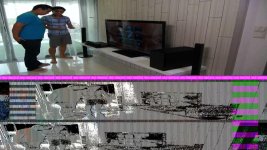
Distorted image Screenshot.jpg
 
this looks bad. do you have all frames of you footage and all are the same?

Do you use After Effects? there you could put all the footage in a HDTV composition as sequenced layers. Then pre-comp the comp and in your new main comp just manually scale and move the precomp so it fits as good as possible, then export to a new file.

Good luck!

Edit: I am not sure how much pixels are really lost there, but I wouldn´t expect to get real good footage.
 
Are these AVCHD files captured by the camera, or are you using an external recorder? At this point, like stated about, if that distorted area doesn't change in size you could crop and resize the correct image, but you'll be missing out on that half of vertical resolution. If you're asking how to fix the corrupt file, I don't know if it will help, but these tools are provided by Panasonic for AVCHD file recovery. Give them a shot, but that's assuming that these files were recorded internally, which I'm not clear on from your post.
 
Thanks for the recommendations guys, really appreciate it.

Jack: I've manually resized the clips in FCP and in after effects, the footage looks bad...

Will give the AVCHD file recovery tools a try, thanks blazer for the link.
 
Back
Top