
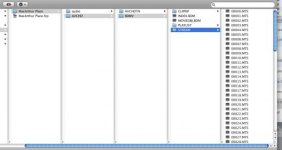
I have a little problem. A client sent me several projects to edit on DVDs. Not sure what camera they were shot with but the file directory looks like the attached image below.
Some of the projects were all on one DVD, and when I open the folder in Log And Transfer, it imports fine.
However, most of the projects were on multiple DVDs. The first DVD had the folders as shown in the picture attached, but the others just had overflow MTS files. FCP says that there is a bad directory structure with these projects. How do I organize the MTS files so that FCP can recognize them?
I tried moving the extra MTS files to the STREAM folder (where the rest of them are) but I get the same result.
Any advice?
Thanks!
Some of the projects were all on one DVD, and when I open the folder in Log And Transfer, it imports fine.
However, most of the projects were on multiple DVDs. The first DVD had the folders as shown in the picture attached, but the others just had overflow MTS files. FCP says that there is a bad directory structure with these projects. How do I organize the MTS files so that FCP can recognize them?
I tried moving the extra MTS files to the STREAM folder (where the rest of them are) but I get the same result.
Any advice?
Thanks!
Attachments
Last edited:
