Help Explain why Big Cinema 24p looks better than "Video" 24p...

Hello,

I was watching a movie last night (Brad Pitt in "Fury") and once again I noticed that major cinema releases seem to have a softer motion judder than video cameras. I know more stuff is being shot on digital these days but is there some sort of handling they are doing to improve the feel of motion or the cadence?

For example - 20 min into the movie, the new guy gets into the tank for the first time. They cut to his 1st person perspective and the camera pans around the inside of the tank. Yes, I said panning form a fixed position (a huge 24p no-no) yet there was hardly any judder. I backed it up three times to watch it and it was magically pretty much judder free.

If I take a 5DMKIII in 24p and pan from a fixed position it will be a judder fest.

How are they doing this?

I was watching over DirecTV on Demand with a 2008 Panasonic 1080p plasma, so no crazy refresh Hz stuff.

Thanks for your input.
 
This is an interesting question; I wish I could see the scene you're talking about. My answer would be that there's nothing magic. They simply found the combination of focal length and pan speed that doesn't produce noticeable judder. If you take your 5DIII, put a 14mm on it, and pan nice and slow, I suspect you won't see judder at all. And you can experiment with longer lens and/or faster pan speed until you hit the threshold of what you take to be distracting.

Now that I think about the tank scene, I assume it must have indeed been a very wide lens given the confines. And the speed I'll have to guess, but I'm guessing pretty slow.
 
They simply found the combination of focal length and pan speed that doesn't produce noticeable judder.

Pretty much it. 24 pictures per second is 24 pictures per second no matter what's shooting it.

The thing is, people really don't appreciate just how slowly you have to pan. At some focal lengths, you need to pan for a minute and a half, two minutes, or more, just to make 90 degrees. That's beyond the patience, or at least the belief, of a lot of people.
 
The advance past rolling shutter is, as you know, global shutter. But did you know that there is yet another step possible after global shutter? I will call it the Tessive shutter, after the company that most notably introduced it. But like global shutter, wide dynamic range, and good highlight roll-off, it's actually something that film has been doing all of this time.

I'm not sure how much you have to read, how much you have to watch, before you get that ah-ha moment. But once it clicks, you will have a whole new category of image quality to complain about on DVXUser.com: "temporal aliasing."

---

In June 2011, at the Cine Gear Expo in Los Angeles, a start-up called Tessive introduced a product called the Time Filter. It was an LCD screen that could fade from clear to black. You mounted it in front of your lens, and it smoothed judder, basically. Adam Wilt said that it "may be nothing less than the most important advance in camera shutter technology since motion picture cameras were invented." But it was bulky and pricey. It took two cables, for power and sync, and it was $14,000 (http://www.provideocoalition.com/cine_gear_expo_la_2011).

In April 2013, at NAB, RED announced the Motion Mount, which uses Tessive's technique. At the same time, Tessive stopped selling its own Time Filter (http://www.redsharknews.com/technol...nificant-nab-announcements-got-the-least-hype)

---

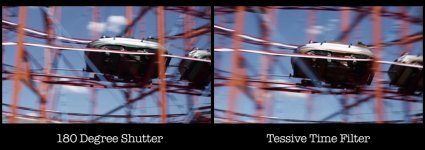
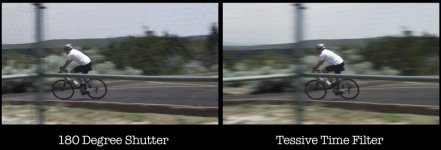
Before diving into what's going on, just watch this old demo video from Tessive, and see if you can spot the difference:


Although discontinued, Tessive still has a few pages on their website explaining it. I would read them in this order:

  1. FAQ
  2. Comparison to a film's mechanical shutter
  3. Introduction
  4. Technical Explanation
  5. Product Information

Some of the pages have graphs and further videos. At some point, it should click for you what it does. I think it's pretty cool!
 
Thanks for your replies. I would say the lens was fairly wide as to mimic human vision, but nothing crazy. Also, the pan speed was a lot quicker than I would expect. Think of "searching" around looking at everything. I will try out a wide lens and see.

Wish I had a link to demonstrate.

I am not a huge user of 24p as I shoot a lot of events, but I really like the look and enjoy watching DPs hide the judder in great movies.
 
The TESSIVE effect is huge. I can really see a big difference on the guy riding the bicycle.

A while back I was in L.A. And was able to have some folks SHOW me exactly how a real spinning shutter produces a different image. I wrote up a piece about it here on the forum.. I'll try to find it..

Here it is. And the TESSIVE system was part of the discussion back then too.

http://www.dvxuser.com/V6/showthrea...ike-film-and-1-48th-doesn-t-matter&highlight=
 
Last edited:
If you want to see the most jarring, unwatchable judder ever from a film camera, watch the opening title sequence of "Sahara", where the camera is panning around the room showing the newspaper clippings and whatnot. It was so stroby it hurt to watch it in the theater. And that was 35mm film, so -- sometimes film may seem softer on the strobing than digital video, but it can still be just awful depending on the speed of movement and the focal length/magnification (which, when combined, add up to the amount of relative motion from frame to frame).
 
Not sure which shots you're talking about, but maybe it was simply shot in slow motion? If it was completely static shot (no movement from coming from people or other things) it could be shot in slow motion and then conformed to 24p. Or maybe it's was done is some different way in post - compositing few shots to get this final one.
 
Last edited:
The TESSIVE effect is huge. I can really see a big difference on the guy riding the bicycle.

It really is quite remarkable. It's like the difference between good and bad bokeh. The blur is so much smoother than the typical digital shutter. The bicyclist separates from the blurred background and foreground objects incredibly. On the normal digital shutter, you still see bark detail on the tree within the blur, and it's just odd.
 
Both the digital shutter and tessive have blur of course. With the digital shutter, the blur starts and stops abruptly. In other words, the leading and trailing edges of the blur are hard.

With the tessive (now RED Motion Mount), the transparency of the blur tapers. It's sort of like the feather-edges tool in Photoshop.

There. That's the best I can describe it.

tessive 1.jpg
tessive 2.jpg
tessive 3.jpg
 
Last edited:
There are at least two big reasons why film looks smoother.
First film is shot at 24 fps but is projected at 48 images per second, each frame is shown twice. Because of the way the brain works things that are moving will appear to have moved in the second flash of the frame. The second biggie is something that is used in some illusions, which is that when your brain sees a black break in the action it resets and will miss some of the things that have changed. Specifically it "creates" the image it expects to see. Film has a short black flash between frames triggering this reset but video doesn't.

There is a really interesting demo of this affect in a "street" shot where every few seconds something radically changes. When they show the sequence connected by short black frames (kind of like a slide show) you miss 90% (or more) of the changes, which include things like buildings changing colors and cars disappearing etc. When they edit out the black frames suddenly it's completely obvious what is changing.

Film would probably seem even smoother if it weren't that humans are also hard wired to focus on movement that doesn't fit "normal" so if something changes position too much between frames our "predator" warning system kicks in.
 
There are at least two big reasons why film looks smoother.

This is interesting but the black flashes you describe are an artifact of film projection, no? I wouldn't think this is a factor with digital playback.
 
Exactly - which is why the digital projection can seem less smooth.
Sorry, my point was that the OP was watching the movie via digital playback, so whatever smoothness he sees (or any of us see these days) is not a result of this projection artifact.
 
Sorry, my point was that the OP was watching the movie via digital playback, so whatever smoothness he sees (or any of us see these days) is not a result of this projection artifact.

Ah...Yes, indeed.

Lenses.
This may have been discussed before, but I swear that how lenses handle edges plays a role in this too.

I have a Panasonic 14-140mm lens that is made for M4/3 and is indeed a very sharp lens.
But not all 'sharp' lenses are sharp in the same way
When I take off the Panny 14-140mm and switch to one of my Nikkor AI-s primes made for 35mm/Full Frame - the image is still very sharp at the same lens settings, in fact some people say they make the image look not only sharp but clearer.
But how these 2 different lenses resolve their finest resolution is visibly different.
It shows most clearly in very small busy things like blades of grass or brick walls in the background - it's the EDGES.
Fine edges on the Panny look ugly in a way I would describe as "similar to post sharpening" while the Nikkors render these edges more smoothly...more coherently.

Just like the edges of blurred elements described by conmbatentropy above, any other overly sharp fine edges seem to consistently generate less smooth visual movement as well.

To the O.P. - throw a set of Sony CineAlta lenses on your Canon and I'll bet you'll like the motion more.
 
Digital does give you the advantage of changing shutter speed easily, to mimic shutter angle changes on film. You can fine-tune motion this way, at the expense of more blur.

Not completely related, but if you want to really grasp how a film shutter works with the film claw, check the first animation, top right, on this wikipedia page. Very cool:

https://en.wikipedia.org/wiki/Rotary_disc_shutter
 
Sorry, my point was that the OP was watching the movie via digital playback, so whatever smoothness he sees (or any of us see these days) is not a result of this projection artifact.

Good point. The real reason then may be a LOT better encoding of the material. There is a lot of time and expertise that goes into creating a commercial release DVD/ BR and low budget filmmakers don't generally put in that time or have access to those tools.

It would be interesting to shoot at 24 and play at 48 with frame doubling and see if it made a difference.
 
It would be interesting to shoot at 24 and play at 48 with frame doubling and see if it made a difference.

My TV does that. If anything, it makes the strobe effect worse.

But that may just be an artifact of the TV, because a normal 60 Hz progressive TV already doubles -- and triples -- 24 fps frames. If there's any smoothing effect to be had from it, it should be present on normal playback.

Bottom line: the vast majority of times you get a strobe when panning, it's because you did it too quickly.
 
Back
Top