
Navigation
Install the app
How to install the app on iOS
Follow along with the video below to see how to install our site as a web app on your home screen.
Note: This feature may not be available in some browsers.
More options
You are using an out of date browser. It may not display this or other websites correctly.
You should upgrade or use an alternative browser.
You should upgrade or use an alternative browser.
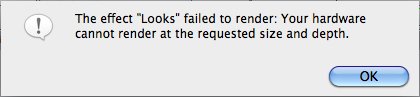
Help error...
- Thread starter Jonathan12uiz
- Start date
Jonathan12uiz
Well-known member
Try deleting the filter from the clip. Quit FCP and restart and reapply.
Tried, but it still didn't work...

Jonathan12uiz
Well-known member
I hope that is not it, because I have an iMac at the moment... I can't mess with the graphics card.
But like i said this is the first time i've tried rendering 1080p24 in prores422 with MBL. ive dont 1080p30 and 720p60 in AIC and everything rendered fine.
Jonathan12uiz
Well-known member
You need to go into your Sequence Settings, go to the Video Processing tab and change your setting to "Render in 8-bit YUV". The version of Magic Bullet you have cannot render at 10-bit, which is probably what your current setting is.
I tried that and was hopeful that it would work, but it did not.
