
Hey,
Im currently working on a short documentary shot with the D800 on the internal codec. I have limited experience and are trying to learn a proper workflow to get the best results possible while still being effective in a one-man environment. To do this I have decided to go with trying to keep as much as possible being done in premiere. I have purchased Neat Video, Colorista II and some Gorilla Grain. My aim is to make a render for the web and a higher quality for for offline screening.
My questions are as follows:
1) Is it advisable to edit, noise reduce, grade and add grain too the original footage inside premiere on the same render?
If:
1a) Is there any way of insuring which order effects get applied in premiere CC? (So that Neat Video can be applied before Colorista)
If not:
1b) Which is the easiest way to transcode an HDSLR (D800 internal) edit into another format? (10bit ProRes 4:2:2?) And when, in which stage should you do this?
2) Adding grain too my footage seems to add alot of compression artifacts to my rendered footage, if not rendered with a high bitrate (like 60Mbps). Is this because of my workflow in premiere or anything I should be aware of in the render-settings?
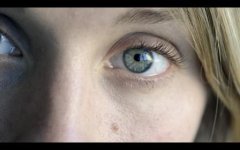
This is a screengrab of a shot im experimenting with from inside premiere, and this is about how I want it too look after my render:
http://snag.gy/I1cQp.jpg
I realise these questions may not be straight forwardly answered, and that you might need more information about my setup/workflow. Please feel free to ask me anything and thanks in advance for any sharing!
Im currently working on a short documentary shot with the D800 on the internal codec. I have limited experience and are trying to learn a proper workflow to get the best results possible while still being effective in a one-man environment. To do this I have decided to go with trying to keep as much as possible being done in premiere. I have purchased Neat Video, Colorista II and some Gorilla Grain. My aim is to make a render for the web and a higher quality for for offline screening.
My questions are as follows:
1) Is it advisable to edit, noise reduce, grade and add grain too the original footage inside premiere on the same render?
If:
1a) Is there any way of insuring which order effects get applied in premiere CC? (So that Neat Video can be applied before Colorista)
If not:
1b) Which is the easiest way to transcode an HDSLR (D800 internal) edit into another format? (10bit ProRes 4:2:2?) And when, in which stage should you do this?
2) Adding grain too my footage seems to add alot of compression artifacts to my rendered footage, if not rendered with a high bitrate (like 60Mbps). Is this because of my workflow in premiere or anything I should be aware of in the render-settings?
This is a screengrab of a shot im experimenting with from inside premiere, and this is about how I want it too look after my render:
http://snag.gy/I1cQp.jpg
I realise these questions may not be straight forwardly answered, and that you might need more information about my setup/workflow. Please feel free to ask me anything and thanks in advance for any sharing!

