FS5: HDR with FS5 and Atomos Inferno

lagmandokk

New member
Hello
We are shooting a documentary that will be published in HDR. The main camera is FS7 and shoots in 10-bit, slog3, UHD, Sgamut3.cine. This is fine for HDR. We have 10-bit and we can shoot a flat image that contains all the levels we need.
But our problem comes when we want a smaller camera for gimbal, handheld ect. Our choice has fallen on Sony FS5 with the Raw-upgrade, and the Atomos Inferno recorder. Because of storage restrictions we can not film in RAW with Cinema DNG. We have to film in ProRes.
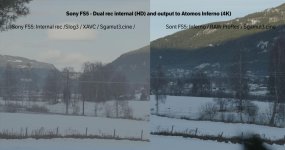
What I am now concerned about is that the ProRes-files is not recorded as flat slog-images. The Inferno applies a gamma-curve that makes it more contrasty. The explanation is given her by Alister Chapman: http://www.xdcam-user.com/2017/02/raw-and-the-pxw-fs5/#comment-98989 . Will this make it unsuitable for HDR-filming? Will we loose much picture information because of this?
Here is an example:

Test-fs5-internal-vs-inferno-slog2.jpg

Must I always shoot with slog2 when using the Inforno with FS5?
Is FS5 and the Inferno and ProRes a bad mix for HDR-shooting?
What are our alternative when it shall work with FS7-footage?
 

Attachments

  • Test-fs5-internal-vs-inferno-landskap.jpg
    Test-fs5-internal-vs-inferno-landskap.jpg
    55.6 KB · Views: 0
seems you baked in the LUT? I don't own a FS5 but you should be able to turn the LUT off in the camera and use the LUT at the atomos for viewing
 
Last edited:
Hello, Clermond. I agree, it does look like that. The problem with that explanation is that Sony FS5 does not have LUTs. So I cant see how I can have baked one in.
 
how does it look on the Atomos? Where do these screen shots come from? Maybe an automised LUT is applied in your NLE for the ProRes and for the internal not?
 
What I think is happening (and what is confusing) is that the camera is set to S-Log3, and you’re recording S-Log3 to the internal cards, however the way that RAW to ProRes works, the RAW linear data will always be interpreted as S-Log2 video signal by the Atomos. This is a limitation of the Atomos I believe. I am unsure if a Convergent Design recorder would allow a RAW->ProRes s-Log3 conversion.
 
So there is now way for the Inferno to record a slog-picture flat?
The camera is set to slog2 as well. I have followed Chapmans advise and set the camera to Picture Profile 7 and S-log2/Sgamut.
 
Yes, the inferno will record a picture that is "close" to S-Log 2 from the camera. As mentioned above, is your editing software applying a LUT automatically? What software are you using? When watching on the Inferno with no viewing LUT applied, does it still look way off? All of this was said I see by Clermond before.

Honesty, the image on the right looks like S-Log2 to me. If that's not flat enough, then, well...
 
As long as it is captured in camera as log but recorded with a gamma curve applied in 10 bit or higher it should not be a problem to recover from this curve.
 
What I think is happening (and what is confusing) is that the camera is set to S-Log3, and you’re recording S-Log3 to the internal cards, however the way that RAW to ProRes works, the RAW linear data will always be interpreted as S-Log2 video signal by the Atomos. This is a limitation of the Atomos I believe. I am unsure if a Convergent Design recorder would allow a RAW->ProRes s-Log3 conversion.

This is NOT a limitation of Atomos - it's just a bug in one of the former firmware, whereby no matter which S-log was set on-camera the Atomos recorder would always apply S-log2 to the RAW signal it was getting. It got acknowledged and rectified very quickly by Atomos, and you can now select whichever S-log (and Gamut) you prefer for Prores or DNxHR recording. The bug was limited to SDI input only (at least on the Inferno).

Piotr
 
That is excellent news Piotr! I will test this and revise my post for future clarity. My testing and research into this issue was done about a month before the fix, so makes sense. However, it would be interesting to hear thoughts regarding the suitability of a 12-bit linear to S-Log3 conversion.
 
This is NOT a limitation of Atomos - it's just a bug in one of the former firmware, whereby no matter which S-log was set on-camera the Atomos recorder would always apply S-log2 to the RAW signal it was getting. It got acknowledged and rectified very quickly by Atomos, and you can now select whichever S-log (and Gamut) you prefer for Prores or DNxHR recording. The bug was limited to SDI input only (at least on the Inferno).

Piotr

Just tried this on my FS5 + Shogun Inferno V8.42 and only able to get S-Log2 out of the camera. No difference in the picture when switching between S-Log2 and S-Log3. Were you doing this with a FS5 or a FS7?
 
Well, I'm on 8.41 currently but don't think the bug has come back (still a slight opportunity, though).

Here with FS7, when I feed my Inferno with the XDCA module's RAW SDI signal, it doesn't matter which S-Log/Gamut I have on the camera (only the internal recording reflects those if I pick both the RAW + the HD internal recording) - on the Shogun - when configuring the AtomHDR display - I have the option to display it either with S-Log3/S-Gamu3.Cine OR with S-Log2/S-Gamut applied to the RAW picture (some S-Log NEEDS to be applied as RAW is just that - the raw data, not picture). Configuring my AtomHDR monitoring displays with one of the above options, at the same time I'm telling the Shogun to use exactly the same S-log/Gamut as for the monitoring picture I instruct the unit to use the same S-log/Gamut type to be applied for Prores/DHxHR encoding (unless I chose CDNG encoding of course, where no S-log is applied and raw data is recorded again).

So basically: the S-log/Gamut types I select for my AtomHDR monitoring is used by the Inferno for DHxHR/Prores encoding. It works like a charm and I clearly see the chosen gamma/color space applied to me Shogun non-CDNG picture (so that it can look like the internal recording gamma/gamut in the case of using the same gamma/color space for botth, or differ from the internal if I selected the other gamma/gamut option). Hope it helps,

Piotr
 
Back
Top