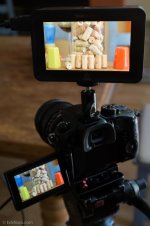
GH4 HDMI OUT to External Recorder

Michael Erlewine

Well-known member
I am trying to get the GH4 1080 10-bit signal out of the camera and into my PIX 220i external recorder. Something is not working right, because the PIX 220i says it does not find a signal.

Any ideas? Anyone have experience recording to external devices from the GH4 and HDMI OUT?
 
Hi Michael,

There appears to be a problem with the GH4 and HDMI output at the moment.

Lots of people discovering that it doesn't work with their Atomos Recorders either...

It appears that changing the mode to AVCHD in the camera, enables the HDMI output to work. I'm wondering if its outputting a 1080p60 signal in all other modes, apart from AVCHD - but thats just a guess.
 
I switched the codec to AVCHD and sure enough the Sound Device PIX 220i immediately recognized and recorded it. Unfortunately AVCHD is not what I need. I need ProRes equivalent. I image they will fix this, but is a kind of no-brainer that Panasonic should have picked up.

By the way, I have not used my Sound Device PX 220i for a while and I forgot what a well-made machine that is, and the software too. It has never failed me. Where is their 4K recorder?
 
From my testing (see spreadsheet)

Looks like 24p is the one to use at the moment (as it will work in MP4 and MOV modes too) and 4K internally
 
I switched the codec to AVCHD and sure enough the Sound Device PIX 220i immediately recognized and recorded it. Unfortunately AVCHD is not what I need. I need ProRes equivalent. I image they will fix this, but is a kind of no-brainer that Panasonic should have picked up...

Take this with a grain of salt, since it's going to be a couple of weeks until I get the GH4 and thus don't have hands on with it yet... but unless Panasonic made the HDMI output from the GH4 different from all the rest of their cameras, the internal codec selected shouldn't make a difference in terms of quality coming out of the HDMI port. At least, that's how it is with their pro division cameras... the signal coming out of the HDMI port is before it hits any codec compression (that's how you're able to get 10bit 4:2:2).
 
GH4 With Ninja Blade.jpg

I have no issues with the Atomos Ninja Blade and the GH4. Even when the camera is set to 4K. In the menu set the HDMI out to AUTO or 1080P. If you want 10bit 4:2:2 then the camera wont record on the SD Card. Punch in also passes through the HDMI making focus easier on external monitors. I haven't been able to get the recorder to trigger from the GH4. Could be that the GH4 isn't sending a flag or the Ninja Blade doesn't understand it yet. I bought a brand new Micro HDMI cable over the weekend and it failed. Cutting in and out. Not cool. Had to get another one and it works fine. I can see this little connector being an issue.

Side note is the OLED monitor on the GH4 is pretty good color wise when compared to the Ninja Blades calibrated screen. In the picture above the greens look a little off but looking at it live it's very close.
 
Last edited:
Yep - no issues here with that frame rate either.

Trying 30p, 25p it won't work. :(

As to the HDMI Triggers, no triggers are presented by the GH4 via HDMI at this time - sadly...

I agree re the MicroHDMI socket - why o'why did they change it to this - its tiny!!! I can see myself hot gluing in a MicroHDMI to HDMI 0.3cm cable, so the stress is taken away from the socket.
 
I am getting the PIX 220i to record the 8-bit 4K, at 24p as was pointed out. I will have to check that. So the HDMI to external recorder works, but I get no sound.

Is there something special on the GH4 I need to set to send sound to he PIC 220i. Sound works find internally in the GH4 itself.
 
I just tested PAL and NTSC 29.97 and the Ninja Blade doesnt see those formats. 24p is the only frame rate that seems to work for now.
 
Erik, is your Ninja Blade recording sound with video? Michael was able to record video with his PIX 220i but no audio.......
 
View attachment 85817

I have no issues with the Atomos Ninja Blade and the GH4. Even when the camera is set to 4K. In the menu set the HDMI out to AUTO or 1080P. If you want 10bit 4:2:2 then the camera wont record on the SD Card. Punch in also passes through the HDMI making focus easier on external monitors. I haven't been able to get the recorder to trigger from the GH4. Could be that the GH4 isn't sending a flag or the Ninja Blade doesn't understand it yet. I bought a brand new Micro HDMI cable over the weekend and it failed. Cutting in and out. Not cool. Had to get another one and it works fine. I can see this little connector being an issue.

Side note is the OLED monitor on the GH4 is pretty good color wise when compared to the Ninja Blades calibrated screen. In the picture above the greens look a little off but looking at it live it's very close.
Eric,
Having real trouble sourcing micro hdmi cables in the UK. Would you mind posting your source? Thanks very much.
 
Erik, is your Ninja Blade recording sound with video? Michael was able to record video with his PIX 220i but no audio.......
Yes it is. I havent tried an external mic connected to the camera to see if it passes thought but the built in audio did.
 
BUG!

I can confirm that the GH4 is outputting incorrect framerates at the HDMI port in relation to those it's recording.
1080p25 is outputting 1080p50
1080p30 is outputting 1080p60


1080p24 is outputting CORRECTLY at 1080p24


Plugged the GH4 directly in to my TV (1080p) and it tells me what it's receiving (1080p60) when the camera is recording 1080p30
 
Hi all. I got my GH4 to be recognized by my PIX240i, but... the photo style profile seems wrong and I can't seem to get 10-bit either. Specifically, I have Cine D set on the camera but PIX is recording what looks like a standard color profile. Also, when I set GH4 output to 10-bit, the PIX still says it's 8-bit. Anyone know what's going on? Thanks.
 
Back
Top