
Reading through various threads, one picks up on the fact that many of us are not all happy with the readily available solutions to clamping the HDMI cable so it doesn't either pull out of get knocked, damaging the connection. Anyway I purchased a Varavon cage for my GH4 and was faced with just this problem, the cable clamp that came with the cage did not address the HDMI clamping solution, so with a bit of research and about 1/2 hr in the workshop, I arrived at what I believe is a very satisfactory solution.
This is the end result:
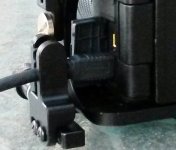
It's easy to use and solid. So how was this put together...
To start with I purchased a HDMI clamp from CoollCD.com love these guys and their gear is top notch. http://www.coollcd.com/smallrig-hdmi-lock-1283_p1283.html it's all of $42 so that's really going to burn a hole in your pocket..LOL!!
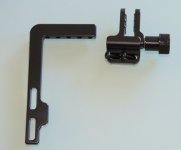
This is the clamp before any modification, it's designed to be mounted on a wedge plate.
First stage was to shorten the long slotted leg, by cutting it off at the top of the slot, a quick file to remove the burrs then two small pilot holes were drilled. The position of these is critical as they need to align with the solid section of the cage between the two larger holes at the top of the cage base:
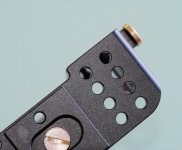
Now, holding the clamp arm in place drill the first of the pilot holed through the base of the cage, then having selected the countersunk screws you want to use, mine are 3/16 BSW, drill a clearance hole through the pilot hole you just used to align and drill the cage, and then countersink. Next drill the cage with the right size 'tap drill' for threading, then tap the hole to suit your screw and mount the two parts together, before drilling the second hole and repeating the exercise.
Now you have the cage drilled and tapped and the clamp mounting drilled and countersunk:
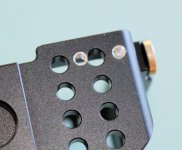
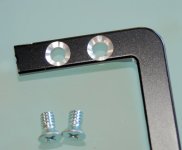
Touch up with some black enamel paint and screw the two pieces together, then mount the clamp with the knurled know facing forward (lens side), making sure the cable and clamp are aligned ( there is plenty of lateral adjustment) and add a few washers to the clamp screw so it doesn't interfere with the mounting arm. You can replace the screw with a longer one and fit a sleeve if you want more room to turn the knurled knob.
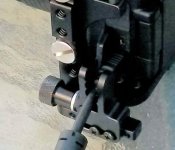
Mounting this way round minimises the interference with the screen if you want it open.
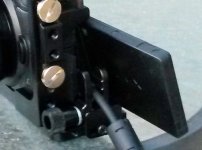
Job done... Sorry about the picture quality, with the camera mounted, had to use the phone!!
If you get stuck, post so I can answer for everyones benefit.
I hope those with Varavon cage find this of benefit.
This is the end result:
It's easy to use and solid. So how was this put together...
To start with I purchased a HDMI clamp from CoollCD.com love these guys and their gear is top notch. http://www.coollcd.com/smallrig-hdmi-lock-1283_p1283.html it's all of $42 so that's really going to burn a hole in your pocket..LOL!!
This is the clamp before any modification, it's designed to be mounted on a wedge plate.
First stage was to shorten the long slotted leg, by cutting it off at the top of the slot, a quick file to remove the burrs then two small pilot holes were drilled. The position of these is critical as they need to align with the solid section of the cage between the two larger holes at the top of the cage base:
Now, holding the clamp arm in place drill the first of the pilot holed through the base of the cage, then having selected the countersunk screws you want to use, mine are 3/16 BSW, drill a clearance hole through the pilot hole you just used to align and drill the cage, and then countersink. Next drill the cage with the right size 'tap drill' for threading, then tap the hole to suit your screw and mount the two parts together, before drilling the second hole and repeating the exercise.
Now you have the cage drilled and tapped and the clamp mounting drilled and countersunk:
Touch up with some black enamel paint and screw the two pieces together, then mount the clamp with the knurled know facing forward (lens side), making sure the cable and clamp are aligned ( there is plenty of lateral adjustment) and add a few washers to the clamp screw so it doesn't interfere with the mounting arm. You can replace the screw with a longer one and fit a sleeve if you want more room to turn the knurled knob.
Mounting this way round minimises the interference with the screen if you want it open.
Job done... Sorry about the picture quality, with the camera mounted, had to use the phone!!
If you get stuck, post so I can answer for everyones benefit.
I hope those with Varavon cage find this of benefit.


