
Navigation
Install the app
How to install the app on iOS
Follow along with the video below to see how to install our site as a web app on your home screen.
Note: This feature may not be available in some browsers.
More options
You are using an out of date browser. It may not display this or other websites correctly.
You should upgrade or use an alternative browser.
You should upgrade or use an alternative browser.
Hd100
- Thread starter brianluce
- Start date
I am distracted by the fixed pattern noise on most of the footage... not a major issue, but an issue. The only other thing is skin tones look slightly odd on a few clips. I would like to see more before I could pass any judgement though.
Do you have any concerns about the codec Barry (apart from dropout when using tape)? It looks pretty good to me.
Lets hopw they sort the dead pixel and spilt screen issues in the next batch!
Do you have any concerns about the codec Barry (apart from dropout when using tape)? It looks pretty good to me.
Lets hopw they sort the dead pixel and spilt screen issues in the next batch!
Barry_Green
Moderator
I saw a lot of that on some clips when we were shooting with the mini35, but I haven't said anything about it because I wasn't sure whether the ground glass was spinning or not on the clips.mmm said:I am distracted by the fixed pattern noise on most of the footage... not a major issue, but an issue.
I'll look through Nate's most recent clips and see if it's still there, as I know those clips were shot with the stock lens.
I'm sure those could be painted out with the image controls in the camera.. The only other thing is skin tones look slightly odd on a few clips. I would like to see more before I could pass any judgement though.
It seems reasonably robust. Definitely the best implementation of HDV. It can still get overwhelmed (look at the crunchy texture of the water in the top left shots of the chromatic aberration page at http://www.icexpo.com/HD100/index.html) but that's a pretty extreme case. I'm not nearly so concerned about it as I was with the 60i implementation.Do you have any concerns about the codec Barry (apart from dropout when using tape)? It looks pretty good to me.
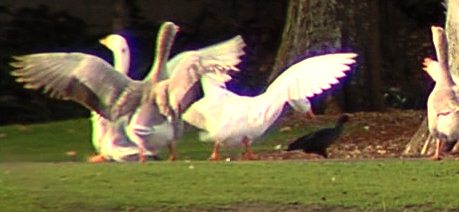
Good God!! That is horrible! Like stated though...quite worst case stuff.
Mediacre, The fixed pattern noise is visible on basically every shot I have seen. It doesn't actually look that ugly (like the colour fringing above!) but may not be to the taste or style required. Looks a little like fine film grain.
Barry, check out Nate's Downtown 4 (I think) with the bus in the foreground.
Barry_Green
Moderator
That's not MPEG, that's the chromatic aberration in the lens. What I meant by the MPEG compression is stuff like in this shot:mmm said:That is horrible! Like stated though...quite worst case stuff.

If you look at the ripples in the water, you'll see that they're totally blocky and MPEGged. But, considering that this is a pixel-for-pixel extraction, I am surprised it held up as well as it did.
I think that's the only one of his clips where you can really detect it, and even then it's pretty mild. I'd like to see it on my TV to see how it looks, but I can't play back 24p at full resolution (the i.link application on the TV apparently only plays back at lesser quality than on tape). It's a lot more noticeable when you single-step through the frames; when playing back at full speed I haven't really notice it -- or, at least, it hasn't stuck out. Then again, that's playing on my desktop LCD. Like I say, I'd like to see it on a real HDTV to know for sure.Barry, check out Nate's Downtown 4 (I think) with the bus in the foreground.
Barry_Green said:That's not MPEG, that's the chromatic aberration in the lens. What I meant by the MPEG compression is stuff like in this shot:
If you look at the ripples in the water, you'll see that they're totally blocky and MPEGged. But, considering that this is a pixel-for-pixel extraction, I am surprised it held up as well as it did.
Yeah, I know, I didn't realise the lens was that bad, I thought your were just being a picky techy!
Still in the shot of the water the aberration looks worse to me than the MPEG artifacts. I would need to see the motion video to judge what the MPEG artifacting was really like. It is often easy to make something look terrible in a cropped still which is hardly noticeable in motion video, especially to a Layman!!
A guy lent me a pirate copy of the Island the other day, saying the quality was "just like a normal DVD." (No I didn't buy it!!) It was DREADFUL! Filmed with a camcorder from the back of the cinema. How can people think that looks good!! After all the efforts we go to to produce a quality product, blind people watch it!

Anyway I digress, but basically I can accept some issues with a $6000 HD camera, because the average viewer will never notice... that goose's purple wing is pushing it though! If the problem is only really at the edge of the frame, it isn't too bad... or is it all over?
mmm said:It was DREADFUL! Filmed with a camcorder from the back of the cinema. How can people think that looks good!! After all the efforts we go to to produce a quality product, blind people watch it!
Yep, my biggest concern. Is there anyone one out there that actually think any of our cliens will notice? Not even most broadcast stations. They used to ask: Is it Digibeta? or Beta SP? If you dropped a miniDV, it was no good, but if you dropped a Digibeta, originated from a miniDV, it was perfect....
Barry_Green
Moderator
No, when I started saying there was a problem, it's because there's a problem. However, again, as Nate has shown, it's not necessarily a showstopper. You just have to learn what the lens can do, and what it can't.mmm said:Yeah, I know, I didn't realise the lens was that bad, I thought your were just being a picky techy!
Extremely agreed. Like I said about the fixed-pattern noise: it's very noticeable in frame-by-frame examination, but when it's playing full-speed I don't even really think about it. The same is true of MPEG artifacts -- when they're in motion they're a lot less objectionable.It is often easy to make something look terrible in a cropped still which is hardly noticeable in motion video, especially to a Layman!!
It appears to depend on two things: the amount of telephoto, and where the image is. On the goose shot that you're referencing, that was close to the center of the frame. The more telephoto the setting, the more obvious the aberration is. I played with the camera for a while at WEVA and didn't really notice the aberration until I zoomed in 100% onto the glass, or onto the loaf of bread, etc. So if you stay towards the wide end of the zoom, aberrations will not be nearly as noticeable. And, while that sounds limiting, keep in mind that the Z1's maximum telephoto is only 55mm, and the HVX's is 59mm... so perhaps if you keep the HD100 below 60mm, its aberrations will be more in line with the Z1? I won't be able to really put it to the test until I get my camera (whenever that is) but it seems reasonable.that goose's purple wing is pushing it though! If the problem is only really at the edge of the frame, it isn't too bad... or is it all over?
Many of those aberration shots were taken from the sides of the frame. In all Nate's shots there was only one that I found with a significant purple aberration, and that was on the very rightmost side of the frame, near the top. So if you know when & where the aberrations happen, perhaps a skilled cameraperson could manipulate the circumstances such that they minimize the occurrence of aberrations...
Barry_Green
Moderator
This is so true... we fret over it, and the average viewer simply cannot see the difference...mezelf27 said:Yep, my biggest concern. Is there anyone one out there that actually think any of our cliens will notice? Not even most broadcast stations. They used to ask: Is it Digibeta? or Beta SP? If you dropped a miniDV, it was no good, but if you dropped a Digibeta, originated from a miniDV, it was perfect....