
It’s been mentioned by a few people and I’ve noticed it too... the latency of the HC-X1E's LCD is really noticeable. But in the limited time I’ve had the camera I also noticed that the HDMI output seemed to be less laggy than the LCD, which is counterintuitive to me. So I did the most scientific test I could with the devices I had to hand.
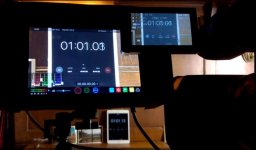
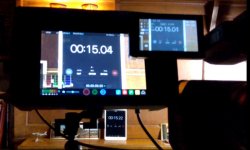
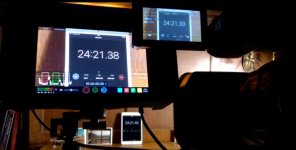
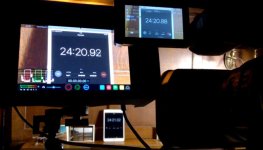
The camera is set up pointing at an ipad running the stopwatch app. The monitor/recorder is a Shogun Inferno. Photos were taken with a smart phone. It’s all I had at the time. The idea being that comparing the “live” ipad time display with what appeared on the Inferno screen and the camera’s LCD would give an idea what the lag on the two devices. It’s not academic to me, the camera and Inferno are mainly going to be used to film aircraft doing high-energy aerobatics, which requires good tracking. Under those circumstances, frame lag can be a real problem.
I ran through a few different scenarios – all at 59.94 FPS, which is how I’ll be using the camera anyway. I left it on full auto for this experiment.
I downloaded the photos from the smartphone to the PC and took screen grabs, which is what you see below. In doing so, I reviewed about a hundred images and these are some of the ones that show the lag effect most clearly.
I’m not pretending this is a scientific analysis, but the results from all of the images are consistent.
My maths is rubbish, but I’ll say (again what you see here is a small percentage of the images I’ve reviewed), it appears that:
• at 1080/60P the HC-X1E’s LCD lags by around .15 of a second – which at 60FPS is 9 frames. If my rudimentary maths is correct!
• the HDMI/Inferno combination lags by about .10 of a second, so around 6 frames. Doesn’t seem to matter whether it’s UHD or 1080. I expected it to get worse when recording, but it doesn't.
• the lag in the Camera’s LCD actually improves to around the same as the HDMI – 6 frames - when it's recording. Strange.... but I'll take it.
Two images with the camera set at 1080/60P, not recording:
Two at UHD/60P, not recording:
One at 180/60P with both the camera and Inferno recording, notice how the LCD lag has reduced(!)... weird:
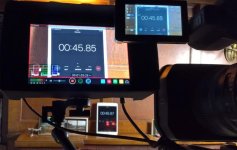
Then finally, as it will likely be used in the field (because the camera can't record and spit out UHD/50/60P over the HDMI at the same time)... the camera in standby and the Inferno recording:
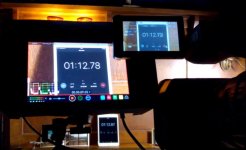
As much as I really like this camera (and I really do), this lag might be a problem.
The camera is set up pointing at an ipad running the stopwatch app. The monitor/recorder is a Shogun Inferno. Photos were taken with a smart phone. It’s all I had at the time. The idea being that comparing the “live” ipad time display with what appeared on the Inferno screen and the camera’s LCD would give an idea what the lag on the two devices. It’s not academic to me, the camera and Inferno are mainly going to be used to film aircraft doing high-energy aerobatics, which requires good tracking. Under those circumstances, frame lag can be a real problem.
I ran through a few different scenarios – all at 59.94 FPS, which is how I’ll be using the camera anyway. I left it on full auto for this experiment.
I downloaded the photos from the smartphone to the PC and took screen grabs, which is what you see below. In doing so, I reviewed about a hundred images and these are some of the ones that show the lag effect most clearly.
I’m not pretending this is a scientific analysis, but the results from all of the images are consistent.
My maths is rubbish, but I’ll say (again what you see here is a small percentage of the images I’ve reviewed), it appears that:
• at 1080/60P the HC-X1E’s LCD lags by around .15 of a second – which at 60FPS is 9 frames. If my rudimentary maths is correct!
• the HDMI/Inferno combination lags by about .10 of a second, so around 6 frames. Doesn’t seem to matter whether it’s UHD or 1080. I expected it to get worse when recording, but it doesn't.
• the lag in the Camera’s LCD actually improves to around the same as the HDMI – 6 frames - when it's recording. Strange.... but I'll take it.
Two images with the camera set at 1080/60P, not recording:
Two at UHD/60P, not recording:
One at 180/60P with both the camera and Inferno recording, notice how the LCD lag has reduced(!)... weird:
Then finally, as it will likely be used in the field (because the camera can't record and spit out UHD/50/60P over the HDMI at the same time)... the camera in standby and the Inferno recording:
As much as I really like this camera (and I really do), this lag might be a problem.
Last edited: